
Google Business Guide: Boost Your Presence in 2026
Blueprint to PPC Glory | High-Performance WordPress PPC Strategy in London
Introduction: Why PPC in London Demands Strategy
Imagine opening a sleek new café on a quiet London backstreet — the coffee is award-winning, the vibe is perfect, but no one knows you exist. That’s what it’s like to run a WordPress site without a strong PPC strategy in a city like London.
With millions of searches happening in London every day, and thousands of businesses competing for the same digital space, showing up isn’t enough. You have to stand out — and not just to anyone, but to the right people, at the right time, with the right message. That's the essence of a high-performance PPC strategy.
Whether you're a WordPress-based design agency in Shoreditch or an eCommerce site serving all 32 boroughs, this guide will help you craft a PPC campaign that not only gets clicks but converts those clicks into clients.
So buckle up — this isn’t just another “run ads and hope” guide. This is your blueprint for PPC glory.
Contact Us
Table of Contents
- Keyword Research: Digging Deeper Than Your Competition
- Audience Targeting: Speak to London, Not Just the Internet
- Crafting Irresistible Ads That Hook Clicks
- Conversion-ready WordPress landing pages
- Smart Bidding for Smarter Spending
- Tracking & Analytics: Making Every Pound Count
- Conclusion: Turning Traffic into Revenue
1. Keyword Research: Digging Deeper Than Your Competition
Let’s take one of our past electrician clients in West Sussex. They were running generic PPC ads targeting “local electrician” — which sounds fine, right? But they were getting traffic from all over the UK. The result? A lot of wasted clicks and no real leads.
We refined their keyword strategy to include phrases like “24-hour electrician Burgess Hill” and “emergency fuse box repair West Sussex.” Within two weeks, their click-through rate increased by 112%, and they started getting real calls from nearby clients ready to book.
That’s the power of a targeted keyword strategy.
What to focus on:
- Local Intent Matters: People don’t just search “florist” — they search “florist near Soho” or “wedding flowers in East London.” Add geo-specific modifiers to match.
- Long-Tail Keywords Convert Better: Instead of “WordPress PPC,” try “WordPress PPC agency London” or “best PPC for WordPress ecommerce UK.”
- Match Types: Use a mix of broad match modifier, phrase match, and exact match — don’t rely on just one.
- Negative Keywords: Don’t waste money on irrelevant clicks. Filter out searches like “free,” “jobs,” or locations outside your delivery range.
Questions to Ask Yourself:
- Are you targeting keywords that buyers use, not just browsers?
- Is your keyword set reflecting your unique value in the London market?
- Could your ads be showing to people who are nowhere near ready to convert?
Suggested Tools:
- SEMrush or Ahrefs for competitor keyword analysis.
- Google Ads Keyword Planner for search volume and bid estimates.
- Google Trends shows local keyword trends over time.
2. Audience Targeting: Speak to London, Not Just the Internet
Take a landscaping company we worked with in Sussex. Initially, their ads were targeting everyone in Greater London — but that included boroughs where they didn’t offer services. After focusing their PPC on zones like Brighton, Worthing, and Turners Hill and narrowing the audience to homeowners aged 30+, we saw a 70% boost in conversion rate.
Local targeting worked because it matched their service zone and ideal customer: homeowners who had both the need and the budget for premium landscaping.
Almost instantly, her bounce rate plummeted, and her conversion rate skyrocketed. Why? Because we stopped chasing everyone and focused on the right ones.
How to Laser-Focus Your PPC Targeting:
- Use Demographics & Interests: Gender, age, income level, and even marital status can influence buying behaviour.
- Geo-targeting at borough level: Focus campaigns on areas where your customers actually are — Kensington, Shoreditch, Camden, etc.
- Custom Audiences: Target visitors who have interacted with your site but didn’t convert.
- Lookalike Audiences: Reach new users who behave like your best existing customers.
Questions to Reflect On:
- Are you showing ads to the person most likely to take action?
- Are you leveraging local trends in buyer behaviour?
- Does your current ad strategy allow for A/B testing across audience segments?
Contact Us
3. Crafting Irresistible Ads That Hook Clicks
Think of your ad like a Tube poster — you've got 3 seconds to grab attention, 7 seconds to explain, and 1 second to convince someone to act.
Components of High-Click Ad Copy:
- Headline That Pops: Be direct and benefit-focused. e.g., “Boost Your Sales with Expert WordPress PPC in London.”
- Emotional Pull: Use words like “frustrated with low traffic?” or “finally, PPC that works.”
- Clear CTA: Use action words — “Get Your Free Audit,” “See Plans,” or “Book a Call Today.”
- Use Ad Extensions: Add location, reviews, site links, and phone numbers for better visibility.
Pro Tip:
Match your ad message to the searcher’s intent. Someone searching “emergency plumbing PPC London” wants results yesterday. Your ad should promise speed, not a vague strategy.
Ask Yourself:
- Would you click on your ad?
- Is your messaging aligned with the pain point that your audience is trying to solve?
4. Conversion-Ready WordPress Landing Pages
This is where the magic happens — or doesn’t. A user clicks your ad and lands on your site. But if your WordPress page loads slowly, looks clunky on mobile, or asks for too much information too soon, they are gone.
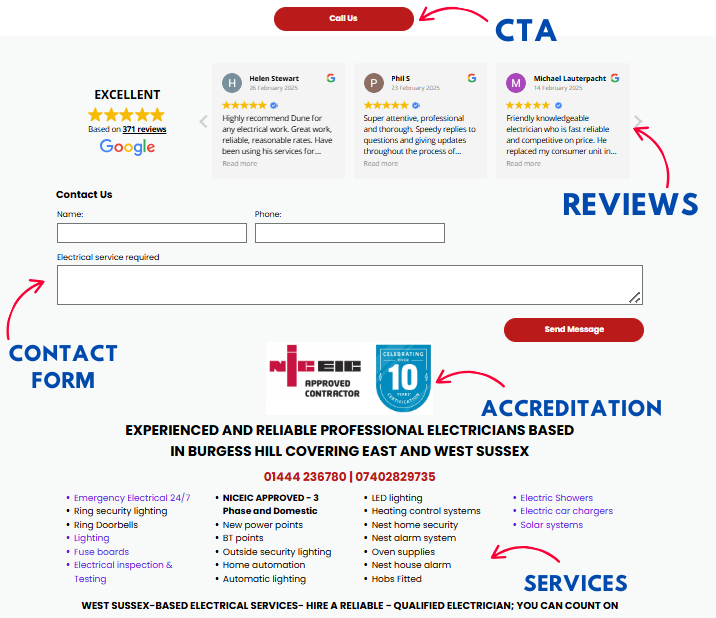
If you are a London-based legal services firm, and your ads have great CTR, but bounce rates were 80%. Why? The landing page had no headline, no clear CTA, and used stock photos that looked… well, stock.
This is redesigned Ads using Elementor on WordPress with the following changes:
- A benefit-driven headline: "Do You Need a Quick Legal Consultation in London?”
- Social proof: client testimonials and a 5-star Trustpilot badge.
- A single, focused CTA: “Book Your Free 15-Minute Call”
Result? Your Ads bounce rate will drop to 42%, and the conversion rate tripled.
Elements of a Killer PPC Landing Page:
- Fast Loading Time: Use caching plugins such as WP Rocket.
- Mobile-First Design: More than 60% of users browse on mobile.
- Clear Value Proposition: What makes you better? Say it in the first scroll.
- One goal, one CTA: No menus, no distractions. Guide the user to act.
Questions to Ask yourself:
- Is your landing page doing justice to your PPC ad?
- Can users tell within 5 seconds who you are and what you offer?
6. Smart Bidding for Smarter Spend
Imagine going to Borough Market with £100 and a list of things to buy — you wouldn't hand your money to a stranger and hope they shop smart. Yet many businesses set their ad budget without a real bidding strategy.
Why Smart Bidding Works:
With tools like Google Ads Smart Bidding, you can:
- Optimise bids for conversions in real time.
- Use data such as location, time of day, and device to auto-adjust.
- Improve ROI without micromanaging each keyword.
But it still needs supervised machine learning — that is, human oversight. AI can learn patterns, but it needs context (e.g., your seasonal offers or holiday rushes in London).
Questions to Ask yourself:
- Are you bidding for bottom-funnel actions, or just top-funnel visibility?
- Is your bidding strategy aligned with your monthly PPC goals?
7. Tracking & Analytics: Making Every Pound Count
If you don’t track your conversions, it’s like running a marathon blindfolded. You’re sweating, you’re moving — but are you winning?
Use these tools:
- Google Analytics 4: Set up goals such as form submissions, purchases, or newsletter signups.
- UTM Parameters: Tag your URLs to track which ad or keyword brought the traffic.
- Call Tracking Tools: Services like CallRail help to track phone leads generated by PPC.
Final Word: Turning Traffic into Revenue
London is a crowded, competitive digital space — and WordPress users often make the mistake of thinking that a good-looking website is enough. But without a finely tuned, data-driven PPC strategy, you're simply hoping to be found.
With professional WordPress PPC management tailored to the London market, you're no longer hoping. You're engineering success — with keywords that convert, targeting that matters, landing pages that work, and budgets that stretch.
You now hold the blueprint to PPC glory. Are you ready to build?🚀 Ready to take your WordPress PPC to the next level? Let’s craft a custom strategy that puts your business in front of the right London audience. 👉 Book a free consultation today!

Are you ready for your business to stand out and attract more customers in 2026? The digital world keeps changing, and google business remains your gateway to local search success.
In this friendly guide, we’ll show you how to unlock the full power of your Google Business Profile. You’ll discover how to set up, verify, and optimize your profile, as well as use advanced features to stay ahead.
Let’s help you build trust, boost your presence, and leave your competition behind. Ready to start your journey to local growth? This roadmap is for you.
Understanding Google Business Profile in 2026
Google Business Profile has become a cornerstone for local success, connecting businesses with customers searching for products and services nearby. In 2026, the importance of a strong google business presence has only grown, as more people rely on Google to find trusted local options quickly and easily.
At its core, google business is a free tool from Google that allows companies to manage how they appear on Google Search and Maps. When a customer looks for a service or shop in their area, the information they see — opening hours, location, reviews, photos — all comes from the business’s profile. This profile is often the first impression your business makes online.
Why is google business so crucial for small businesses, service providers, and retailers in 2026? The answer is simple. Over 90% of consumers use Google to find local information, and most choose a business that appears in the top local search results. If your profile is optimised and up to date, you’re far more likely to attract new customers than competitors who neglect theirs. For a deeper dive into the impact and necessity of google business for local businesses, you can check out Why Google Business Profile matters for local businesses.
Since 2024, google business has evolved rapidly. Artificial intelligence now powers many features, offering smart suggestions for profile updates and responding to customer queries. Integration with other Google products, like Google Ads and Merchant Center, means your profile does more than just show information — it can drive bookings, showcase products, and even process orders directly from search.
Trust is at the heart of google business. Verified profiles are highlighted in search, and customers are more likely to choose a business that appears trustworthy. Features such as customer reviews, business attributes (like “women-owned” or “accessible”), and up-to-date photos all help build credibility. Google’s algorithm rewards businesses that maintain accurate, verified, and active profiles, boosting their position in both Maps and Search.
Let’s look at a real-world scenario. Imagine a local bakery in Manchester. Before they optimised their google business profile, they struggled to appear in local searches. After updating their details, adding mouth-watering photos, and encouraging happy customers to leave reviews, they saw a surge in foot traffic and online orders. Their story isn’t unique — countless businesses have experienced growth simply by investing time in their profile.
The competitive advantage of early and ongoing optimisation cannot be overstated. Businesses that stay ahead with regular updates, prompt review responses, and new feature adoption consistently outperform those who let their profiles stagnate. In crowded markets, this can be the difference between thriving and being overlooked.
In summary, google business is more than just a listing. It’s your digital shopfront, a trust signal, and a direct line to potential customers. By understanding its evolving features and committing to best practices, your business can stand out, gain trust, and achieve local growth in 2026.

Step-by-Step: Setting Up and Verifying Your Google Business Profile4

Getting your google business profile right is the foundation for local success in 2026. Let's walk through the process together, so you can stand out, gain trust, and start attracting more customers.

What You Need Before You Start
Before you dive in, make sure you have everything ready. You’ll need a Google account, your official business name, physical address (if applicable), contact details, and a clear idea of your main services. Only eligible businesses can appear on google business, so check that you meet the requirements, such as having face-to-face contact with customers.
Having these details at hand makes the process faster and helps you avoid mistakes that could delay your profile appearing in search results.
Creating Your Google Business Profile
Head to the Google Business Profile website and sign in with your Google account. Start by entering your business name exactly as it appears in the real world. Next, select the most accurate business category—this is crucial, as it helps google business match your services with what customers are searching for.
Add your location if customers visit you, or specify that you deliver goods and services to customers at their locations. For mobile or service-area businesses, you can define the areas you serve. Include a contact phone number and website so people can reach you easily.
If you want detailed step-by-step guidance or run into a snag, check out this Starting your Google Business Profile resource for extra support.
Choosing the Right Category and Service Areas
Choosing the right category is like putting up the perfect shop sign. It tells google business what you do and helps you appear for the right searches. Take your time and pick the category that best fits your main service, then add additional categories if needed.
If you operate across different towns or regions, use the service area feature to list every location you cover. This boosts your visibility for customers searching nearby.
Adding Business Hours and Holiday Schedules
Accurate opening hours are essential for customer trust. Enter your regular business hours, and don’t forget to add special hours for holidays or seasonal changes. This means google business will always show the right information, keeping customers happy and reducing missed opportunities.
Regularly review and update your hours to make sure they’re always correct.
Uploading Photos and Crafting Your Description
Photos bring your profile to life. Upload high-quality images of your shopfront, team, products, or services. These visuals help google business users get a feel for your business before they visit.
Write a clear, friendly business description using relevant keywords. This helps google business understand your offer and improves your chances of showing up in the right searches.
Verification Process Explained
Verification is a crucial step for every google business profile. It proves to Google and your customers that you’re legitimate. Without it, your business may not appear on Maps or in local search packs, and customers are less likely to trust you.
When you’re ready, start the verification process. Google may offer phone, email, postcard, or video verification, depending on your business type and location. Follow the instructions carefully, and keep an eye out for any follow-up requests.
Once verified, you’ll unlock advanced features and analytics, giving you even more control over your google business presence.
Troubleshooting and Tips for Success
Sometimes things don’t go as planned. If your verification postcard goes missing, or you notice incorrect details, don’t panic. Double-check your address, request a new code if needed, and make sure your business name matches what’s on your signage and website.
For trades and service businesses in the UK, verification can sometimes feel tricky. Stay patient, follow the prompts, and reach out for help if you get stuck. Keeping your profile accurate and compliant with google business guidelines is the best way to avoid delays or suspensions.

Summary Table: Quick Steps to Google Business Success

By following these steps, you’ll set your google business profile up for maximum impact. A complete, verified profile is your digital shopfront—make it shine so customers can find and trust you.
Optimising Your Google Business Profile for Maximum Impact
Is your google business profile working as hard as it could for you? In 2026, an optimised profile is the difference between being found by new customers or being left behind. Let's walk through the practical steps to make your google business listing shine, attract more attention, and convert local searches into real visits and calls.

Keep Your Google Business Details Accurate and Complete
First impressions count. Make sure your google business profile has up-to-date details: business name, address, phone number, website, hours, and holiday schedules.
Check that your business category is accurate and specific. If you serve customers at their location, add service areas. Double-check your location pin on the map so customers can find you without confusion.
If your business hours change during holidays or special events, update them in advance. This avoids frustration and builds trust.
Add High-Quality Photos and Videos
The right visuals make your google business profile stand out in crowded search results. Upload crisp, well-lit photos of your storefront, team, products, or services. Include a clear logo and cover image.
Short videos are a great way to showcase your atmosphere or unique selling points. Businesses with photos get 42 percent more requests for directions, so don't miss out on this easy win.
Organise your images into categories, such as exterior, interior, team, and products. Refresh your gallery regularly to keep content current and engaging.
Use Attributes and a Compelling Description
Attributes help your google business listing connect with the right audience. Highlight features like "women-owned," "LGBTQ+ friendly," or "wheelchair accessible" to show what makes you special.
Write a business description that is clear, welcoming, and includes your main keywords naturally. Focus on what sets you apart and what customers can expect. Keep it concise but full of personality.
Remember to update your description if your services or focus change.
Manage and Respond to Reviews
Reviews are the heartbeat of your google business presence. Encourage happy customers to leave feedback. Respond to every review, whether positive or negative, with gratitude and professionalism.
A thoughtful reply to a negative review can turn a critic into a loyal supporter. Always thank reviewers for their time, and address any concerns with empathy.
Did you know businesses that respond to reviews see 35 percent more engagement? Make review management a regular habit.
Publish Regular Posts and Use Q&A
Keep your google business profile fresh by posting updates about offers, events, or news. Posts appear directly in search and maps, grabbing attention from potential customers. Use eye-catching images and clear calls to action.
The Q&A section lets you answer common questions before customers even reach out. Monitor these regularly and provide helpful, friendly answers.
A well-maintained profile signals that your business is active and attentive.
Before-and-After: The Impact of Optimisation
Consider a local café before optimisation: incomplete info, no photos, and a handful of reviews. After a full google business makeover? The café now shows off mouth-watering images, boasts glowing reviews, and posts weekly specials.
The result? More calls, more website visits, and more customers through the door. Consistent optimisation leads to lasting results.

Managing Your Reputation and Customer Engagement
Building a stellar reputation on your google business profile is one of the most effective ways to attract new customers and keep your existing ones coming back. In 2026, your digital reputation is often the first impression you make, and it can be the deciding factor for someone choosing your business over a competitor.

Encouraging Reviews
Customer reviews are the lifeblood of your google business reputation. Positive feedback not only increases your credibility but also boosts your visibility in local searches. In fact, businesses with active review management see 35% more engagement according to Google.
Encourage every satisfied customer to leave a review. You can do this by:
- Asking in person after a successful service or sale.
- Sending a friendly follow-up email with a direct link to your google business profile.
- Displaying signs or reminders at your physical location.
Make the process simple, and thank customers for their time. Remember, a steady stream of fresh reviews signals to Google that your business is trustworthy and active.
Responding to Feedback
Responding to both positive and negative reviews shows customers you care about their experience. Always thank customers for positive comments, and address any concerns raised in negative feedback with empathy and a willingness to resolve issues.
If you receive a negative review, reply promptly and professionally:
- Apologise for their experience.
- Offer a solution or invite them to discuss the matter privately.
- Show your commitment to improvement.
This approach can turn unhappy customers into loyal advocates and demonstrates to potential clients that you value feedback.
Handling Spam and Fake Reviews
Unfortunately, not all reviews left on your google business profile will be genuine. Spam and fake reviews can harm your reputation if not dealt with quickly.
To handle these:
- Regularly monitor your reviews for suspicious activity.
- Use Google’s built-in tools to report and request removal of fake content.
- Keep records of your correspondence with Google in case further action is needed.
Staying vigilant helps maintain the integrity of your profile and reassures customers that your reviews are authentic.
Leveraging Google’s Engagement Tools
Beyond reviews, google business offers powerful features like direct messaging and Q&A sections. These tools allow you to answer questions, resolve concerns, and engage with customers in real time.
Make sure you:
- Enable messaging so customers can reach you instantly.
- Monitor and answer Q&A promptly to provide helpful information.
- Share positive reviews and testimonials on your website and social media to further build trust.
For more detailed strategies on deepening customer engagement through your google business profile, see these Google Business Profile Optimization Best Practices for 2025.
Investing time in managing your reputation and engaging with customers on your google business profile is one of the best ways to stand out locally and build lasting relationships. A strong reputation today sets the stage for even greater success tomorrow.
Future-Proofing Your Google Business Presence
Staying ahead with your google business profile is all about embracing change. The digital world evolves quickly, and so must we. To keep your business visible and competitive, you need to be proactive, flexible, and open to new ideas.
Embracing Change and Innovation
The landscape of google business is never static. Google often rolls out updates, new features, and algorithm tweaks that can affect your visibility overnight. By monitoring official updates and regularly checking your profile, you can spot changes early and adjust your strategy. For example, AI-driven features and enhanced analytics tools are now standard, so staying informed ensures you benefit before your competitors do.
Keeping Your Profile Accurate and Compliant
Regular audits are essential for future-proofing your google business profile. Check your business hours, contact details, and service areas at least quarterly. Remove outdated photos and add new ones that reflect your current offerings. Keeping everything up to date not only builds trust but also protects you from losing visibility due to non-compliance.
- Review all information every three months
- Update photos and posts frequently
- Respond quickly to changes in your business
If you ever face technical hurdles or profile issues, using a Troubleshooting Google Business Profile issues guide can help you resolve them swiftly and keep your listing in top shape.
Training and Integration for Lasting Success
Your team should understand the ins and outs of google business management. Training staff on profile updates, review responses, and privacy best practices ensures consistency even as team members change. Integrate your google business profile with your website, social media, and advertising for a seamless online presence that reaches more customers.
- Organise regular staff training sessions
- Connect your profile with other marketing tools
- Share positive reviews across platforms
Integration not only expands your reach but also provides a unified experience for your audience.
Preparing for Privacy and Predicting the Future
Data protection regulations are always shifting. Make sure your google business profile follows privacy best practices, especially when handling customer data. Use secure passwords, limit access to trusted staff, and stay updated on compliance requirements.
Looking ahead, expect even greater AI integration, more advanced analytics, and tighter privacy controls. Businesses that stay proactive and regularly engage with Google’s learning resources will remain at the forefront. Imagine your business, years from now, still leading local search because you took steps today to future-proof your profile.
The key to long-term success is simple: keep learning, stay adaptable, and make your google business profile a living, evolving part of your marketing strategy.
Resources and Next Steps
Ready to take your google business presence to the next level? Having the right resources and support can make all the difference as you optimize your profile for 2026 and beyond.
Top Resources for Google Business Success:
- Google Business Profile Help Centre for step-by-step guides and troubleshooting.
- Google’s official learning resources and certification programmes to build your expertise.
- Tools like Google Business Profile Manager and third-party dashboards for managing multiple locations.
- Community forums and expert groups, where you can ask questions and share experiences.
Quick Checklist for Ongoing Optimisation:
- Review and update your profile details monthly.
- Respond to all reviews, both positive and negative.
- Add new photos and update business hours regularly.
- Monitor insights to track performance.
- Stay informed about new features and updates.
Taking action now gives you a head start as google business evolves. An active, optimised profile means better visibility, more trust, and increased enquiries. Use these resources, keep learning, and watch your business thrive in 2026.
We’ve covered a lot together from setting up your Google Business Profile to unlocking those advanced features that put you ahead of the competition in 2026. Remember you don’t have to navigate verification or optimisation alone. If you want your business to show up, earn trust, and attract more local customers let’s make it happen together. As a team of UK-based experts who truly understand both your trade and the Google system, we’re here to support you every step of the way. Ready to boost your presence Start strong and
Contact connect SEO Today.












