
Google Business Profile Maps Edit: Complete Guide 2026
Managing your business information on Google has never been more crucial for local visibility. The ability to perform a google business profile maps edit gives you direct control over how customers find and interact with your business online. Whether you're updating your opening hours, adding new photos, or correcting your business address, understanding the editing process ensures your profile remains accurate and competitive. This comprehensive guide explores everything you need to know about editing your Google Business Profile through Maps, from verification through to ongoing optimisation.
Understanding Google Business Profile Maps Editing
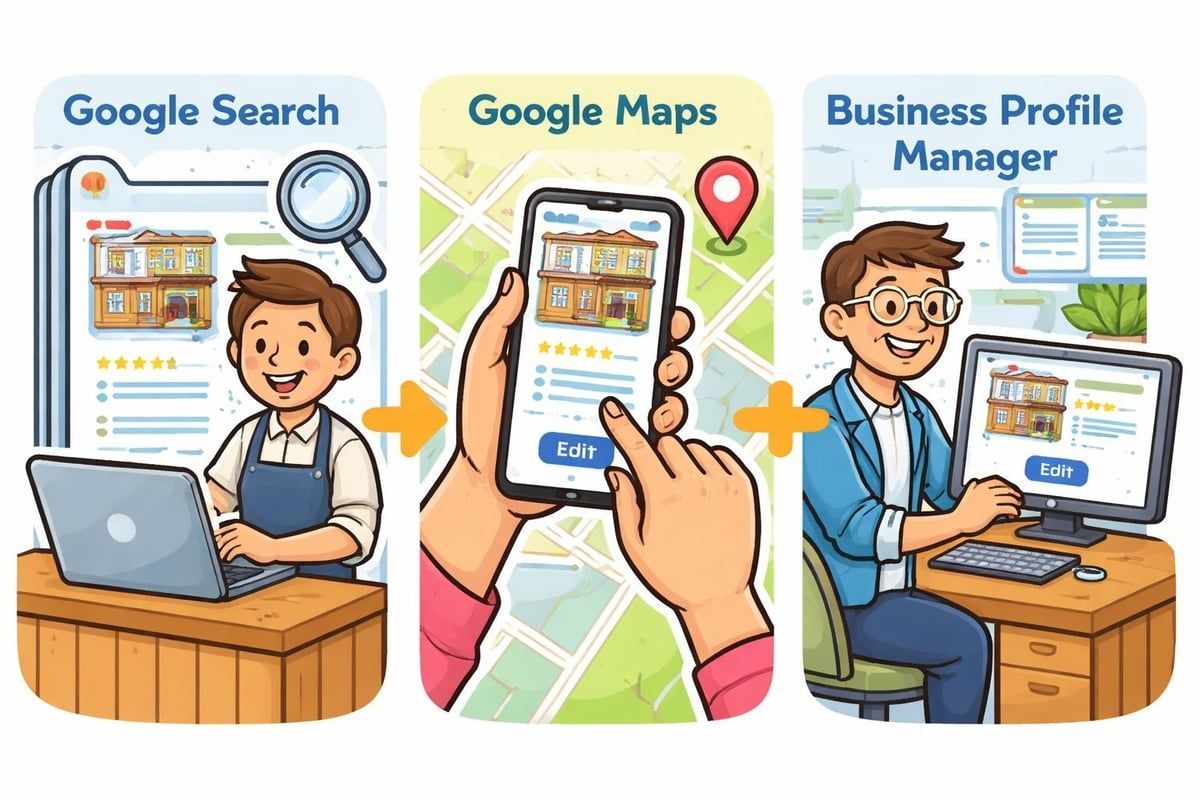
The google business profile maps edit functionality represents a significant evolution in how business owners manage their online presence. Google has streamlined the editing experience, allowing you to
update your Business Profile directly from Google Search and Maps, making it easier than ever to keep your information current.
Your Business Profile serves as the digital storefront for your company. When potential customers search for services you offer, your profile appears in local search results and on Google Maps. Every detail matters, from your business category to your phone number, because these elements determine whether customers can find and contact you.
Why Editing Access Matters
Without proper editing access, you're essentially locked out of your own business information. This creates several problems:
- Competitors can suggest incorrect edits to your listing
- Customers see outdated information like old phone numbers
- You miss opportunities to showcase new products or services
- Your business appears neglected or unprofessional
- Seasonal hour changes can't be updated promptly
The verification process unlocks full editing capabilities. At Connect SEO Ltd, we've helped hundreds of UK businesses navigate the verification maze, ensuring they gain complete control over their profiles quickly and efficiently.
The Verification Foundation
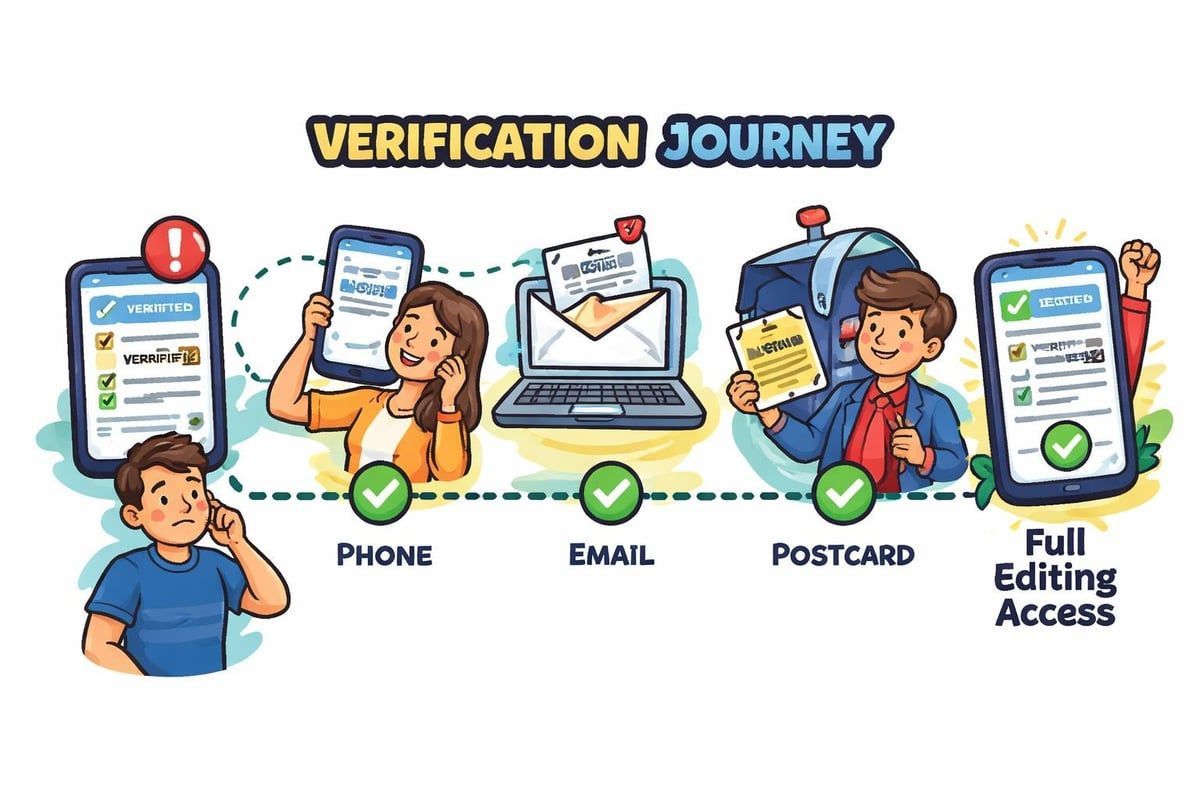
Before you can perform any google business profile maps edit, Google requires verification to confirm you're the legitimate owner. This crucial step protects businesses from fraudulent listings and ensures data accuracy across Google's platforms.
Verification Methods Available
Google offers multiple verification pathways, each suited to different business types:
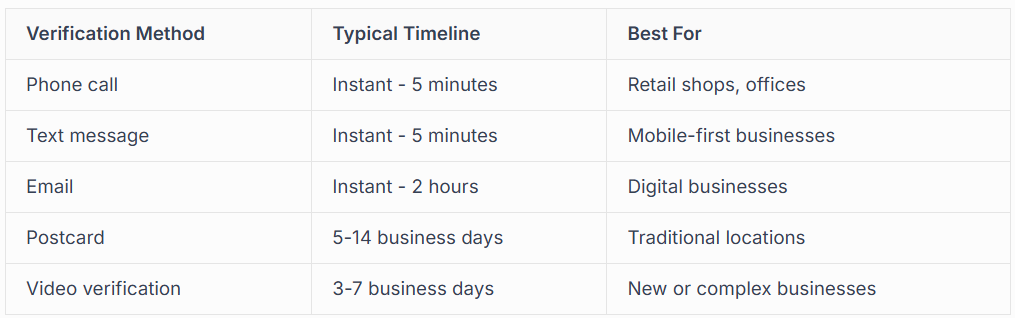
Phone and text verification provide the fastest route to editing access. You'll receive a code that unlocks your profile immediately. However, not every business qualifies for instant verification options.
Email verification works well for businesses already established in Google's ecosystem. You'll need to use an email address associated with your domain name. Postcard verification remains the most common method, though it requires patience as Google mails a physical card to your business address.
Common Verification Challenges
Many businesses encounter obstacles during verification. The postcard never arrives, the phone option isn't offered, or the verification code doesn't work. These situations can delay your ability to perform essential google business profile maps edit tasks.
We've resolved countless verification issues for clients. Sometimes it's a simple address formatting problem. Other times, Google's algorithms flag legitimate businesses due to unusual circumstances. Professional support from experienced providers like our Google Business Profile management services can fast-track resolution.
Accessing Your Profile for Editing
Once verified, accessing your google business profile maps edit options becomes straightforward. Google provides multiple entry points, each offering slightly different interfaces but equivalent functionality.
Desktop Editing Through Google Search
The simplest method involves searching for your business name on Google. Your Business Profile appears in the knowledge panel on the right side. Click "Manage now" or "Edit profile" to access the dashboard. This approach works brilliantly for quick updates like changing phone numbers or adding posts.
Desktop editing offers the most comprehensive view of your profile. You can see how customers view your listing whilst simultaneously making changes. The interface displays real-time previews, ensuring your edits appear exactly as intended.
Mobile Editing via Google Maps
The Google Maps app provides on-the-go editing capabilities. Search engine journal highlighted this feature, noting how it empowers business owners to maintain accuracy wherever they are.
To edit through Maps:
- Open the Google Maps app on your smartphone
- Tap your profile icon in the top right corner
- Select "Your Business Profile" from the menu
- Choose the business you want to edit
- Tap "Edit profile" to access editing options
Mobile editing excels for urgent updates. If your business closes unexpectedly due to emergency repairs, you can update hours immediately from your phone, preventing frustrated customers from wasting journeys.
Business Profile Manager Dashboard
For businesses managing multiple locations or requiring advanced features, the
Business Profile Manager (formerly Google My Business dashboard) offers the most powerful editing environment. Access it at business.google.com.
This centralised hub displays all your locations if you operate multiple premises. Bulk editing features let you update information across all locations simultaneously, saving considerable time for multi-location businesses.
Essential Profile Elements to Edit
Performing a google business profile maps edit involves managing numerous information fields. Each element plays a specific role in customer discovery and conversion.
Business Information Basics
Your NAP (Name, Address, Phone) forms the foundation of your profile. Consistency across all online platforms strengthens
local SEO rankings. Even minor discrepancies, like "Street" versus "St", can confuse Google's algorithms.
Business name guidelines are strict. Use your legal business name or the name customers know you by. Don't stuff keywords into your business name as this violates Google's guidelines and risks suspension.
Address accuracy determines your position on Google Maps. If customers can't find your physical location, they'll choose competitors instead. For service-area businesses that don't serve customers at their address, you can hide your street address whilst still appearing in relevant location searches.
Categories and Attributes
Selecting appropriate categories dramatically impacts visibility. Your primary category defines which searches trigger your profile. Secondary categories expand your reach to related searches.
- Choose the most specific category available
- Add secondary categories that genuinely apply
- Update categories when you expand services
- Avoid irrelevant categories that confuse customers
Attributes provide additional details about your business. These include accessibility features, amenities, and service options. Enable "online estimates" or "same-day service" if applicable, as these attributes appear prominently in search results.
Business Hours and Special Hours
Accurate hours prevent customer frustration and wasted journeys. Regular hours should reflect your standard trading times, but special hours handle exceptions.
Use special hours for:
- Bank holidays and public holidays
- Seasonal changes in trading hours
- One-off closures for events or maintenance
- Extended hours during peak seasons
Google displays special hours prominently, so customers see immediately if your normal schedule differs on specific dates. This transparency builds trust and manages expectations.
Visual Content Optimisation
Photos and videos transform your google business profile maps edit strategy from basic information management to compelling marketing. Visual content increases engagement and influences customer decisions more than any text description.
Strategic Photo Management
Businesses with photos receive 42% more requests for directions and 35% more click-throughs to their websites compared to businesses without photos. This statistic alone justifies investing time in photo optimisation.
Upload photos in these categories:
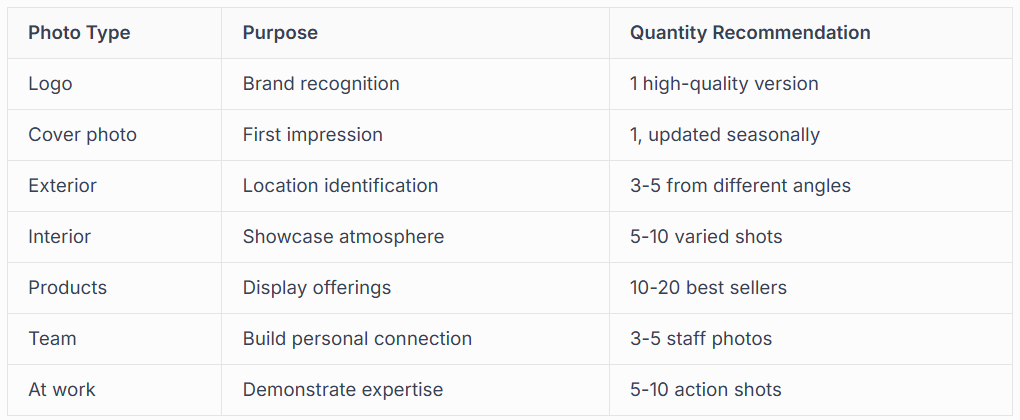
Photo quality matters enormously. Blurry, poorly lit images damage credibility. Professional photography investment pays dividends through increased customer confidence. However, authentic photos often outperform overly staged corporate imagery, particularly for tradespeople and local services.
Video Content Integration
Google increasingly prioritises video content in Business Profiles. Short videos showcasing your work, explaining your services, or introducing your team create engaging experiences that static images can't match. If you need support with visual content, professional
video filming and editing services can elevate your profile significantly.
Posts and Updates Strategy
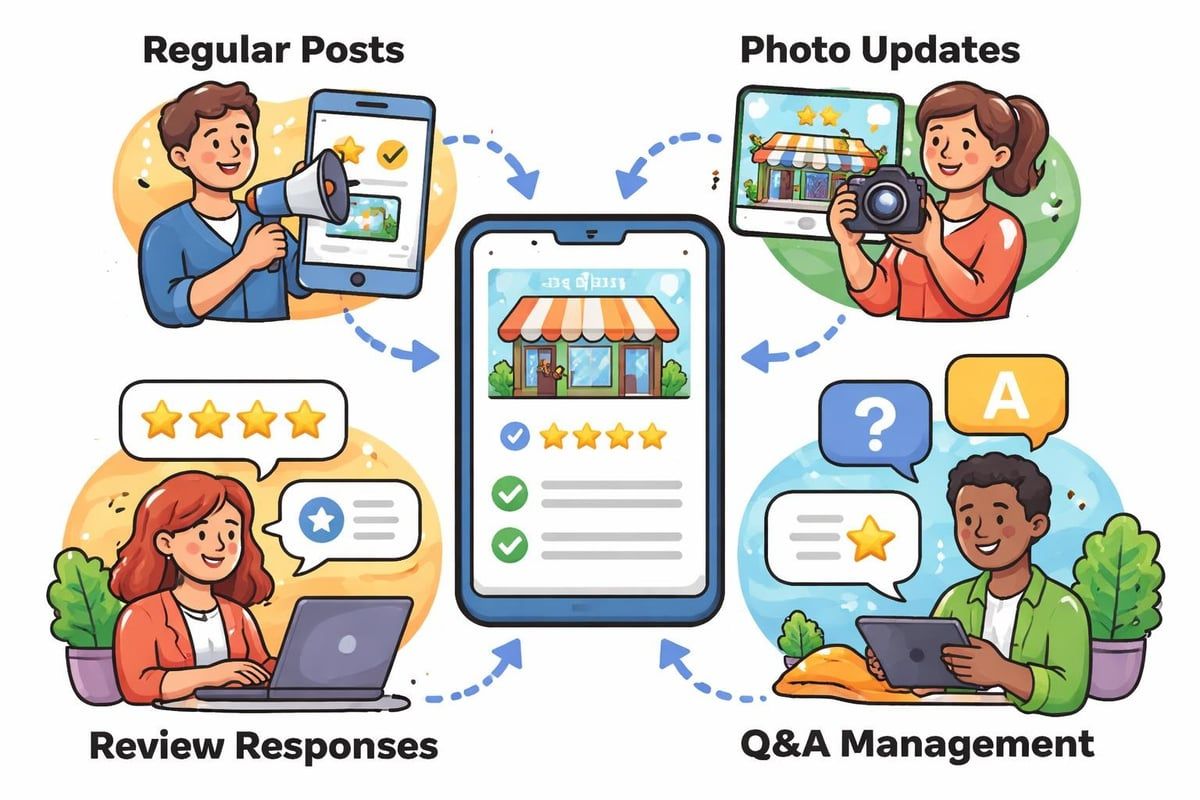
Regular posts keep your profile fresh and engaging. The google business profile maps edit interface includes a posts section where you can share updates, offers, events, and news.
Post Types and Their Uses
What's New posts share general updates about your business. Announce new products, celebrate milestones, or highlight recent projects. These posts remain visible for seven days before archiving.
Offer posts promote special deals and discounts. Include clear terms, expiration dates, and compelling calls-to-action. Offer posts display more prominently than standard updates, attracting deal-seeking customers.
Event posts advertise upcoming happenings at your business. Whether hosting a grand opening, seasonal sale, or customer appreciation day, event posts let customers add events to their calendars directly from your profile.
Posting Frequency Best Practices
Consistency matters more than volume. Weekly posts maintain profile freshness without overwhelming your audience. However, quality trumps quantity; one valuable post weekly beats three generic updates.
Monitor post performance through insights. Google shows how many people viewed, clicked, and engaged with each post. This data guides future content creation, helping you focus on topics and formats that resonate with your audience.
Managing Questions and Answers
The Q&A section often gets neglected during google business profile maps edit sessions, yet it directly influences customer decisions. Potential customers ask questions publicly, and your answers (or lack thereof) shape perceptions.
Proactive Q&A Management
Don't wait for questions to appear. Seed your Q&A section with frequently asked questions and thorough answers. This proactive approach addresses common concerns before customers need to ask.
Common questions to pre-answer include:
- Do you offer free consultations or estimates?
- What payment methods do you accept?
- Do you provide emergency or same-day services?
- Are you licensed and insured?
- What areas do you serve?
Monitor questions daily if possible. Quick responses demonstrate attentiveness and customer care. Delayed responses suggest neglect, even if unintentional.
Handling Inappropriate Content
Sometimes competitors or trolls post inappropriate questions or answers. You can flag content that violates Google's policies, though removal isn't guaranteed. Respond professionally to questionable questions, providing factual information that helps genuine customers whilst addressing the underlying concern.
Reviews and Reputation Management
Whilst not strictly an editing function, review management integrates closely with your google business profile maps edit workflow. Reviews appear prominently on your profile and significantly influence customer decisions.
Response Strategies That Work
Respond to every review, positive and negative. Thank customers for positive feedback specifically, mentioning details from their review. This personalisation shows you value their time and attention.
Negative reviews require delicate handling. Respond quickly, acknowledge their concerns, and offer to resolve issues offline. Never argue publicly or make excuses. Professional, empathetic responses to criticism often impress potential customers more than glowing five-star reviews.
For businesses facing malicious reviews, professional support can help. Our Google negative review removal service assists with cases involving fake reviews, spam, or policy violations.
Encouraging More Reviews
More reviews improve visibility and credibility. Google's algorithms favour businesses with recent, regular reviews. Encourage satisfied customers to share their experiences by:
- Including review links in follow-up emails
- Displaying QR codes at your premises
- Mentioning reviews during checkout conversations
- Making the process simple and quick
Never offer incentives for reviews, as this violates Google's policies and risks suspension. Authentic reviews based on genuine experiences hold far more value than artificially inflated ratings.
Advanced Editing Features
Beyond basic information updates, the google business profile maps edit system includes sophisticated features that elevate your profile's effectiveness.
Service Menu and Products
If you offer services or sell products, adding detailed listings helps customers understand your offerings before contacting you. Each service entry can include descriptions, price ranges, and booking links.
Structure your services logically. Group related services together and use clear, customer-friendly language. Avoid industry jargon that might confuse potential customers unfamiliar with technical terminology.
Product listings work particularly well for retail businesses. Include high-quality images, accurate pricing, and compelling descriptions. Products appear in Google Shopping results, expanding your visibility beyond traditional local search.
Messaging and Communication Tools
Enable messaging to let customers contact you directly through your Business Profile. Messages arrive via the Google Maps app on your phone, facilitating quick responses without sharing your personal phone number.
Messaging works brilliantly for quick questions about availability, pricing, or services. Set up automatic greeting messages to acknowledge enquiries immediately, even outside business hours. However, monitor messages consistently; unanswered messages frustrate potential customers and damage your reputation.
Booking and Appointment Integration
Many service businesses benefit from appointment booking integration. If you use scheduling software, connect it to your Business Profile. Customers can book appointments directly from Google Search or Maps without visiting your website.
This seamless experience reduces friction in the customer journey. Fewer steps between discovery and booking means higher conversion rates.
Monitoring and Insights
Editing your profile is only half the equation. Understanding how customers interact with your listing informs future optimisation decisions.
Performance Metrics to Track
Google provides valuable insights about profile performance:
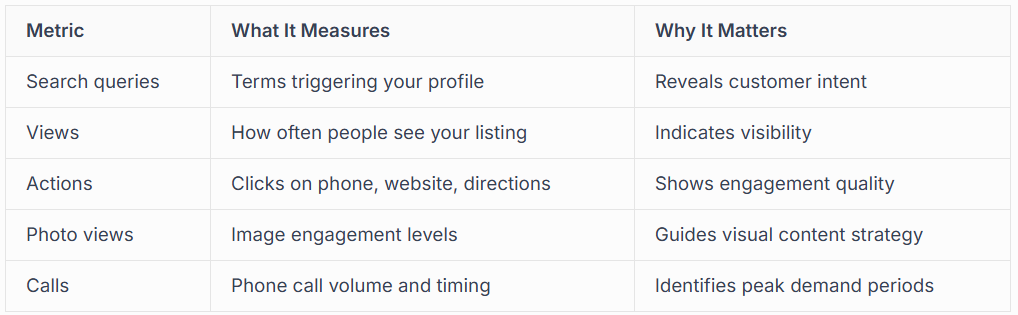
Search query data proves particularly valuable. Seeing which terms lead customers to your profile helps refine your category selections, business description, and service offerings. If people search for services you offer but haven't emphasised, update your profile accordingly.
Direction requests indicate strong purchase intent. Customers asking for directions typically plan to visit soon. High direction requests but low actual visits might suggest address display issues or confusing location information.
Competitive Benchmarking
Insights also show how your profile performs compared to similar businesses in your area. Whilst Google doesn't reveal competitor names, comparative data highlights opportunities for improvement.
If competitors receive significantly more website clicks, examine their profile photos, description, and overall presentation. What makes their profiles more clickable? Implement similar strategies whilst maintaining your unique brand identity.
Common Editing Mistakes to Avoid
Even experienced business owners make errors when performing google business profile maps edit tasks. Avoiding these pitfalls keeps your profile performing optimally.
Keyword Stuffing and Guideline Violations
Resist the temptation to stuff keywords into your business name, categories, or description. Google's algorithms detect manipulation attempts and penalise violators. Suspensions can remove your profile entirely, devastating your local visibility.
Follow Google's guidelines strictly. They exist to maintain search quality and user trust. Understanding common issues helps prevent problems before they occur.
Inconsistent Information Across Platforms
Your Business Profile shouldn't exist in isolation. Ensure your NAP information matches exactly across your website, social media profiles, and online directories. Inconsistencies confuse Google's algorithms and weaken your local SEO performance.
Regular audits catch discrepancies before they cause problems. Check major directories quarterly, updating any outdated information immediately.
Neglecting Mobile Experience
Over 60% of Google searches occur on mobile devices. When editing your profile, check how changes appear on mobile. Some elements that look perfect on the desktop display awkwardly on small screens.
Test your profile on multiple devices. Ask friends or family to search for your business on their phones. Fresh eyes often spot issues you've overlooked through familiarity.
Profile Suspension Recovery
Despite careful management, profiles sometimes face suspension. Google's automated systems occasionally flag legitimate businesses, requiring appeal and reinstatement.
Suspension Warning Signs
Sudden disappearance from search results usually indicates suspension. You might receive email notification, though not always. Check your Business Profile Manager dashboard for suspension messages.
Common suspension triggers include:
- Guideline violations in business name or categories
- Suspicious verification patterns
- Multiple profiles for the same location
- Prohibited business types
- Unusual editing activity patterns
Professional Reinstatement Support
Suspension recovery requires expertise and patience. Google's reinstatement process involves detailed documentation proving your business legitimacy. Professional services like our
Google Business Profile reinstatement service navigate this complex process efficiently, minimising downtime.
Ongoing Optimisation Beyond Basic Edits
The google business profile maps edit process never truly ends. Continuous optimisation keeps your profile competitive and relevant.
Seasonal Updates and Campaigns
Align your profile with seasonal demand patterns. Update photos to reflect current seasons, adjust service emphasis based on typical customer needs, and create timely posts about seasonal offerings.
For tradespeople, this might mean highlighting heating services in winter and air conditioning in summer. Retailers can showcase seasonal products and holiday promotions. These strategic updates keep your profile fresh and relevant to current customer needs.
Integration with Broader Marketing
Your Business Profile shouldn't operate independently from other marketing efforts. Coordinate profile updates with campaigns, promotions, and content marketing initiatives. When launching new services, update your profile simultaneously with website changes and social media announcements.
This integrated approach amplifies message reach and reinforces brand consistency. Customers encountering your business across multiple touchpoints see cohesive, professional presentation that builds confidence.
For businesses investing in Google Ads management services, coordinating ad messaging with Business Profile content creates synergy that improves overall campaign performance.
The Local SEO Connection
Your google business profile maps edit activities directly impact local SEO performance. Google uses profile information to determine ranking positions in local search results.
Ranking Factors You Control
Three primary factors influence local rankings: relevance, distance, and prominence. Your profile edits affect all three.
Relevance improves through accurate categorisation, comprehensive business descriptions, and regular posts demonstrating activity in your industry. The more thoroughly your profile matches what customers search for, the more likely Google shows your business.
Distance depends on your address accuracy and service area settings. Whilst you can't change your physical location, correctly configured service areas ensure you appear for searches throughout your coverage region.
Prominence grows through positive reviews, consistent information across the web, and engagement signals like clicks and calls. Every aspect of profile management contributes to prominence.
Building Authority Through Content
Regular posts, photo uploads, and Q&A engagement signal active business management. Google interprets activity as business legitimacy and relevance, potentially boosting rankings. This doesn't mean posting for posting's sake; quality content that genuinely helps customers provides maximum benefit.
Think of your Business Profile as an extension of your website's content strategy. Just as regular blogging improves website SEO, consistent profile updates strengthen local search positioning. Many businesses benefit from professional content creation services that extend across websites and Business Profiles simultaneously.
Mastering the google business profile maps edit process transforms your local search visibility and customer acquisition. From verification through ongoing optimisation, every element contributes to a powerful digital presence that connects you with customers actively searching for your services. At Connect SEO Ltd, we specialise in Google Business Profile verification and management, handling everything from initial setup through suspension recovery and ongoing optimisation, so you can focus on running your business whilst we ensure customers can find you effortlessly.











