
Step-By-Step Guide To Verify Google Business Profile 2026
Struggling to get your business seen on Google Maps? You are not alone. Thousands of UK businesses miss out on local customers every year simply because they have not taken the steps to verify google business profile.
Customer habits have changed. Did you know 87% of people now use Google to choose a business? Verified profiles get over 21,600 views a year, meaning more eyes on your company.
When you verify, you unlock higher visibility, more trust, and better conversion rates. This guide is your practical, step-by-step resource for 2026, helping your business shine in local search results.
We will break down each stage of the process, explain the latest requirements, reveal the fastest methods, and help you avoid common pitfalls. Get ready for expert tips, real-world examples, and everything you need to know for success.
Why Google Business Profile Verification Matters
Struggling to get your business noticed in local search? If you want customers to find you easily, you need to verify google business profile. Without verification, your business might not even appear on Google Maps or in the Map Pack, no matter how great your products or services are. Verified profiles are the foundation of local SEO, giving your business a real chance to compete and stand out.
The Role of Google Business Profile in Local Search
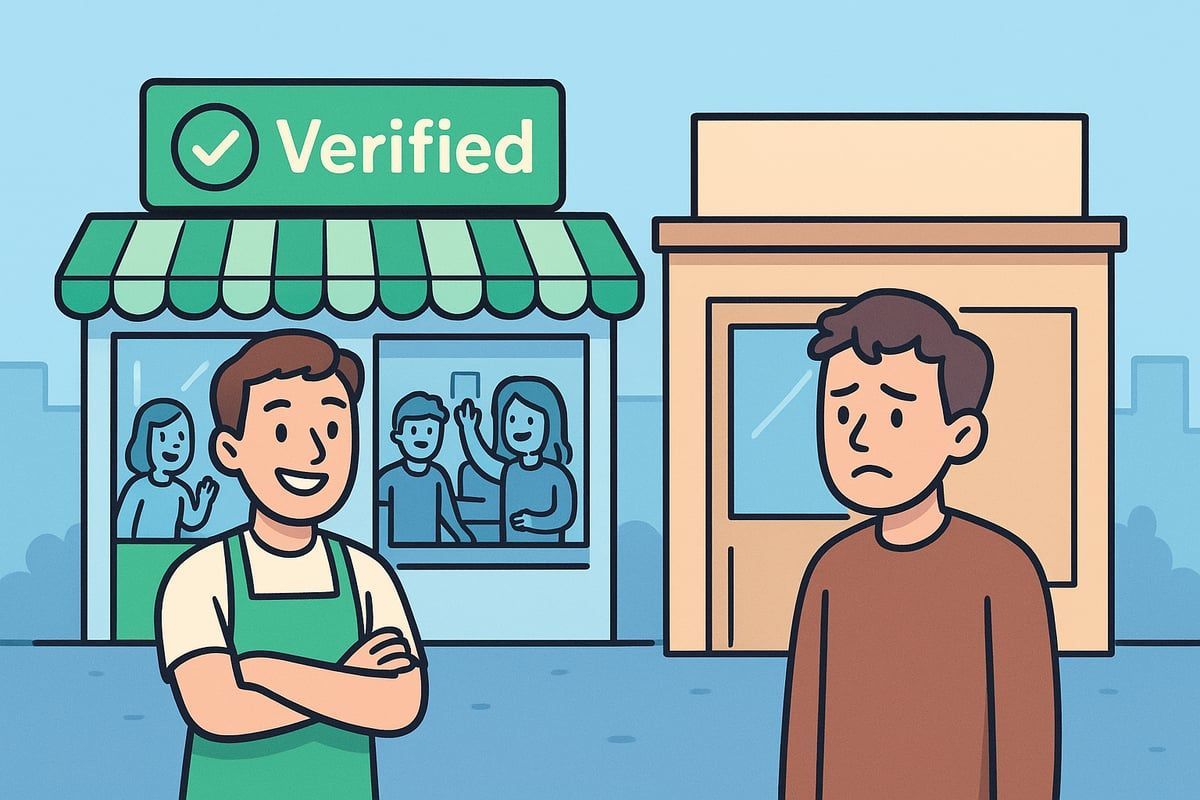
Google Business Profile is the backbone of getting found by local customers. Did you know 87% of people in the UK use Google to choose a business nearby? When you verify google business profile, your listing is eligible to appear higher in both search results and Google Maps. Imagine two plumbers in the same town: only the verified one shows up in the coveted Map Pack. If you want your business to have this advantage, make sure you follow a reliable
Google Business Profile Verification Guide so you do not miss out.
Trust and Credibility: What Verification Signals to Customers
Customers want to know they are choosing a trustworthy and legitimate business. When you verify google business profile, you send a strong signal—Google research shows verified profiles are 2.7 times more likely to be seen as reputable. People are more likely to visit (up to 70%) and buy (up to 50%) from businesses they trust. If your profile is unverified, it may show incomplete or outdated info, making customers hesitate.
Risks of Skipping Verification
Not taking the time to verify google business profile can have serious consequences. Unverified profiles risk being flagged, suspended, or even removed by Google. Your competitors, if verified, will always outrank you in local search results. Customers are less likely to reach out or book services if your business is missing from Maps. For example, a cleaning company with an unverified profile might lose bookings simply because their business is hidden from view.
The Impact on Customer Actions and Revenue
Did you know 72% of people searching locally visit a business within five miles? When you verify google business profile, your listing can appear in front of thousands of potential customers—over 21,600 Google searches a year for verified businesses. There is a direct link between having a verified, complete profile and increased bookings, calls, and revenue. The more complete and visible your profile, the more likely customers are to take action.
Why Verification is Essential in 2026
Google’s verification standards are getting stricter every year to help prevent spam and fraud. In 2026, there are more ways to verify your business, but also more requirements to meet. Keeping your profile up to date and verified is essential if you want your business to remain visible and competitive. Staying on top of these changes will keep your business ahead of the curve and in front of the customers who matter most.
Google Business Profile Verification Requirements (2026 Update)
Getting your Google Business Profile verified is more important than ever in 2026. Google has tightened its standards, so being prepared is key to making sure your business stands out and gets found by local customers. Let’s break down exactly what you’ll need to succeed.
Eligibility and Basic Prerequisites
To verify google business profile in 2026, your business must meet specific eligibility rules. Only real, legitimate businesses with a physical location or clearly defined service area can apply. Whether you run a shop, offer mobile services, or operate a hybrid model, your business must be able to prove it exists and serves customers in the UK.
Google’s updated rules now require stricter evidence of legitimacy. Make sure your business is registered and operates within the guidelines laid out by Google. For further detail, you can review Google's 2025 verification guidelines as a starting point, since 2026 standards build on these principles.
Documentation and Proof Needed
When you verify google business profile, you’ll need to provide clear and recent documentation. This can include utility bills with your business address, business licences, lease agreements, or even a fire inspection report. Google may also ask for GPS-enabled photos of your premises, branded equipment, or staff at work.
If your business is registered, documents from the Secretary of State can help. For example, a local tradesman might submit a water bill and a photo of their branded shopfront as proof. Always double-check that all documents are up to date and match your public business details.
Choosing the Right Business Type
Choosing the correct business type is vital when you verify google business profile. Are you a physical storefront, a service-area business (SAB), or a hybrid? The type you select affects your verification options and what information you must provide.
Here’s a quick comparison:
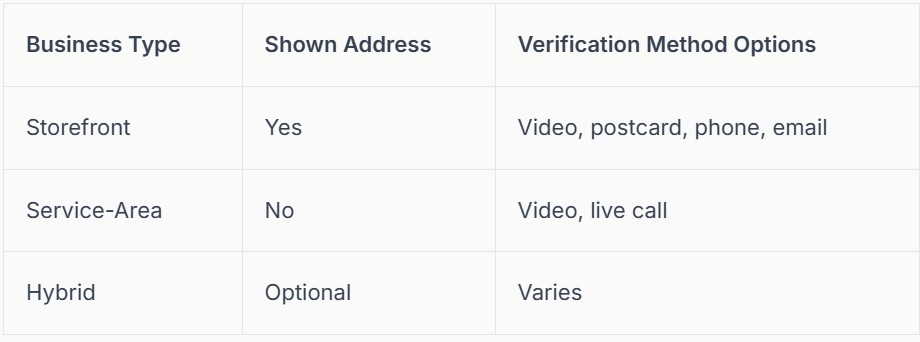
Selecting the right category during setup ensures you’re eligible for the fastest and most suitable verification methods.
Preparing Your Business for Verification
Before you verify google business profile, it’s essential to make sure every business detail is accurate and consistent. Double-check your address, phone number, and business name. These must perfectly match public records and any documents you submit.
Update your details everywhere online to avoid mismatches. Avoid using PO boxes, and never use slightly different versions of your business name. Small errors can cause big delays. Consistency is your best friend in this process.
Google’s 2026 Verification Policies
Google’s 2026 policies include robust anti-spam measures. Video and live video call verifications are now much more common, especially for service-area or high-risk industries. Some businesses may need to complete more than one verification method to prove legitimacy.
If you manage multiple locations, prepare to verify each one separately, with unique documentation for every branch. By staying updated with Google’s latest requirements, your business will remain visible and competitive in local search.
Step-by-Step Guide to Verifying Your Google Business Profile
Ready to get your business seen by more local customers? This guide will walk you through every step you need to verify google business profile in 2026, with expert tips and real-world examples along the way.
Step 1: Claim or Create Your Google Business Profile
The first step to verify google business profile is making sure you actually own or manage your business listing on Google.
Start by searching for your business name on Google or Google Maps. If your business appears, click "Own this business?" to begin the claim process. If not, you’ll need to create a new listing from scratch.
It’s vital to use the correct Google account, ideally the one you want to manage your profile long-term. This helps avoid confusion or access issues later.
If your business already exists but you don’t have access, follow Google’s process to request ownership. Google may contact the current manager to approve your request.
When entering your details, always use your official business name, accurate address, and the main phone number. NAP consistency (Name, Address, Phone) is crucial for local search rankings and successful verification.
Example: A new café owner finds their business already listed on Maps. They claim it using their business Gmail, ensuring all details match their signage and website.
Troubleshooting tip: If you run into issues or want expert support, you can use services like Step-by-Step Google Business Listing Setup for hands-on guidance.
Getting this step right is the foundation you need before you verify google business profile.
Step 2: Enter and Double-Check Your Business Information
Before you can verify google business profile, your business details must be accurate and complete.
Fill out all required fields: business name, main category, full address, phone number, website, and business hours. The category you choose directly affects how you show up in search, so pick the one that best describes your core service.
If you serve customers at their location, such as a mobile locksmith, choose the "service area business" option and add the relevant areas you cover, rather than a physical address.
Upload high-quality photos and your business logo. A profile with professional images looks more trustworthy and gets more engagement.
Example: A mobile locksmith selects "service area business" and enters all the towns he covers, instead of a shop address. He uploads a logo, photos of his van, and a recent job.
Check all information for consistency with your website and other online listings. Mismatched details can delay or prevent verification.
Tip: Avoid using PO Boxes or virtual offices, as Google may reject these. Stick to real addresses or clear service areas.
Taking the time now to ensure everything matches will make it much easier to verify google business profile successfully.
Step 3: Choose Your Verification Method
Now it’s time to select how you want to verify google business profile. In 2026, Google offers several methods, but not all are available to every business.
Common verification methods:
- Video upload
- Phone/SMS
- Postcard
- Live video call
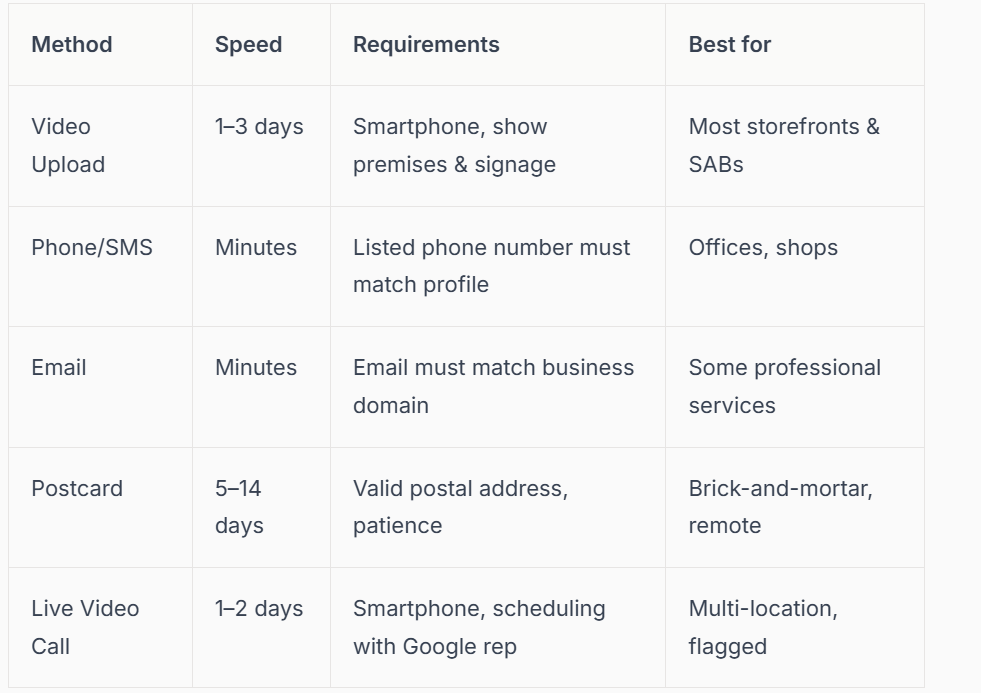
The options you see depend on your business type, category, location, and sometimes business hours. For example, a hair salon might be offered video or postcard, while a plumber may only see the video call option.
Here’s a quick comparison of the main methods:
Example: A plumber is only given the live video call option, while a hair salon gets to choose between video upload and postcard.
Tips for choosing: If you want the fastest route, phone or email are quickest when available. Video is increasingly common, especially for new listings. Sometimes, Google may require more than one method, especially in competitive industries.
Remember, you must verify google business profile before your listing will appear fully on Google Maps or in local search.
Step 4: Complete the Verification Process
This is the moment you actually verify google business profile. The exact process depends on the method you selected.
Video Verification
- Record a video showing your premises, signage, business equipment, staff, and proof of operations.
- Access the video upload option from your Google Business dashboard.
- Make sure the footage is clear, steady, and includes all required elements.
Example: A tradesman walks through his workshop with his phone, showing branded tools, invoices, and a sign with the business name.
Common mistakes: Missing signage, unclear footage, or not showing enough detail can result in rejection. Double-check Google’s instructions before uploading.
- Phone/SMS Verification
- Google sends a code to your business phone.
- Enter the code into your dashboard.
- Make sure your phone number is correct and active.
Example: A florist receives an SMS, enters the code, and is verified within minutes.
Email and Postcard Verification
- Email: Google sends a code to your business email. Follow the instructions in the message.
- Postcard: Expect delivery in 5–14 days. Do not edit your profile before entering the code, as this can delay or reset the process.
Live Video Call Verification
- Schedule a live video call with a Google representative.
- Prepare documents like business licences, utility bills, and ID.
- Walk the rep through your premises on video.
Example: A multi-location gym chain verifies each branch via live call, showing signage and staff.
No matter which method you use, you must verify google business profile to unlock full visibility and features.
Step 5: Confirm Verification and Optimise Your Profile
After you verify your Google business profile, check your status in the Google Business dashboard. If your profile says "verified," your business should start appearing in search and on Maps within a few days.
If verification is pending or fails, review Google’s feedback. Common issues include mismatched info, unclear documents, or missing evidence.
Once verified, it’s time to optimise your profile for maximum results:
- Add a detailed business description and all services you offer.
- Set accurate opening hours and holiday times.
- Upload more photos, including inside and outside shots.
- Encourage happy customers to leave reviews.
- Use Google Posts to share updates, offers, and news.
Example: A newly verified bakery updates their profile with new menu photos, asks loyal customers for reviews, and quickly notices an increase in calls and walk-ins.
Keep your profile up to date. Regularly adding new photos and posts helps you stay visible and competitive. Monitoring your performance with Google Insights shows how your listing is driving calls, bookings, and visits.
By following these five steps, you will not only verify google business profile but also set your business up for long-term local success.
Troubleshooting & Advanced Scenarios
Even with the best preparation, issues can arise when you try to verify google business profile. Whether it's a failed attempt, a tricky multi-location setup, or a sudden suspension, knowing what to do next helps you stay visible and trusted in local search. Let's tackle the most common scenarios and how to solve them.
What to Do If Verification Fails
It can be disheartening if your attempt to verify google business profile doesn't work out first time. Common reasons include mismatched business info, blurry photos, or missing documents. If this happens, don't panic—review the error message carefully.
Steps to recover:
- Double-check your business name, address, and phone number for consistency.
- Gather clearer or more up-to-date documents.
- If you used video verification, ensure your footage clearly shows your storefront, signage, and business activity.
You can resubmit your information or appeal if needed. For a deeper dive into frequent pitfalls, see Common Google Business Profile Verification Issues. Often, simply correcting your info leads to a successful outcome.
Multi-Location and Franchise Verification
Managing several sites? You must verify google business profile for each location. For larger brands, Google offers bulk verification, but every branch needs unique, accurate details and supporting documents.
Steps for multi-location setups:
- Create or claim each location individually in your account.
- Prepare location-specific documents (utility bills, photos, local licences).
- Use bulk verification for ten or more locations, following Google’s process.
For example, a fitness chain verifies each gym separately with its own address and proof. This keeps listings accurate and customers confident in your brand.
Service-Area Businesses and Home-Based Setups
If you run a mobile or home-based business, you can still verify google business profile and reach local customers. Service-area businesses (SABs) are allowed to hide their address but must provide a real service area and valid documentation.
Tips for SAB and home-based verification:
- Use your real address for document checks, even if you hide it publicly.
- Submit photos of your branded vehicle, equipment, or workspace.
- Avoid using PO boxes or virtual offices.
A mobile dog groomer, for example, can show their van and appointment records to meet Google’s requirements. This ensures you appear in local search even without a shopfront.
Handling Suspensions and Flags
Sometimes, your profile may get suspended or flagged if Google suspects policy violations or sees inconsistent details. If this happens, don’t worry—there are clear steps to get back on track and verify google business profile again.
Triggers include:
- Conflicting business information online.
- Sudden changes to your address or name.
- Reports of fake locations.
- To reinstate your profile:
- Review the suspension notice for details.
- Update your info to match public records.
- Submit an appeal through your Google Business dashboard.
For ongoing support, consult the Complete Google Business Profile Troubleshooting guide. Stay vigilant to prevent future issues.
Staying Updated with Google’s Policies
Google’s rules for how you verify google business profiles change frequently. It's vital to keep up with these updates to avoid verification delays or accidental suspensions.
How to stay informed:
- Check Google’s official guidelines regularly.
- Follow reputable industry blogs for news.
- Use trusted services like Connect SEO for expert help.
By staying proactive, you protect your business and keep your profile visible to local customers.
How to Tell If Your Google Business Profile is Verified (and What to Do Next)
Wondering if you managed to successfully verify google business profile for your business? It is a crucial step, as only verified listings appear prominently in Google Maps and local search. Making sure your profile is verified gives you the confidence that local customers can easily find and trust your business.
How to Check Your Verification Status
To check if you managed to verify google business profile, log in to your Google Business Profile dashboard. Look for a green tick or “Verified” badge next to your business name. If you see this, your profile is verified and ready to show up in local search results.
You can also search your business name on Google Maps or Google Search. If your business appears with full details and you can respond to customer reviews, it is a good sign your verification was successful.
Signs Your Profile Is Verified
Here are the clear signs you have managed to verify google business profile:
- Your business appears in Google Maps and the local search panel.
- A “Verified” badge or green tick is visible on your dashboard.
- You can reply to customer reviews and update business information freely.
- Customers start to find and contact your business more easily.
If you do not see your business showing up, or you are missing these features, your verification may still be processing or there may be an issue.
What If Your Business Is Not Showing Up?
Sometimes, even after you verify google business profile, your listing might not appear in search results. This can happen if there is a pending issue, such as incomplete information or inconsistent details. Double-check your profile for accuracy and make sure your business information matches what is on your website and public directories.
For more detailed troubleshooting, check out this Google Business Profile verification methods guide, which explains how to resolve common issues and ensure your profile appears correctly.
Here is a real-world example: A café owner completed all steps to verify google business profile but did not appear on Maps. By correcting a small typo in the address and resubmitting a photo, the profile went live within days.
What to Do Next: Monitor and Optimise
Once you have managed to verify google business profile, keep an eye on your listing’s performance using Google Insights. This tool shows you how customers find and interact with your business.
Encourage your happy customers to leave reviews, update your profile regularly with new photos, and post updates to keep your business looking fresh and active. Verified profiles that are active and complete see far more engagement, bookings, and calls.
You’ve made it this far, so you clearly care about getting your business noticed and building trust with local customers. We know the whole Google Business Profile verification process can feel a bit daunting, but you don’t have to tackle it alone. Whether you’re stuck on paperwork, worried about the new 2026 requirements, or just want that peace of mind knowing your profile is set up right, we’re here to help. Let’s make sure your business stands out and keeps growing together. If you’d like personalised support from UK experts who genuinely understand your trade,
Contact connect SEO Today.











