
Google Ad Account Guide: Master Setup & Success in 2026
Mastering your google ad account is more important than ever in 2026. The digital world is moving fast, and Google Ads keeps evolving with powerful new features, automation, and AI-driven tools.
This means setting up and managing your google ad account can feel more complex, but also more rewarding if you get it right. A well-optimised account brings your business greater reach, a measurable return on investment, and a real edge over the competition.
Ready to make the most of your google ad account? This guide is here to walk you through every step, from the basics of account creation to advanced strategies for ongoing success.
We will cover everything you need to know: account creation, essential settings, linking and integrations, campaign setup, advanced optimisation, troubleshooting, and how to future-proof your account for 2026 and beyond.
Step 1: Creating Your Google Ad Account in 2026
Setting up your google ad account in 2026 is the first step to unlocking digital growth. Google's platform has introduced new AI-driven features and interface changes, making it more powerful and a bit more complex. Let’s break down each part of the process so you can start with confidence and clarity.
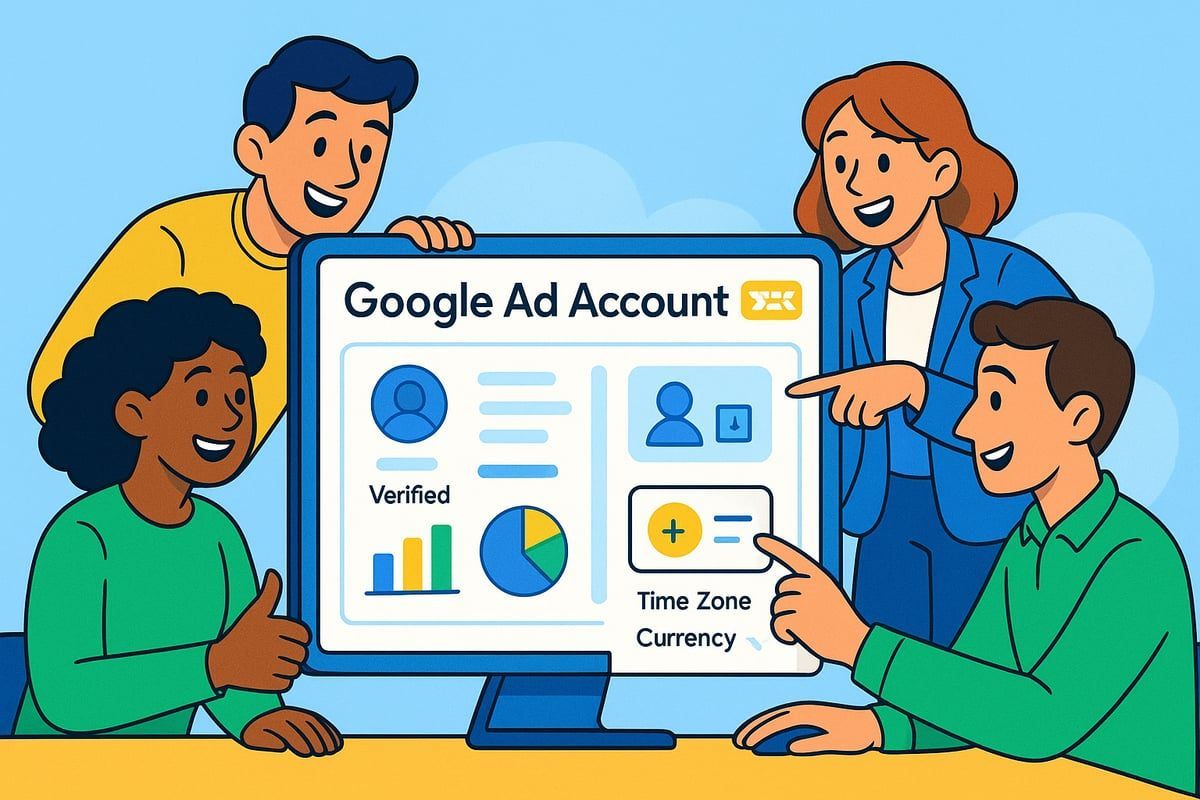
Understanding Google Ads’ Evolving Interface
The 2026 Google Ads dashboard looks and feels different from previous years. Google’s latest updates focus on deeper AI integration, streamlined navigation, and new campaign templates. These changes are designed to simplify campaign creation, yet they introduce new tools and settings that require attention.
For example, the new interface now guides you through campaign setup with step-by-step prompts, reducing confusion. Recent updates from 2025 and 2026 have introduced predictive insights and automation panels directly into the dashboard. Learning your way around the updated google ad account interface early will save you hours later and help you spot new opportunities as they arrive.
Staying updated is crucial, as Google’s frequent changes impact how you manage and optimise your campaigns. The time you invest now in exploring each tab and feature pays off with smoother, more efficient management as your campaigns grow.
Registering and Verifying Your Account
To start your google ad account, visit the Google Ads homepage and click “Start now”. You’ll need to provide a business email, your website, and your business name. You can choose between Standard and Expert Mode during setup. For full feature access and more control, select Expert Mode. If you prefer to set up your campaigns later, you can skip the initial campaign setup step.
Verification is a key part of account setup. Without verification, your business may not appear on Google Maps, and customers are less likely to trust your ads. Verified businesses also rank above unverified ones in search. Make sure to complete this step to boost your visibility and credibility.
If you’re new to the process, check out this Google Ads setup for beginners guide for extra support with each step.
Setting Up User Access and Roles
Once your google ad account is created, it’s time to add your team. You can assign roles such as Admin, Standard, Read-only, or Email-only. This structure allows you to control who can make changes, view reports, or simply receive notifications.
Always use account invitations instead of sharing passwords for security. For example, if you’re working with an agency, grant them the appropriate access level without risking your data. As your business grows, regularly review and update permissions, adding or removing users as needed.
Proper role assignment not only protects your google ad account but also reduces the risk of accidental changes or data loss. Data shows that accounts with clearly defined roles experience 30 percent fewer admin errors, making collaboration safer and smoother.
Initial Account Preferences: Time Zone, Currency, and Language
During setup, you’ll be asked to select your billing country, time zone, and currency. These choices affect how your google ad account reports data, manages billing, and schedules ad delivery.
For example, UK businesses should choose GBP and GMT for accurate billing and reporting. Setting the correct time zone is vital because errors here can cause your ads to run at odd hours or skew your analytics. In fact, incorrect time zone settings are among the top five support issues for new accounts.
If you plan to run ads in multiple regions, set your language preferences accordingly. This ensures your ads reach the right audience in their preferred language, helping your campaigns succeed from day one.
Step 2: Essential Account Settings and Integrations
Getting your google ad account set up correctly from the start is crucial for long-term success. This stage covers everything from linking your properties to setting up billing, security, and compliance, ensuring your account is ready to perform in 2026.
Linking Google Analytics, Merchant Centre, and Other Properties
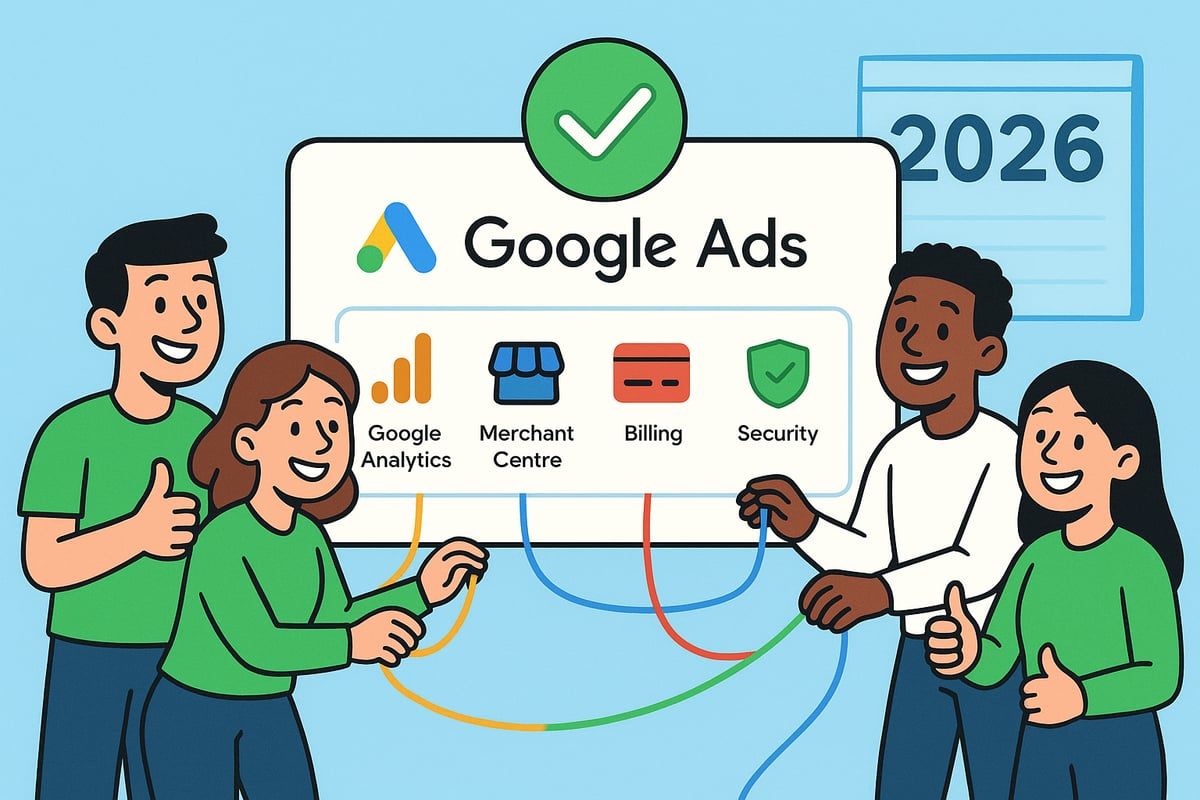
Linking all your digital properties is a foundational step for your google ad account. Connect Google Analytics for richer insights and conversion tracking, and integrate Google Merchant Centre if you run Shopping or Performance Max campaigns.
- Link your YouTube channel for video ads and remarketing.
- Connect your Google Business Profile for local reach.
- Ensure all properties use the same email for smoother linking.
When you link everything, your google ad account gains up to 40% better attribution accuracy. If you run into issues, double-check permissions and make sure your user role has admin rights.
Configuring Billing and Payment Methods
Setting up billing correctly in your google ad account avoids future payment hiccups. Choose between an Organisation or Individual payment profile, keeping tax requirements in mind.
- Add your preferred payment method: credit/debit card, PayPal, or bank transfer.
- Apply any promotional codes to stretch your early ad budget.
- Set up billing alerts so you never miss a payment.
Did you know 90% of new accounts use promo codes in the first month? Keeping your billing up to date ensures your ads run smoothly and your account remains active.
Setting Up Conversion Tracking and Measurement
Conversion tracking is vital for measuring the real impact of your google ad account. Set up goals in Analytics or directly in Google Ads, and use Google Tag Manager for advanced tracking.
- Track actions like form submissions, phone calls, or sales.
- Import conversions from Analytics for better reporting.
- Enable enhanced conversions for more accurate data.
Accounts with conversion tracking enabled achieve 50% higher optimisation scores. Regularly review your conversion actions to ensure they're still aligned with your business goals.
Managing Account Security and Access Controls
Protecting your google ad account is a team effort. Always enable two-step verification for every user, and use account invitations rather than sharing passwords.
- Assign roles carefully: Admin, Standard, Read-only, or Email-only.
- Remove access for anyone who no longer needs it, like ex-employees or agencies.
- Set up alerts for suspicious activity.
Accounts using enforced 2-step verification see 70% fewer security incidents. Regularly review your access list to keep your account safe and in trusted hands.
Navigating Account Settings for Compliance and Privacy
Compliance with GDPR and ad policies is more important than ever for your google ad account in 2026. Set your data sharing and consent preferences based on your audience regions.
- Adjust settings for EU and UK targeting to respect local laws.
- Stay informed about policy updates, as new rules can affect ad personalisation.
- Use Google's privacy tools to manage user data responsibly.
Incorrect settings are among the top five support issues for new accounts. Keeping up with compliance helps you avoid ad disapprovals and account suspensions, giving you peace of mind as your campaigns grow.
Step 3: Campaign Creation and Structure for Maximum Impact
Getting campaign structure right is where a google ad account truly starts to shine. With the 2026 landscape full of new campaign types, AI-powered features, and advanced targeting, it's more important than ever to lay a solid foundation. Let's explore how to build campaigns that drive meaningful results and create lasting impact.
Choosing the Right Campaign Type in 2026
Selecting the right campaign type is the first big decision when building your google ad account strategy. In 2026, options include Search, Display, Video, Shopping, Performance Max, Demand Gen, App, Hotel, and Smart campaigns. Each type suits different goals, such as lead generation, sales, or brand awareness.
Here's a quick comparison:
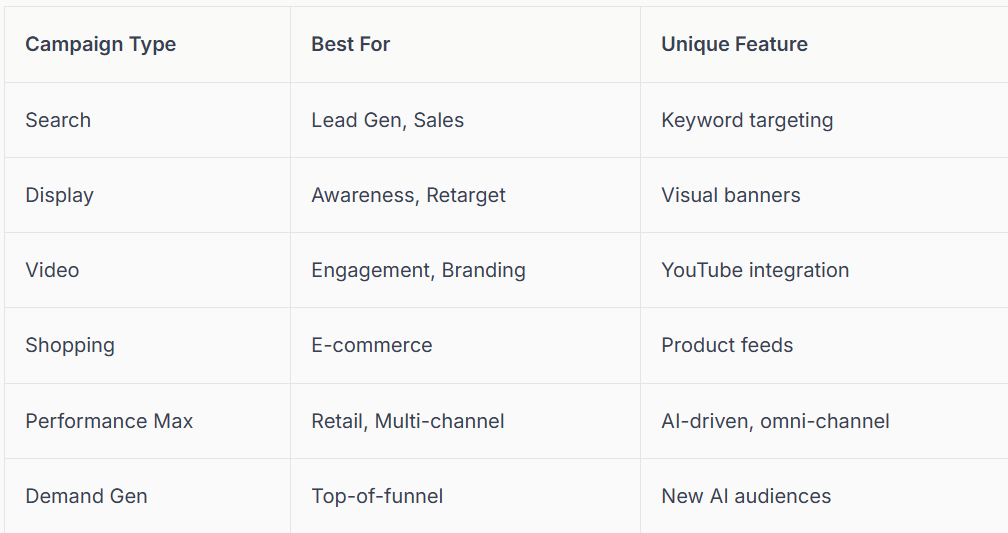
For e-commerce brands, Performance Max and Shopping campaigns are especially powerful, accounting for 60% of retail ad spend in 2026. Testing new AI-driven campaigns can uncover fresh opportunities for your google ad account.
Structuring Campaigns, Ad Groups, and Assets
A well-organised google ad account is easier to manage and scale. Structure your campaigns by product category, service line, or audience segment. Within each campaign, use ad groups to separate themes or targeting. Asset groups allow you to manage creative elements like headlines, images, and videos efficiently.
Consider using responsive ad formats and dynamic creative for maximum flexibility. Ad extensions and assets, such as sitelinks and callouts, can boost your click-through rates and make your ads stand out.
If managing campaign structure feels overwhelming, you might benefit from expert help. Check out Google Ads management services for tailored support in building a high-performing google ad account.
Advanced Targeting and Audience Selection
Targeting is where your google ad account can get truly smart. Set up location, demographic, and device targeting to reach the right users. Google’s custom audiences, in-market segments, and remarketing lists help you zero in on those most likely to convert.
Customer Match lets you upload your own customer lists for personalised ads. For example, you can target high-value repeat buyers or exclude previous converters.
- Key targeting options:
- Location (city, country, radius)
- Age, gender, household income
- Devices (mobile, desktop, tablet)
- Interests and behaviour
- Remarketing lists
Layering these targeting options increases relevance and lowers cost per acquisition for your google ad account.
Keyword Research, Match Types, and Negative Keywords
Effective keyword research is at the heart of any successful google ad account. Use Google’s AI-powered tools to find high-intent keywords relevant to your business. Decide between broad, phrase, and exact match types for different campaign goals.
Negative keywords help filter out irrelevant searches, saving budget and improving results. For example, if you sell luxury shoes, you might add:
Negative keyword: "cheap"
Well-managed negative keywords can cut wasted spend by up to 20%. In 2026, long-tail keywords and understanding search intent are more important than ever for targeting the right audience in your google ad account.
Setting Budgets, Bidding Strategies, and Optimisation Rules
Budgeting and bidding are where your google ad account’s performance is shaped. Set daily or monthly budgets that match your business goals. Automated bidding strategies, like Maximise Conversions, Target CPA, or Target ROAS, use Google’s AI to optimize bids in real time.
Smart Bidding has become the norm, now powering 85% of Google Ads spend. Set up automated rules and budget alerts to keep everything running smoothly.
- Steps to optimise:
- Choose a realistic starting budget
- Select the best automated bidding strategy
- Monitor performance and adjust as needed
This proactive approach ensures your google ad account stays efficient and competitive.
Creating Compelling Ads: Copywriting and Creative Best Practices
The creative side of your google ad account can make or break campaign results. Write clear, engaging headlines and descriptions that speak directly to your audience’s needs. Use strong calls to action, like "Shop now" or "Get your free quote".
Incorporate images, video, and dynamic assets to boost engagement. Responsive Search Ads are a must in 2026, offering a 15% higher click-through rate compared to old text ads.
A/B test different ad variations to see what works best, and let Google rotate your creatives for ongoing improvement. With thoughtful copywriting and creativity, your google ad account will stand out in a crowded marketplace.
Step 4: Optimising, Managing, and Scaling Your Account
Getting the most out of your google ad account requires ongoing effort, not just a one-off setup. As we move through 2026, optimisation, smart management, and scaling are the keys to lasting success. Let’s explore how to monitor results, adjust for better performance, and grow your reach step by step.
Analysing Performance with Reports and Dashboards
To keep your google ad account on track, regularly reviewing your performance data is essential. Google Ads offers built-in reports and customisable dashboards, letting you track metrics like impressions, clicks, CTR, CPC, conversions, and ROAS.
Set up a routine to check your key numbers every week. Use filters and segmentation to drill down into what’s working and what needs improvement. For example, you might spot that your mobile ads are outperforming desktop, or that certain locations bring in the best results.
A simple table can help summarise your most important metrics:
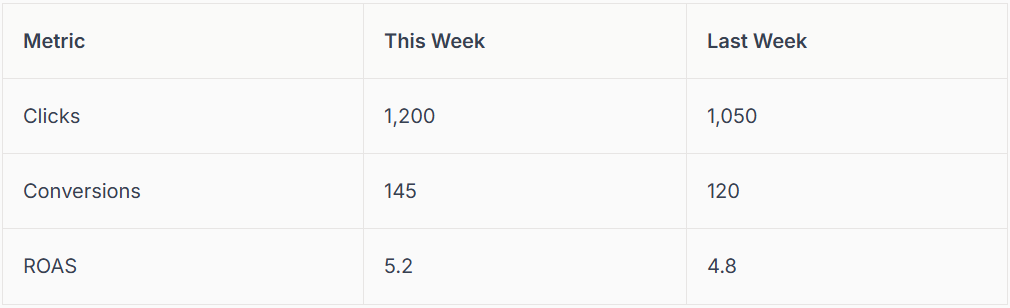
Accounts monitoring metrics weekly see a 20% improvement. If you need actionable tips for better analysis, check out Improve Google Ads performance for practical guidance.
Ongoing Optimisation: A/B Testing, Bid Adjustments, and Ad Rotation
Continuous optimisation is the secret to a thriving google ad account. Start by running A/B tests on your ads and landing pages. Test different headlines, images, and calls to action to see what truly resonates with your audience.
Adjust your bids based on device, location, and time of day. If you notice that evenings bring in more conversions, increase your bids during those hours. Rotate your ads to keep content fresh and avoid creative fatigue.
Setting up automated experiments in Google Ads can save time. Regular A/B testing can lift conversion rates by 10 to 30%. Keep your approach agile, and never stop experimenting for growth.
Leveraging AI and Automation in Google Ads 2026
AI is transforming how we manage a google ad account. Google’s AI-driven tools now offer automated keyword suggestions, bidding strategies, and creative generation, letting you focus on strategy rather than repetitive tasks.
For example, using Google’s AI Max for Search can automate campaign adjustments in real time, adapting bids and targeting to maximise results. AI-powered campaigns now reduce management time by 40%, freeing you up to focus on broader business goals.
Trust automation for day-to-day optimisation, but always review results manually. Sometimes, human intuition catches trends that algorithms miss. The right blend of AI and human insight delivers the best outcomes.
Managing Audiences and Remarketing Lists
Audience management is a cornerstone of every successful google ad account. Build and segment remarketing lists for every stage of the customer journey, from first-time visitors to loyal repeat buyers.
Dynamic remarketing is especially effective for e-commerce, targeting users who abandoned their baskets or viewed specific products. Combining audience signals across channels like YouTube and Search can boost campaign impact.
Remarketing strategies can increase conversion rates by up to 70%. Keep your lists updated and experiment with new segments to discover untapped opportunities for growth.
Scaling Campaigns: Budget Increases, Geo-Expansion, and New Channels
When your google ad account is consistently delivering results, it’s time to think about scaling. Start with gradual budget increases, watching performance closely to avoid sudden shifts in results.
Consider expanding your reach from local to national, or even international, targeting. Try adding new campaign types, like Demand Gen or Hotel Ads, to capture fresh audiences. Testing new channels keeps your strategy future-ready.
Gradual scaling delivers steadier improvements and reduces risk. Monitor performance after each change and adjust as needed to maintain strong ROI as you grow.
Preventing and Fixing Common Issues: Disapprovals, Suspensions, and Billing Errors
Even the best-managed google ad account can run into issues like ad disapprovals, account suspensions, or billing errors. Common causes include policy violations, outdated payment info, or technical glitches.
If your ads are not spending or your account is suspended, don’t panic. First, review notifications for specific reasons. Then, follow Google’s recommended steps or visit Fixing Google Ads not spending for a handy troubleshooting guide.
Always keep your billing details current and regularly check for policy updates. When in doubt, contact Google Support promptly. Staying proactive helps you avoid downtime and keeps your campaigns running smoothly.
Step 5: Future-Proofing Your Google Ad Account for 2026 and Beyond
The digital marketing landscape is always shifting, so future-proofing your google ad account is essential. As we look towards 2026 and beyond, the pace of change is only accelerating. Let’s explore how you can stay ahead, adapt to new technologies, and ensure your account thrives for years to come.
Adapting to Google’s Latest Features and Policy Changes
Keep your google ad account compliant by subscribing to Google’s official update channels and setting aside time for regular policy reviews. Use alerts to notify your team of changes that could affect your campaigns. Adopting beta features early can give you a competitive edge, but always test thoroughly before a full rollout. Staying proactive helps protect your reach and investment.
Embracing AI, Automation, and Generative Tools
AI and automation are at the heart of digital marketing in 2026. Your google ad account can now leverage AI-driven tools for everything from ad copy to bidding strategies. AI agents are transforming how businesses approach campaign optimization.
Generative AI tools can quickly create images, videos, and responsive ads, saving your team hours. However, balance automation with hands-on management to ensure your brand’s voice and goals stay at the forefront. Keep experimenting with new AI features, but always monitor performance for best results.
Building a Resilient Account Structure for Long-Term Success
A resilient google ad account is built on regular audits and clear documentation. Standardise your processes, create a playbook for campaign launches, and keep records of settings and strategies. This approach reduces errors and makes onboarding new team members much smoother.
Set up account alerts for unusual activity and always have backup admin contacts in place. Review your structure every quarter to ensure it still aligns with your business goals. With strong foundations, your google ad account can adapt to any future changes with ease.
Training, Resources, and Community Support
Continuous learning is the secret weapon for any successful google ad account. Platforms like Google Skillshop, industry webinars, and peer forums offer up-to-date training and valuable insights. Joining online communities gives you a support network for troubleshooting and sharing best practices.
Encourage your team to earn certifications and stay informed about the latest trends. Advertisers who invest in ongoing education often outperform their competitors. By staying curious and connected, you’ll ensure your google ad account is always ready for what’s next.
We’ve covered a lot together—from setting up your Google Ad Account to unlocking the power of AI and automation for 2026. If you’re ready to put these insights into action or want guidance from someone who truly understands both your trade and the digital landscape, you don’t have to figure it all out alone. Let’s make sure your business stands out in local search, stays verified, and keeps growing with expert support tailored just for you. If you’d like a helping hand on your journey,
Contact connect SEO Today and let’s build your success story together.











