
Google Business Account Guide: Step-by-Step for 2026 Success
In 2026, having a google business account is more vital than ever for businesses wanting to stand out locally and online. This tool is key to building trust with customers, boosting your search ranking, and driving real engagement. A well-optimised and verified profile gives you a clear edge over the competition, helping you attract more customers and grow. In this guide, we’ll walk you through every step, from setting up your account and getting verified to advanced optimization, troubleshooting, and the latest strategies tailored for 2026.
Understanding Google Business Accounts in 2026
Let’s take a closer look at what a google business account really is and why it’s become such a must-have for business owners in 2026. Managing your presence on Google is about more than just showing up online—it’s about building trust and connecting with your local community.
What is a Google Business Account?
A google business account is a free tool from Google that lets you control how your business appears across Google Search and Maps. It evolved from Google My Business, offering more robust management in 2026.
There’s often confusion between a google business account, a Google Business Profile, and Google Workspace. The account is your central dashboard, the Profile is your public listing, and Workspace is for email and collaboration.
For example, a local bakery uses its google business account to update opening hours and add new services, making sure customers always see accurate info when they search.
Why a Google Business Account Matters in 2026
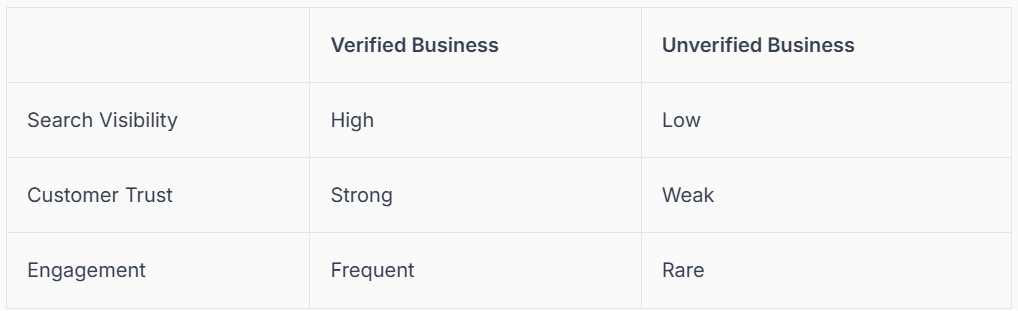
In 2026, a google business account is essential for local SEO. It’s your ticket to appearing in the Google Maps “map pack” and standing out in local searches. Verified businesses earn more trust and attract more customers, directly influencing buying decisions.
Recent data shows verified businesses show up to 70% more often in search results. Here’s a quick comparison:
Want to dig deeper into why this matters? Read The Importance of Google Business Profile for local businesses.
Key Features and Benefits
With a google business account, you can manage your business details, such as opening hours, address, and services, all in one place. Key features include:
- Customer reviews and direct messaging
- Free Google website builder and ad credits
- Integration with Maps, Search, and Analytics
For example, a salon owner can reply to reviews, update their service menu, and track profile performance, all from the google business account dashboard.
2026 Updates and Trends
The google business account in 2026 brings new verification methods, like instant checks via Workspace and advanced security features. AI now helps with business insights and automates tasks, from reviewing analytics to suggesting profile updates.
Visual content options are richer, letting you customise your profile with videos and banners. Many businesses now use AI chatbots within Google Business messaging to answer customer queries instantly, saving time and boosting satisfaction.
Common Misconceptions and Mistakes
Many people still mix up their personal Google account with their google business account, risking security and management issues. Skipping verification is a common mistake—unverified businesses are far less visible and trusted.
Another pitfall is failing to keep information updated. Imagine a customer showing up at a shop only to find the hours are wrong. Regular updates keep your google business account working for you and prevent lost sales.
Step 1: Setting Up Your Google Business Account
Getting your google business account set up is the first step towards building a strong presence on Google. A well-structured account ensures your business is visible and trustworthy, making it easier for customers to find and connect with you. Let’s break down the setup process into simple, manageable steps so you can start on the right foot.
Preparing for Account Creation
Before you even open your browser, it’s important to gather all the details you’ll need for your google business account. Start by writing down your legal business name, address, phone number, and website. Make sure these match your official documents and what appears elsewhere online.
Decide who will own the account. Using a dedicated business email (rather than a personal one) keeps things professional and secure. Consistency is key, so double-check that your Name, Address, and Phone number (NAP) are the same everywhere. This helps Google trust your business and improves your search visibility.
A little preparation now saves a lot of time later. With your info ready, you’ll breeze through the next steps of your google business account setup.
Creating Your Google Business Account
Head to
https://business.google.com/en-all/business-profile/
to start your google business account. Choose the “For my work or business” option when prompted. This ensures you’re setting up the right type of account for your company.
Follow the on-screen instructions, entering your business email and basic details. If you get stuck or want a detailed walkthrough, check out the How to Add Your Business to Google guide for extra tips and screenshots. Creating your google business account is free and only takes a few minutes.
Once you’ve started the process, you’ll soon be ready to claim or create your public business profile, which is what customers will see on Google Search and Maps.
Claiming or Creating Your Business Profile
Now it’s time to see if your business profile already exists. Search for your business name on Google Maps or Search. If you find a listing, look for the “Own this business?” link. Click it to begin the claim process. Sometimes, a customer or previous employee may have created a listing for you.
If you don’t see your business, you can create a new profile from scratch within your google business account dashboard. Make sure all the details match your official information to avoid confusion for customers.
Claiming your profile is a crucial step. It ensures only you can update information and respond to reviews, putting you in control of your online presence.
Completing Initial Business Details
With your profile ready, fill in the essential details. Select the most accurate business category, write a clear description, and set your service area if you serve customers at their location. Add your opening hours, phone number, and preferred methods of contact.
Choosing the right category helps your google business account show up for relevant searches. For niche businesses, be as specific as possible. For example, “vegan bakery” is better than just “bakery.” The more complete your profile, the easier it is for customers to understand what you offer.
Take this opportunity to make your business stand out right from the start.
Avoiding Setup Pitfalls
Setting up a google business account is straightforward, but a few common mistakes can cause problems. Avoid creating duplicate listings, as this can confuse both customers and Google. Double-check your business category, as choosing the wrong one can limit your visibility.
Always fill in every detail—missing information makes your business look less professional. Make sure you follow Google’s business guidelines, since violations can lead to suspensions. For example, listing a home address for a business without a physical location can get your account flagged.
By staying accurate and up to date, your google business account will be set up for long-term success and ready for verification.
Step 2: Verifying Your Google Business Profile
Getting your google business account verified is a crucial step for every business owner in 2026. Without verification, your business may not appear in Google Maps or local search results. This can make it tough for customers to find you online, and even harder for them to trust your brand. Verified profiles appear above unverified ones, giving you a real advantage over the competition. Let's walk through why this step matters, how the process works, and
how you can make verification as smooth as possible for your google business account.
Why Verification is Critical
Verifying your google business account is the gateway to full access and visibility on Google. Only verified businesses show up in Google Maps and the local search pack, which is where most customers look first. If your business is not verified, it will not appear in these areas, making it much harder for customers to find you.
Customers naturally trust verified profiles more. They know your business is legitimate and active, so they feel safer making contact or a purchase. Competitors with verified accounts will always appear above unverified listings, which means missing out on valuable traffic. Recent data shows that verified businesses get 50 percent more engagement through their google business account than those left unverified.
Verification Methods in 2026
There are several ways to verify your google business account in 2026, each designed to suit different business types and needs. The classic options include phone, email, video call, and the traditional postcard sent to your business address. New for 2026 are instant verification for those with an active Google Workspace, plus AI-powered checks that speed up the process for many businesses.
Here is a quick comparison:
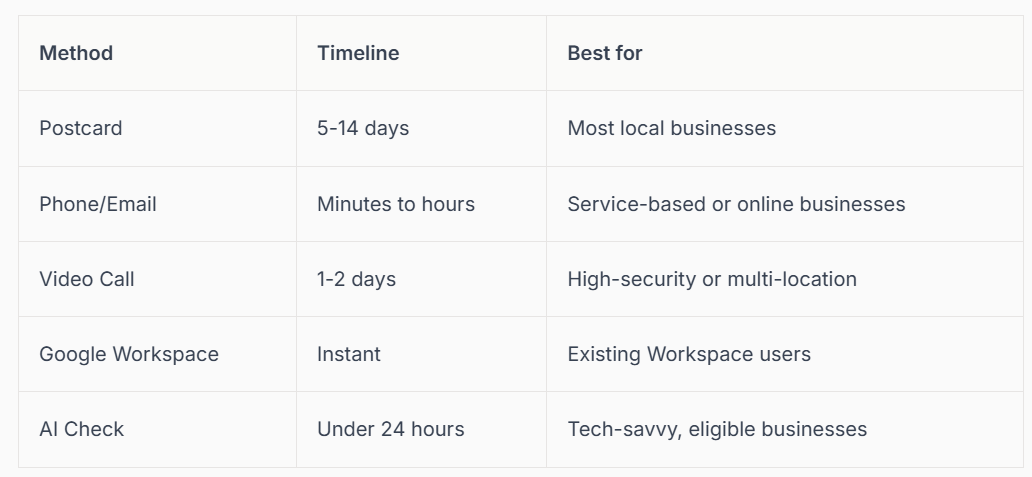
Choosing the right method depends on how your google business account is set up and your business type.
Step-by-Step Verification Process
The verification process for your google business account is straightforward, but each method has its own steps. For most, once you log in, Google will guide you to select a verification method. If you choose a postcard, Google sends a code to your address, which you then enter online. Phone or email methods provide a code instantly. For a video call, you join a scheduled call with a Google representative who confirms your details.
After submitting your request, keep an eye on your email or mail for the code. Postcard methods can take up to two weeks, while instant and AI-based options often complete in hours. No matter the method, double-check that all details in your google business account are correct before you start.
Troubleshooting Verification Issues
Sometimes, things do not go as planned with google business account verification. The most common problems include lost postcards, mismatched business information, or declined claims when someone else has already claimed your profile. If this happens, do not panic. First, review your details for accuracy. If you still have trouble, reach out to Google Support through your dashboard.
In cases of ownership disputes, be ready to provide documents proving your connection to the business. Stay patient and persistent, as resolving these issues ensures your google business account is secure and visible to customers.
Maintaining Verified Status
Once your google business account is verified, it is important to keep it that way. Make sure you regularly update your business information, such as hours and contact details. Google may request periodic re-verification, especially if you make significant changes or if suspicious activity is detected.
Avoid actions that could lead to your profile being suspended or removed, like violating Google's guidelines or using misleading information. A well-maintained google business account keeps you ranking high and trusted in local search.
Connect SEO: Professional Google Business Profile Verification
At Connect SEO, we specialise in helping businesses like yours verify and optimise their google business account quickly and efficiently. Our expert team handles the entire process, from setup to troubleshooting, ensuring your profile is visible on Google Search and Maps. With our support, you will see increased visibility, faster verification, and quicker resolution for any issues that arise.
By letting professionals manage your google business account verification, you can focus on serving your customers while we handle the technical details. This partnership gives your business a real edge in the competitive local search landscape.
Step 3: Optimising Your Google Business Profile for Maximum Impact
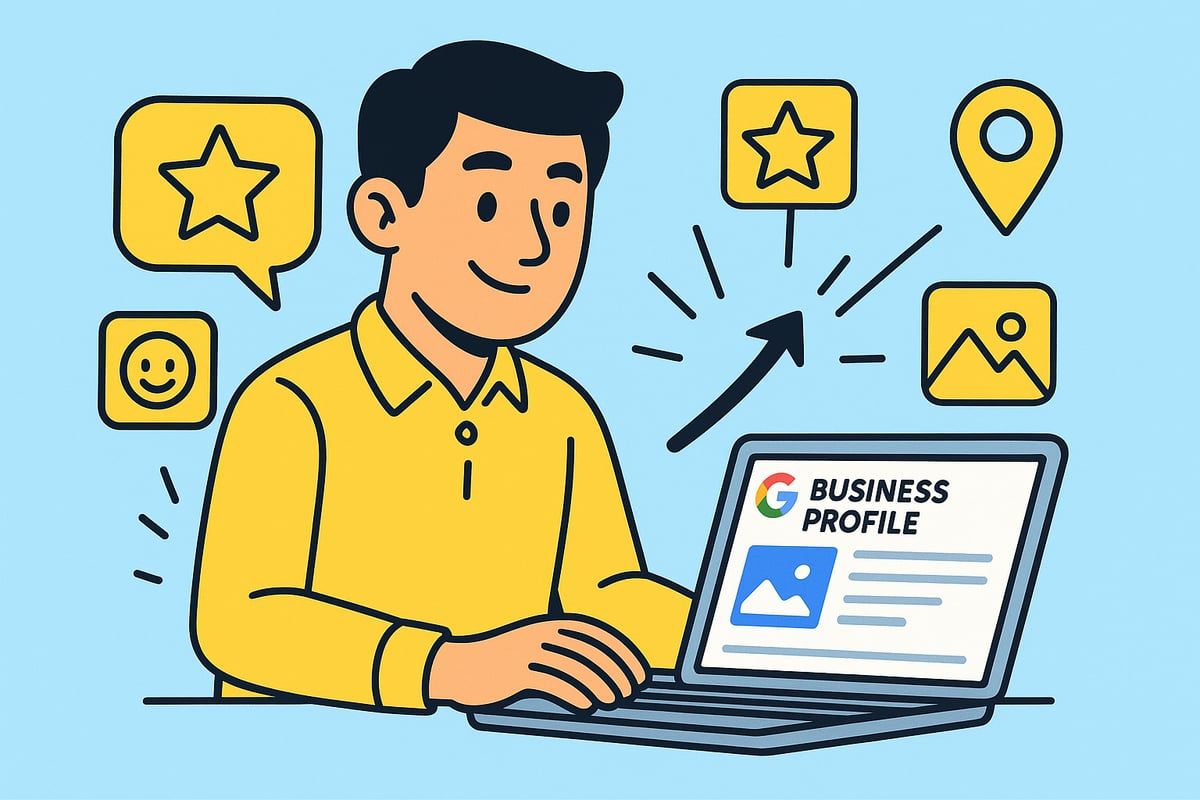
Optimising your google business account is the secret to standing out, whether you run a family bakery or a growing online brand. A well-tuned profile is your digital shopfront, welcoming new customers and building trust even before you say hello. Let’s explore how to make your presence shine and draw more eyes to your business.
Essential Profile Elements to Optimise
Start with the basics. Your google business account should showcase your correct business name, the most relevant categories, a clear description, and your service area.
Upload high-quality photos and your logo. Bright, inviting images make a big difference.
Optimisation checklist:
- Accurate business name (no extra keywords)
- Primary and secondary categories
- Engaging, keyword-rich description
- Service area or physical address
- Clear, current photos and logo
For example, after updating photos and refining their description, one cafe saw a 30% jump in profile views within a month.
If you want expert help, the Google Business Profile Management service offers tailored optimisation for your google business account.
Leveraging Reviews and Messaging
Reviews are the heartbeat of your google business account. Encourage customers to leave feedback and always respond, even to negative comments.
Use Google’s messaging feature to answer questions quickly. Responsive businesses build trust and turn curious visitors into loyal customers.
- Ask for reviews after a positive service
- Reply to every review, showing appreciation
Enable messaging for instant communication.
Did you know businesses that respond to reviews are trusted 1.7 times more? Make reviews and messaging part of your daily routine.
Adding Products, Services, and Attributes
Showcase what makes your business unique by adding products, services, and detailed attributes to your google business account.
List your main offerings and any special features, like “women-led” or “wheelchair accessible.” This helps you appear for more searches and attracts your ideal customers.
- Add all key products or services
- Highlight unique attributes (e.g., vegan-friendly, free Wi-Fi)
- Update offerings as your business grows
Service businesses, like salons or consultants, can stand out by listing niche services and helpful attributes.
Using Posts, Offers, and Events
Keep your google business account fresh by posting regular updates. Use posts to share offers, events, or news.
Posts appear in your profile and can drive more clicks and calls. For example, a florist’s seasonal offer post led to a 40% rise in phone enquiries.
- Promote special deals or events
- Share new product launches
- Announce changes to hours or services
Timely updates keep your audience engaged and coming back for more.
Free Website and Google Ad Credits
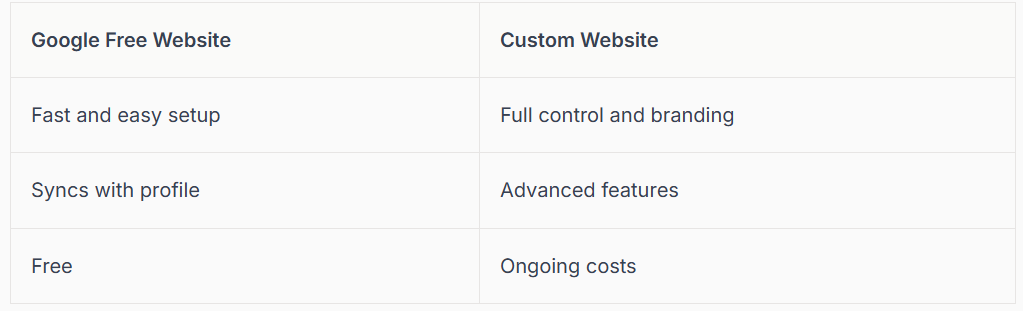
Your google business account lets you create a free, simple website in minutes. This is perfect if you don’t have a website yet.
Pros:
You can also claim Google Ad credits to kickstart your advertising, helping your business reach more people from the start.
Monitoring and Improving Performance
Use Google Insights within your google business account to track how people find and interact with you. Check views, searches, and actions like calls or direction requests.
Adjust your strategy based on what works. For instance, if analytics show more visitors on weekends, update your hours or post weekend offers.
- Monitor profile views and search queries
- Update photos and posts based on performance
- Test changes and track results
Regularly reviewing your insights helps you stay ahead and keep your profile working its hardest.
Step 4: Advanced Strategies for Google Business Account Success in 2026
Ready to take your google business account to the next level? In this section, we will explore advanced strategies to help your business stand out and stay ahead in 2026. From keeping up with Google’s ever-changing algorithms to integrating powerful AI tools, these tips are designed for businesses that want to lead, not just compete.
Staying Ahead of Algorithm Changes
Google’s local search algorithm is always evolving, so it’s important to keep your google business account up to date with the latest best practices. Regular updates to your profile, including fresh photos and accurate business details, help you maintain visibility.
Pay attention to new AI-driven ranking signals, such as customer engagement and content quality. For example, businesses that regularly post updates and respond to reviews often see higher rankings. Staying proactive means you will not be caught off guard by major changes.
Would you like even more expert tips? See the Google Business Profile Optimization Best Practices for 2025 for the latest insights.
Integrating with Other Google Services
A powerful google business account works best when connected to other Google tools. By linking your account with Google Analytics, Ads, and Merchant Center, you can get deeper insights into customer behaviour and campaign performance.
For retailers, integrating inventory with Google Shopping allows products to appear directly in search results. Service providers can sync booking and ordering features, making it easier for customers to take action. These integrations create a seamless experience for both you and your clients.
Make sure all integrations are set up correctly so you are ready to leverage every opportunity Google offers.
Harnessing AI and Automation Tools
Embracing AI is key to maximising your google business account in 2026. AI-powered chatbots can handle common customer queries, freeing up your staff for more complex tasks. Automation tools can request reviews, respond to messages, and even update your profile based on changing trends.
For example, a service business could save hours each week by automating review requests after appointments. AI insights also help you understand customer preferences, making it easier to tailor your services and stand out from competitors.
Stay open to new AI features as Google continues rolling out updates.
Managing Multi-Location and Franchise Accounts
If you are managing more than one location, your google business account needs to be organised and consistent. Use bulk location management tools to update details for all branches at once. Assign roles and permissions, so each team member has access only to what they need.
National chains benefit from maintaining a unified brand image across all profiles. Regular audits help catch inconsistencies or outdated information quickly. Consistency is key, and it builds trust with customers wherever they find you.
Take time to train staff on the importance of accurate, timely updates for every location.
Reputation Management and Crisis Response
Your google business account is a digital first impression, so reputation management matters. Respond quickly to negative reviews, and always thank customers for positive feedback.
If you spot fake or inappropriate content, use Google’s reporting tools to flag it. Set up rapid response protocols, so your team knows exactly what to do if a public complaint arises. For example, a well-prepared response can turn an unhappy customer into a loyal advocate.
Remember, transparency and empathy go a long way in building lasting trust.
Local SEO Beyond Google Business Profile
While a google business account is the foundation, successful local SEO goes further. Build citations on platforms like Bing, Apple Maps, and Yelp. Getting backlinks from local news sites and community organisations boosts your authority.
Consider listing your business in relevant local directories, and engage with your community both online and offline. These complementary strategies ensure you dominate local search, not just on Google but everywhere your customers look.
Staying diversified helps future-proof your business against changes in any single platform.
Step 5: Troubleshooting & Ongoing Management
Keeping your google business account running smoothly is essential for ongoing visibility and customer trust. Even after setup and optimisation, challenges can arise. Let us walk you through the most common issues, proven solutions, and smart management tips for 2026 and beyond.
Common Google Business Account Problems
Even the best-managed google business account can run into problems. Suspensions, duplicate listings, and ownership disputes are among the top headaches for business owners. Sometimes, your business might not appear in search due to inaccurate map placements or missing locations.
Here are a few common scenarios:
- Sudden profile suspension after an update.
- Duplicate profiles confusing customers.
- Incorrect business details or map placement.
- Ownership locked by a previous employee.
If you face any of these, don't panic. Many issues can be resolved with the right steps. For a detailed walkthrough of fixes, check out the Complete Google Business Profile Troubleshooting guide, which covers solutions for nearly every google business account challenge.
Recovering from Suspensions and Flags
A suspended google business account can feel like a disaster, but recovery is possible. Start by carefully reviewing any emails from Google explaining the reason for suspension. Usually, you'll need to correct guideline violations, then submit an appeal with supporting documentation.
Typical documents include:
- Proof of business address (utility bill or lease)
- Official business registration documents
- Photos of your storefront
Success stories often involve patience and clear evidence. For example, a local restaurant owner was reinstated after showing a photo of their sign and a recent utility bill. If your appeal is rejected, escalate the case through Google Support and keep all communications documented.
Updating and Maintaining Accurate Information
Accuracy is everything when it comes to your google business account. Outdated hours, wrong contact info, or missing holiday updates can frustrate customers and lead to lost sales. Make it a habit to review and update your profile regularly.
Use these tips:
- Set reminders for holiday or seasonal changes.
- Use the bulk update tool if you manage multiple locations.
- Double-check service areas and categories every quarter.
One retailer saw a 20 percent increase in store visits after updating bank holiday hours. Real-time updates help you stay ahead and build trust with your audience.
Monitoring for Unauthorised Changes
Did you know that anyone can suggest edits to a google business account? Sometimes, even competitors might try to change your hours or details. Set up email notifications to alert you of any edits, and review your profile weekly.
Quick steps to protect your profile:
- Enable notifications in your settings.
- Check for changes in the account dashboard.
- Use the “Reject” option for incorrect edits.
If you spot suspicious activity, act fast. Restoring your correct information quickly keeps your listing accurate and customers happy.
Training Staff and Delegating Access
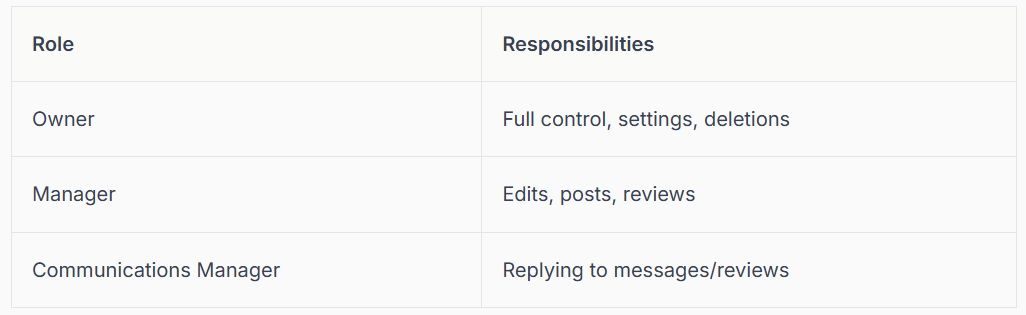
Your google business account works best when your team is involved. Assign clear roles to staff members so updates, reviews, and messages never get missed. Google allows you to set different permissions for owners, managers, and communications managers.
Example staff roles:
Train your front desk or customer support team to respond promptly to messages and reviews, making your business feel approachable and responsive.
Preparing for Future Changes
Google regularly updates policies and features, so staying informed is crucial for your google business account. Subscribe to Google’s official blogs and trusted SEO news sites. This way, you’ll be ready for new verification requirements, profile features, or changes in local search algorithms.
Tips for staying ahead:
- Join Google Business forums for peer advice.
- Bookmark Google’s update log.
- Review your account settings after every major update.
Being proactive means you’ll adapt quickly and keep your business visible, no matter what changes 2026 brings.
We’ve covered a lot together from setting up your Google Business Account to making sure it’s verified, optimised, and ready for 2026’s new features. I know all this can feel overwhelming, but you don’t have to do it alone. If you want peace of mind that your Google Business Profile is not just set up but truly working for you, why not let local experts take the stress out of the process? You’ll get friendly support, professional know how, and ongoing help if you need it. We’re here for you—Contact connect SEO Today and let’s make your business shine together.











