
Google Listing for My Business: Expert Guide for 2026 Success
Are you finding it tough to get your business noticed on Google in 2026? You are not alone. With more local competition than ever, having an optimised google listing for my business is now essential for standing out and earning customer trust.
An up-to-date Google Business Profile helps you appear in local search results and on Google Maps, making it easier for people to find and contact you. In this guide, we will walk you through each step of creating, verifying, and optimising your profile for real results.
Let us explore the latest features, best practices, and expert tips to help your business shine online this year.
Understanding Google Business Profile in 2026
Trying to get your business noticed online can feel overwhelming, especially with all the changes happening each year. If you have ever wondered how a google listing for my business works or why it is so vital for local success, you are in the right place. Let us break down what you need to know in 2026.
What is a Google Business Profile?
A Google Business Profile is your business’s public identity on Google Search and Maps. It evolved from Google My Business, now offering more interactive features like posts, Q&A, messaging, and reviews. By keeping your google listing for my business up to date, you make it easy for customers to find key info, get directions, and trust your services. In 2026, a complete profile is essential for local visibility.
Why Google Listings Matter for Local Businesses
Did you know over 90 percent of people use Google to find local businesses? Verified profiles get higher rankings and more clicks. Reviews, photos, and a verified badge boost trust with potential customers. If you want more reasons why your google listing for my business is so important, check out this helpful guide on the importance of
Google Business Profile for local businesses. Make your first impression count.
Latest Changes and Features in 2026
Google is always evolving, and 2026 brings exciting updates. The new interface is easier to navigate, with AI-powered insights suggesting ways to improve your google listing for my business. Integration with Google Search Generative Experience (SGE) means your profile can appear in more conversational search results. Plus, automated review responses and better analytics help you stay ahead of the competition.
How Google Ranks Local Listings
Understanding how Google ranks your google listing for my business can give you an edge. The main factors are proximity (how close you are to the searcher), relevance (how well your profile matches the search), and prominence (overall reputation and activity). Here is a quick summary:
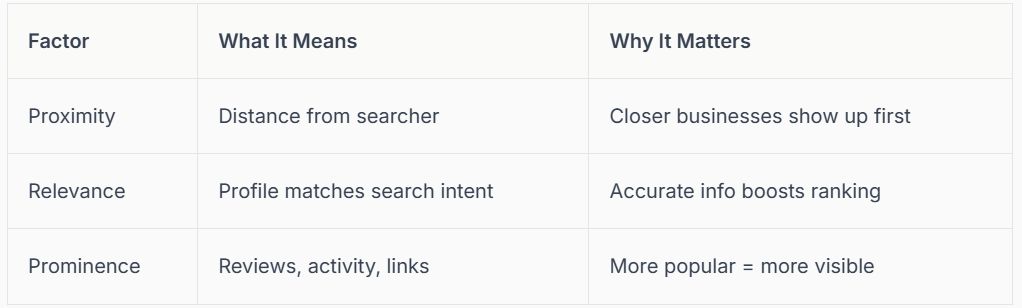
Complete profiles with great reviews and fresh photos get the best results.
Common Misconceptions and Pitfalls
Some believe having a website alone is enough, but a google listing for my business is now more important for local discovery. Common mistakes include inconsistent name, address, and phone details, ignoring reviews, or skipping verification. Neglecting your profile can lead to lower rankings or even being hidden from Maps, costing you valuable customers and visibility.
Real-World Example: Local Business Growth via Google Listing
Consider a UK tradesman who optimised his google listing for my business and saw calls jump by 300 percent. By updating details, adding photos, and encouraging reviews, he quickly climbed local rankings. In fact, 70 percent of local searchers visit a business within 24 hours, so making your profile stand out can directly boost your bottom line.
Step-by-Step Guide: Setting Up & Verifying Your Google Listing
Ready to unlock more local customers in 2026? Let’s walk through every stage of setting up and verifying your google listing for my business, so your business shines on Google Search and Maps.
Creating Your Google Business Profile
Starting your google listing for my business journey means claiming or creating your profile from scratch. Visit Google Business Profile, sign in, and search for your business. If it’s not listed, simply add your details.
Select the most accurate business category. This helps Google understand what you offer and who to show your listing to in local searches. Consistency is vital, so double-check your business name, address, and phone number (NAP) match everywhere online.
Common errors? Using nicknames, abbreviations, or outdated addresses can cause confusion or even duplicate listings. For a complete, visual guide, see How to add your business to Google.
Completing Your Profile Details
A polished profile helps your google listing for my business stand out. Fill in every section: add your main services, business hours, and select relevant attributes like “wheelchair accessible” or “contactless payment”.
Upload high-quality photos and a crisp logo. Images give customers a real feel for your brand and boost engagement. In your business description, naturally weave in keywords that customers might use to find you.
Don’t forget 2026 essentials: highlight accessibility options and health/safety measures. These details can make all the difference for customers choosing between businesses.
Verification Process Explained
Verification is a crucial step for your google listing for my business. Without it, your business won’t appear on Maps or local search. Google offers several verification methods: phone, email, postcard, or even a short video.
Each method has its steps. For example, postcard verification means Google sends a code to your address, which you enter online. If you hit a snag, double-check your contact info or try another method.
If your verification is delayed or fails, don’t worry. Review your details, look for duplicate listings, and follow Google’s support prompts to resolve the issue.
Why Verification Matters More Than Ever in 2026
In 2026, verifying your google listing for my business is more critical than ever. Unverified profiles are hidden from Google Maps, and customers are less likely to trust businesses without that verified badge.
Competitors with verified profiles not only appear above you in local search, but also benefit from new features. Google’s Search Generative Experience (SGE) and automated review responses now prioritise verified businesses.
Trust and visibility go hand in hand. Taking a few extra minutes to verify can mean the difference between being found or forgotten.
Troubleshooting Verification Issues
Sometimes, your google listing for my business might face verification hurdles. Common problems include incorrect addresses, duplicate listings, or even a suspended profile due to policy violations.
To fix these, start by updating your details and ensuring there are no duplicates. If you’re waiting on a code, request a new one or try a different verification method. Google’s help centre and support channels are there for persistent issues.
Real example: A local café in Manchester was suspended due to address discrepancies. After updating their info and contacting Google support, their profile was reinstated and quickly climbed back up in local search.
Connect SEO: Professional Google Business Profile Verification
Verification doesn’t have to be stressful. At Connect SEO, we specialise in fast, professional google listing for my business verification to get you visible on Google Search and Maps.
Our hassle-free process covers phone, email, or postcard verification, so you can focus on your customers. We’ll also optimize your profile with stunning photos, detailed services, accurate hours, and engaging descriptions.
If you ever face suspensions or flags, we’re here with ongoing support. With UK-based expertise and over 2 million Google Local Guide views, we know how to help your business thrive. Professional verification saves time, reduces frustration, and maximises your local visibility.
Advanced Optimisation Strategies for Google Listings in 2026
Ready to take your google listing for my business to the next level? In 2026, standing out in local search is about much more than just being listed. It’s about making your profile shine, engaging your audience, and using every tool Google offers. Let’s explore the advanced strategies that will help your business grab attention and win more customers.
Mastering Photos, Videos, and Visual Content
First impressions count, especially on your google listing for my business. High-quality images not only showcase your products or services but also build trust with potential customers. Listings with photos receive up to 42% more requests for directions and 35% more clicks to websites.
Consider adding:
Crisp, well-lit images of your location, staff, and products
360° virtual tours to let customers explore before visiting
Short video clips highlighting what makes your business unique
Keep your visuals up to date and relevant. Fresh content signals to Google and customers that your business is active and cares about appearance.
Leveraging Google Posts and Updates
An active google listing for my business means posting regular updates. Google Posts allow you to share offers, news, and events directly on your profile, keeping your audience informed and engaged.
Try these post ideas:
- Weekly special offers or discounts
- Upcoming events or workshops
- Announcements about new products or services
Businesses that post at least once a week often see a 25% increase in footfall. Use eye-catching images and clear calls to action. Schedule posts around peak times for your audience to maximise impact.
Managing Services, Products, and Attributes
The services and products section of your google listing for my business is your virtual shop window. Detailed menus, service lists, and catalogues help customers understand what you offer at a glance.
In 2026, take advantage of new attributes:
- Sustainability practices (eco-friendly, carbon neutral)
- Payment options (contactless, digital wallets)
- Accessibility features (step-free access, hearing loops)
Adding these details helps your business appear in more filtered searches and allows customers to make informed choices. Keep everything accurate and update your offerings as your business evolves.
Optimising for Voice and Mobile Search
With 65% of local searches now happening on mobile, optimising your google listing for my business for mobile and voice is essential. Make sure your business name, address, and phone number are accurate and formatted for easy reading on small screens.
Tips for optimisation:
- Use conversational keywords and phrases customers might speak
- Ensure your profile loads quickly and looks great on all devices
- Add FAQs to your profile to capture voice queries
Structured data and simple, clear information help your business surface when people ask their voice assistants for recommendations nearby.
Using Messaging and Booking Features
Direct communication is a game-changer for your google listing for my business. Enable messaging so customers can ask questions instantly. Integrate Google’s booking features to let people reserve appointments or services in a few taps.
Features to explore:
- Automated replies for common queries
- Real-time notifications for new messages
- Seamless integration with booking partners
For example, a local salon using these features saw a 40% increase in bookings. Quick responses and easy appointment systems create a frictionless experience for your customers.
Monitoring Insights and Analytics
Ongoing success with your google listing for my business depends on data-driven decisions. Google’s enhanced analytics dashboard in 2026 lets you track calls, clicks, direction requests, and more.
Key metrics to monitor:
- Number of profile views
- Engagement with posts and photos
- Booking and message conversions
Adjust your strategy based on what the data tells you. For more expert guidance on maximising your Business Profile, check out these Google Business Profile management tips. Staying proactive ensures your business remains visible, appealing, and competitive.
Managing Reviews and Building Reputation
Building a strong reputation on your google listing for my business can transform how customers see your brand in 2026. Reviews are no longer just feedback—they are a lifeline for local businesses. Let’s explore how to manage reviews, respond effectively, and turn your google listing for my business into a magnet for trust and loyalty.

The Power of Google Reviews in 2026
Reviews are the heartbeat of your google listing for my business. In fact, 87% of shoppers now read online reviews before choosing a local business. Positive reviews boost your ranking, while negative ones can quickly push you down the list.
A steady stream of reviews signals to Google and customers that your business is active and trustworthy. According to Google Search Statistics 2025, businesses with more recent reviews see higher engagement and more clicks.
It’s not just about quantity, but the quality and consistency of reviews that help your google listing for my business stand out.
Strategies for Getting More Positive Reviews
Encouraging happy customers to leave a review on your google listing for my business is easier than you might think. The best time to ask is right after a positive interaction, whether in person, by text, or over email.
Send a friendly SMS or email with a direct review link.
Display signs in your shop or office encouraging reviews.
Use automated tools to remind customers after their visit.
Remember, Google’s guidelines don’t allow incentives for reviews, but a heartfelt request goes a long way. According to Local SEO Statistics 2025, businesses that actively request reviews grow their customer base much faster.
Making review requests part of your routine will keep your google listing for my business fresh and appealing.
Responding to Reviews: Best Practices
How you reply to reviews on your google listing for my business matters just as much as getting them. A thoughtful response shows you care, even when the review isn’t glowing.
When replying:
- Thank the reviewer for their feedback.
- Address any specific points they mentioned.
- Offer to resolve issues offline if needed.
AI-powered tools in 2026 can help draft responses, but personal touches make a difference. For example, a business that turned a negative review into a loyal customer did so by responding promptly and professionally. Every reply on your google listing for my business is a chance to build trust and show your values.
Handling Fake or Malicious Reviews
Sadly, not all reviews are genuine. Fake or malicious feedback can hurt your google listing for my business, but there are ways to fight back.
First, learn to spot suspicious reviews, like those with vague details or from profiles with no history. Report these reviews through Google’s built-in tools.
If you receive a fake review:
- Flag it immediately for Google’s moderation.
- Respond calmly, stating your commitment to honest service.
- Monitor your listing for patterns of abuse.
Google has improved review moderation in 2026, making it easier to maintain the integrity of your google listing for my business and protect your reputation.
Building Reputation Beyond Reviews
Your google listing for my business reputation goes further than just star ratings. Encourage customers to upload photos, answer Q&A, or share testimonials. These user-generated contributions add depth to your profile and invite new customers to connect.
Collaborate with local influencers, and work towards badges like “Top Rated” or “Local Favourite.” These honours make your business stand out visually and boost clicks.
With proactive engagement, your google listing for my business will become a trusted hub in your community, attracting new business and building lasting loyalty.
Ongoing Management, Updates & Future-Proofing Your Listing
Staying ahead with your google listing for my business is not a one-time task. Ongoing management is essential to keep your business visible, trusted, and competitive. As Google evolves, so must your approach, ensuring your profile always reflects your business at its best.
Keeping Information Accurate and Up-to-Date
Accuracy is the foundation of a successful google listing for my business. Outdated hours, old phone numbers, or missing services can frustrate potential customers and harm your reputation. Google values real-time updates, rewarding businesses that keep their profiles fresh.
Simple steps to stay on top:
- Schedule monthly checks for business hours, contact details, and services.
- Update your holiday hours and special events promptly.
- Use Google’s mobile app for instant edits, even on the go.
Google may penalise listings with outdated or misleading information, pushing you lower in local search results. Automated tools are available to help streamline updates. If you ever encounter persistent issues, consult this Troubleshooting Google Business Profile issues guide for expert solutions.
Staying Ahead of Google Algorithm Changes
Google’s local search algorithm is always evolving. If you ignore changes, your google listing for my business could lose visibility overnight. Proactive monitoring and quick adaptation are key to maintaining your edge.
Tips to stay ahead:
- Subscribe to official Google updates and local SEO news.
- Regularly review your analytics for sudden drops in traffic or engagement.
- Test new features as soon as they’re available.
Consider this: a business that failed to adjust after a major algorithm update saw its listing disappear from the top three results. By staying informed and flexible, you protect your profile from unexpected ranking losses and keep your business front of mind for local customers.
Leveraging New Google Business Profile Features
Google frequently rolls out new features, many powered by AI. Embracing these innovations keeps your google listing for my business relevant and engaging. Early adopters often gain a competitive advantage, especially when they join beta programmes.
Exciting features to explore:
- AI chat for instant customer support.
- Advanced analytics for deeper insights.
- Augmented reality (AR) integrations for immersive experiences.
Understanding how to optimize for generative search is becoming essential. By leading with innovation, you ensure your profile stands out in a crowded marketplace.
Integrating with Other Google Services
Your google listing for my business works best when connected with the wider Google ecosystem. Integration with Google Ads, Maps, and Shopping can amplify your reach and drive more results.
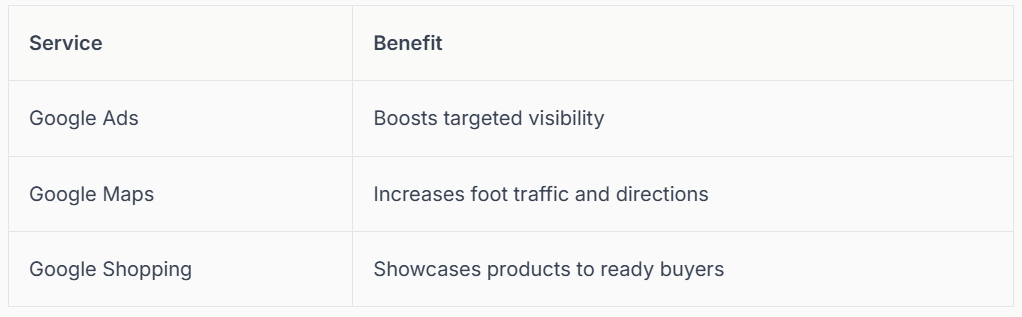
Cross-platform integration can increase your ROI and simplify management. For example, syncing your profile with Google Ads lets you run local campaigns and track conversions, all from one dashboard.
Planning for the Future: Trends & Predictions
The future of your google listing for my business is shaped by technology and customer expectations. AI-driven local search, personalisation, and new verification protocols are on the horizon.
Key trends to watch:
- Growing demand for sustainability and accessibility attributes.
- Enhanced verification and security measures.
- Greater focus on user-generated content and real-time engagement.
Prepare now by keeping your profile complete and embracing new features as they launch. Staying proactive helps future-proof your listing, ensuring your business remains visible and trusted for years to come.
We’ve covered a lot of ground together on getting your business seen and trusted on Google in 2026, and I hope you’re feeling more confident about what comes next. Still, if you’d rather skip the hassle of verification or just want personal support from someone who truly understands both your trade and Google’s local search world, you’re not alone. We’re here to make this easy and help your business shine in Maps and local searches—not just now, but as Google keeps evolving. If you’re ready for friendly, expert help,
Contact connect SEO Today.











