
Google Business Confirmation: Complete UK Guide 2026
Getting your business visible on Google Maps and local search results depends entirely on completing Google Business Confirmation. Without this crucial step, potential customers simply won't find you when they search for services in your area. In 2026, Google refined its verification methods to combat fake listings whilst making the process more accessible for legitimate businesses. Whether you're a tradesperson, retailer, or service provider, understanding how google business confirmation works can mean the difference between appearing at the top of local search results or remaining invisible to your target audience.
Understanding Google Business Confirmation Requirements
Google business confirmation serves as proof that you're authorised to manage a business profile and that your business legitimately operates at the location you've specified. This verification protects consumers from fraudulent listings whilst ensuring that search results remain trustworthy and accurate.
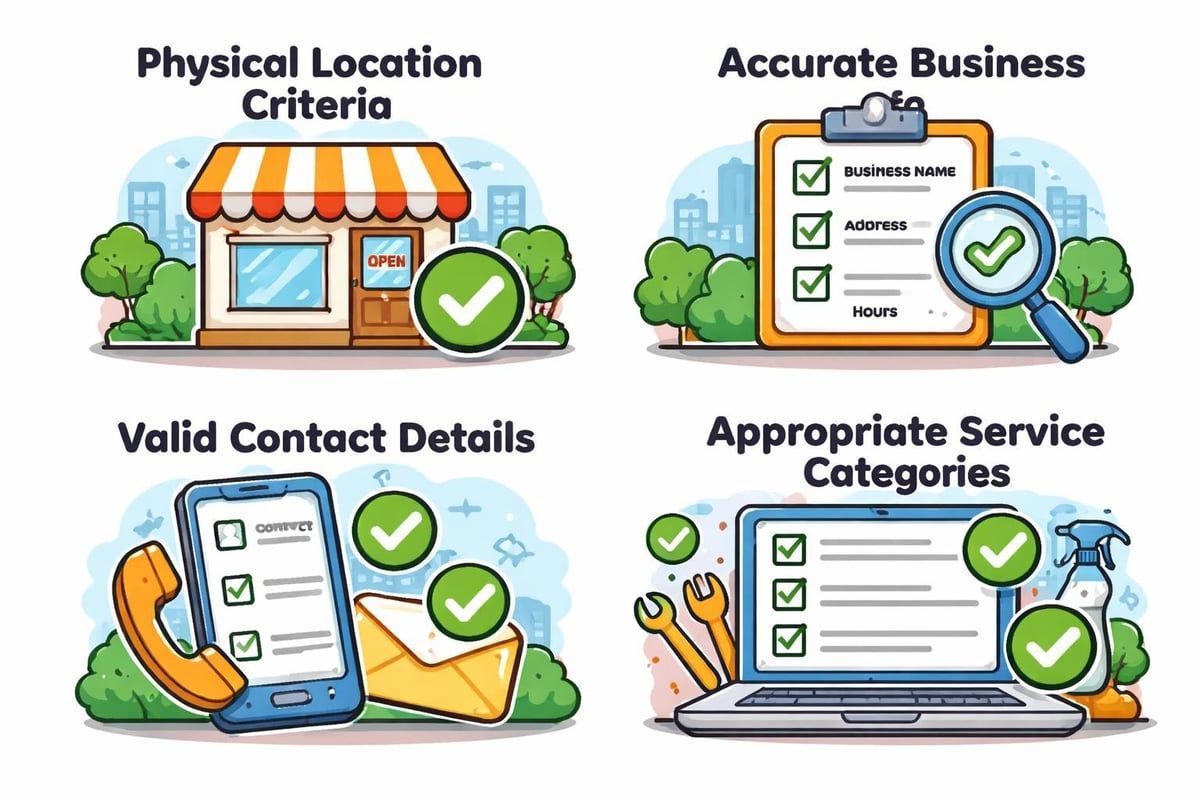
Before starting the verification process, you'll need to ensure your business meets Google's eligibility criteria. Your business must have a physical location that customers can visit, or you must serve customers at their locations within a defined service area. Purely online businesses without physical customer interactions aren't eligible for standard verification.
The information you provide during setup must be completely accurate:
- Business name matching your actual signage and legal documentation
- Correct physical address or service area boundaries
- Valid phone number that connects directly to your business
- Accurate business category representing your primary service
- Operating hours reflecting when customers can reach you
Why Verification Matters for Local Visibility
Without google business confirmation, your profile exists in a suspended state, invisible to potential customers searching on Google Maps or local search results. This creates a significant competitive disadvantage, as verified competitors will consistently outrank you.
Trust signals play a massive role in customer decision-making. When users see an unverified business profile, they often assume the business is either inactive or potentially fraudulent. According to recent policy changes, Google now requires verified Business Profiles even for Local Services ads, demonstrating how crucial confirmation has become across all Google platforms.
The verification badge acts as a quality signal to both Google's algorithm and your potential customers. It confirms that someone at your business has gone through the authentication process and that Google has validated your legitimacy.
Available Google Business Confirmation Methods
Google offers multiple
verification methods to accommodate different business types and situations. The method available to you depends on various factors including your business category, location, and Google's assessment of your profile information.
Postcard Verification
Postcard verification remains the most common google business confirmation method. Google sends a physical postcard containing a unique verification code to your business address. This typically arrives within 5-14 days, though international deliveries may take longer.
How it works:
- Request postcard verification through your Business Profile dashboard
- Wait for delivery to your registered business address
- Enter the five-digit code from the postcard into your profile
- Your profile becomes live once the code is validated
Important considerations for postcard verification include ensuring someone monitors your business post regularly and that your address is formatted correctly in Google's system. If your postcard doesn't arrive within 14 days, you can request a new one.
Phone and SMS Verification
Some businesses receive the option for immediate phone or SMS verification. This method delivers a verification code via automated phone call or text message to your registered business number.
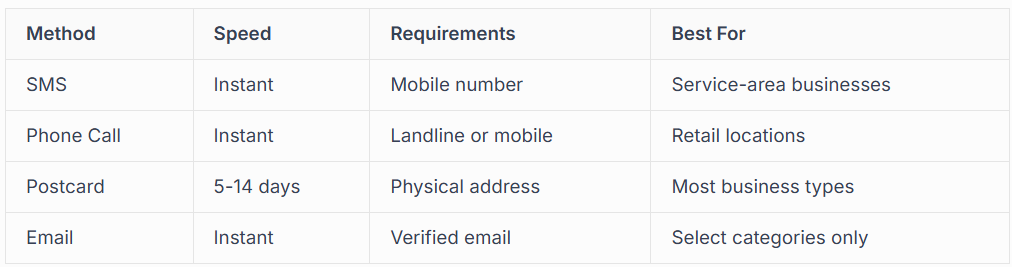
Phone verification provides the fastest path to google business confirmation when available. However, Google doesn't offer this option universally, and availability changes based on risk assessment algorithms.
Video Verification Methods
In 2026, video verification has become increasingly prominent, particularly for service-area businesses and categories where fraudulent listings are common. This method requires you to record and submit video evidence proving your business legitimacy.
Short video recording asks you to film specific aspects of your business operation.
You'll typically need to show:
- Your business signage or branded materials
- Your service vehicles with business branding
- Equipment or tools specific to your trade
- Any additional proof of legitimate operation
Video verification guides walk through the exact requirements, which vary by business category. The process usually takes 3-5 business days for Google to review your submission.
Live video call verification connects you with a Google representative in real-time. During this 5-10 minute call, you'll show proof of your business operation, answer questions about your services, and demonstrate that you're at your claimed location or operating within your service area.
Email Verification
Email verification appears as an option for select business categories where Google has high confidence in the business legitimacy. This method sends a verification link to an email address associated with your business domain.
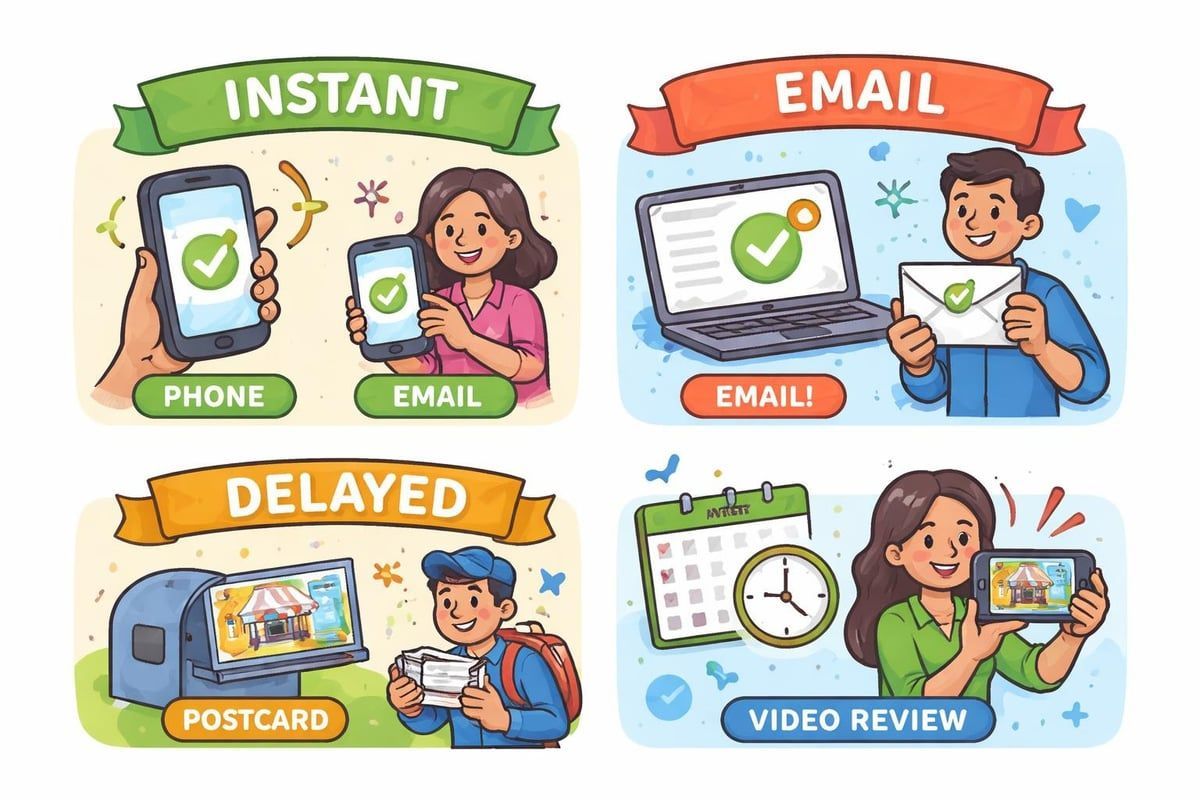
To qualify for email verification, you typically need a business email address using your own domain (yourname@yourbusiness.co.uk rather than generic email services). This method provides instant google business confirmation when available.
Step-by-Step Google Business Confirmation Process
Starting your verification requires accessing your Google Business Profile dashboard. Sign in with the Google account you want to use for managing your business presence.
Initial Profile Setup
Before requesting verification, complete your profile thoroughly. Google's algorithms assess profile completion when determining verification methods and approval likelihood.
Essential information to complete:
- Business name exactly as it appears publicly
- Complete address with correct postcode formatting
- Primary and secondary business categories
- Phone number that answers during business hours
- Website URL (if applicable)
- Service areas or location details
- Opening hours for each day
The more completely you fill out your profile before requesting verification, the smoother your google business confirmation will proceed. Incomplete profiles often face additional scrutiny or delays.
Requesting Verification
Navigate to your Business Profile and look for the "Verify now" or "Get verified" option. Google will display which verification methods are available for your specific business.
Choose your preferred method from those offered. If multiple options appear, consider:
- Postcard: Most reliable but slowest
- Phone/SMS: Fastest but not always available
- Video: Growing in popularity, moderate timeline
- Email: Instant but rarely offered
For service-area businesses, verification guides emphasise the importance of properly configuring your service area before requesting verification. Make sure you've hidden your physical address if you serve customers at their locations rather than inviting them to your premises.
Completing Verification
Once you receive your verification code or complete your video submission, enter the information promptly. Verification codes typically expire after 30 days, requiring you to restart the process if you miss the deadline.
After submitting your verification, Google processes your request according to the verification process documentation. Most verifications complete within minutes to hours, though video submissions may take several days for manual review.
Common Google Business Confirmation Issues
Even with careful preparation, businesses sometimes encounter obstacles during verification. Understanding these challenges helps you avoid delays and frustration.
Verification Code Problems
Postcard codes occasionally fail to arrive due to postal issues, incorrect address formatting, or interception. If your postcard doesn't arrive within the expected timeframe, you can request a replacement through your Business Profile dashboard.
Troubleshooting missing postcards:
- Verify your address matches exactly what appears on official business documents
- Check that you've included all address components (building numbers, floor levels, suite numbers)
- Ensure your postcode is correctly formatted
- Confirm someone regularly checks your business post
- Request a new postcard if 14 days have passed
Some businesses operating from shared office spaces or virtual offices face additional complications. Google's policies require that you have physical access to receive posts at your listed location.
Video Verification Rejections
Video verification failures often result from not following Google's specific requirements.
Here we highlight the most common rejection reasons:
- Poor video quality making details unclear
- Failing to show required proof elements
- Recording in incorrect locations
- Not demonstrating clear connection between yourself and the business
- Missing required documentation or signage
When your video verification gets rejected, Google typically provides feedback explaining what was insufficient. You can usually resubmit with corrections, though repeated failures may limit your options.
Multiple Location Complications
Businesses with multiple locations must verify each profile separately. Google doesn't allow bulk verification for most businesses, meaning you'll need to go through google business confirmation for every single location you operate.
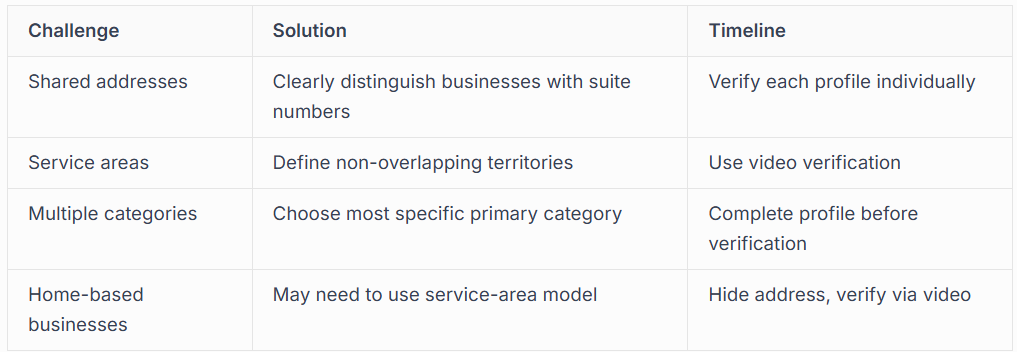
Managing multiple verifications requires organisation and patience. Consider professional Google Business Profile management if you're handling numerous locations simultaneously.
Verification for Service-Area Businesses
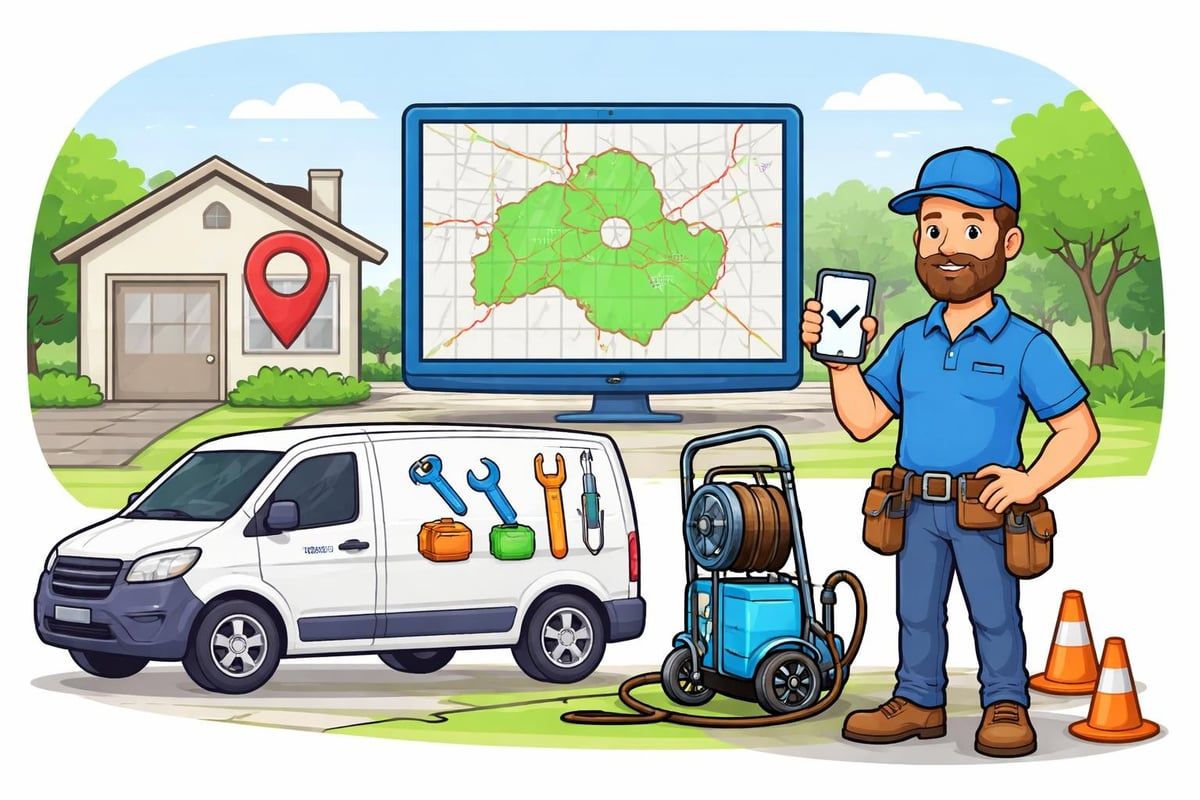
Service-area businesses (plumbers, electricians, cleaners, mobile mechanics) face unique google business confirmation requirements. Since these businesses typically don't invite customers to their physical location, Google's verification process differs slightly.
Hiding Your Physical Address
Before requesting verification as a service-area business, you must hide your physical address from public view. Your Business Profile will show your service areas instead, displaying the regions where you operate rather than your home or office location.
This configuration affects which verification methods become available. Service-area businesses more frequently receive video verification options, as Google wants additional proof that you legitimately operate within your claimed service areas.
Proving Service-Area Legitimacy
When verifying as a service-area business, Google may request additional evidence of your operations:
- Photos of your service vehicles with business branding
- Images of equipment and tools you use for your trade
- Documentation showing you perform services in your claimed areas
- Customer reviews or testimonials from different service locations
Detailed verification guides explain how service-area businesses should document their legitimacy. The key is demonstrating that you actively serve customers throughout your claimed territories, not just operate from a single location.
After Google Business Confirmation
Completing verification isn't the final step-it's actually the beginning of maximising your local search presence. Once your google business confirmation succeeds, focus shifts to optimising your profile for maximum visibility.
Immediate Post-Verification Actions
As soon as your verification completes, take these essential steps:
- Upload high-quality photos of your business, team, and work
- Add detailed descriptions of your products or services
- Set up messaging to enable customer communication
- Create posts showcasing offers, updates, or helpful content
- Encourage satisfied customers to leave reviews
Your verified profile gains significantly more visibility, but optimisation determines how effectively you convert that visibility into actual business enquiries. Businesses that actively manage their profiles typically see 35-50% more customer actions than those leaving profiles incomplete.
Maintaining Verification Status
Your verification status can be revoked if Google detects policy violations or suspicious activity. Protecting your verified status requires ongoing attention to profile management.
Common verification revocation triggers:
- Changing business name to include keywords or service descriptions
- Modifying your address to a location you don't physically occupy
- Creating duplicate profiles for the same location
- Violating Google's quality guidelines
- Receiving multiple spam reports from users
If your profile becomes suspended after verification, services like Google Business Profile reinstatement can help you regain access and visibility. However, prevention through proper management is always preferable to dealing with suspension issues.
Integration with Other Marketing
Your verified Google Business Profile should integrate with your broader marketing strategy. The visibility you gain through google business confirmation creates opportunities across multiple channels.
Connect your profile to your Google Ads campaigns to enhance local advertising effectiveness. Google Ads management services can help coordinate your paid and organic local search presence for maximum impact.
Link your profile to your website, social media accounts, and email marketing. Consistency across all platforms reinforces your legitimacy and makes it easier for customers to find and contact you through their preferred channels.
Professional Verification Support
Whilst google business confirmation is technically a free process any business can complete independently, many businesses choose professional assistance to avoid delays, rejections, and ongoing management challenges.
When to Consider Professional Help
Professional verification services become particularly valuable in these situations:
- You've attempted verification multiple times without success
- Your business operates in a high-risk category with strict verification requirements
- You manage multiple locations requiring simultaneous verification
- You lack time to handle the verification process and ongoing management
- Your profile has been suspended and needs reinstatement
Professional verification services handle the entire process from initial setup through verification completion and ongoing optimisation. This proves especially valuable for tradespeople and service providers who need to focus on their core business operations rather than navigating Google's requirements.
What Professional Services Provide
Comprehensive google business confirmation services typically include:
- Profile audit identifying potential verification obstacles
- Correction of information that might trigger rejections
- Preparation of video verification materials if required
- Management of postcard verification process
- Troubleshooting and resubmission if initial attempts fail
- Profile optimisation after successful verification
- Ongoing monitoring to prevent suspension
For businesses in competitive markets, professional management extends beyond basic verification. Expert local SEO strategies help you outrank competitors and maximise the return on your verified profile.
Choosing the Right Verification Partner
When selecting a verification service provider, look for:
- Proven experience with Google Business Profiles specifically
- UK-based expertise understanding local business requirements
- Transparent processes explaining exactly what they'll do
- Realistic timelines not promising instant results when verification inherently takes time
- Ongoing support beyond just getting verified
Businesses founded by tradespeople who've successfully used Google Business Profiles for their own growth bring practical, real-world understanding. They know the challenges you face because they've navigated them personally whilst building their own businesses.
Maximising Your Investment in Verification
Once you've completed google business confirmation, you've unlocked significant visibility potential. However, verification alone doesn't guarantee customers will choose your business over competitors.
Profile Optimisation Best Practices
Transform your verified profile into a customer acquisition engine through strategic optimisation:
Visual content strategy:
- Upload at least 10 high-quality photos showing your work, team, and location
- Add new photos monthly to signal active business operation
- Include before/after images for service businesses
- Create short videos demonstrating your expertise
Service descriptions:
- List all services you provide with detailed descriptions
- Include pricing information where appropriate
- Highlight unique selling points differentiating you from competitors
- Update seasonal services or special offers regularly
Customer interaction:
- Respond to all reviews within 24-48 hours
- Answer Questions & Answers section queries
- Enable messaging for direct customer contact
- Create weekly posts sharing helpful tips or updates
Review Management
Reviews directly impact both your ranking in local search results and customer decision-making. Verified profiles with active review generation typically see significantly better conversion rates.
Implement a systematic approach to review collection:
- Ask satisfied customers for reviews immediately after completing excellent service
- Provide simple instructions for leaving reviews
- Make the process as easy as possible with direct links
- Thank reviewers publicly, demonstrating your appreciation
- Address negative reviews professionally and constructively
Understanding review management helps you build a stellar reputation that converts profile views into actual customers. Never pay for fake reviews or violate Google's review policies, as this can result in permanent profile suspension.
Competitive Differentiation
With multiple verified businesses competing in most categories and locations, differentiation becomes crucial. Your verified profile needs compelling reasons for customers to choose you over alternatives.
Highlight credentials, certifications, and years of experience. Showcase awards, industry recognition, or unique qualifications. Demonstrate expertise through regularly updated posts sharing helpful information relevant to your customers' needs.
For tradespeople, showing your work speaks volumes. Before/after photos, project showcases, and customer testimonials create trust and demonstrate capability far more effectively than generic descriptions.
Technical Aspects of Verification
Understanding the technical side of google business confirmation helps you troubleshoot issues and optimise your approach.
API and Developer Considerations
For businesses managing multiple locations or integrating Business Profile management into broader systems,
Google's verification API
provides programmatic access to verification processes.
The API allows automated verification management for enterprises and agencies handling numerous client profiles. However, most individual businesses won't need API access, as the standard Business Profile dashboard provides all necessary functionality.
Verification States and Transitions
Your Business Profile exists in different verification states throughout the process:
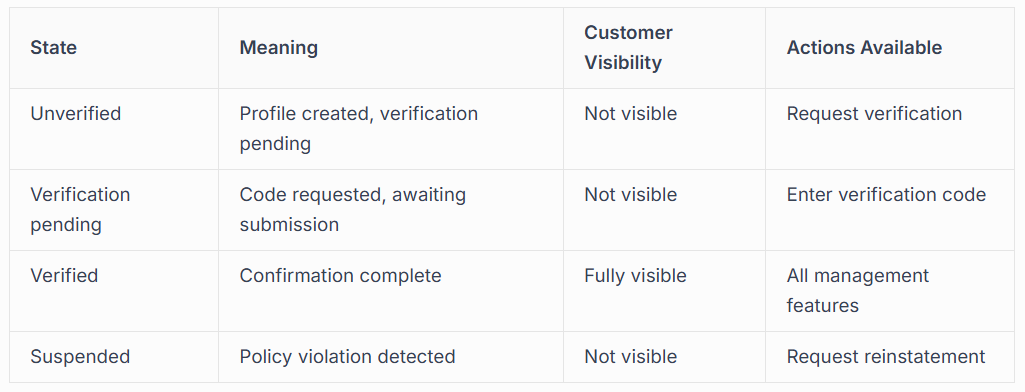
Understanding these states helps you diagnose where you are in the process and what steps come next. Transitions between states should happen automatically once you complete required actions.
Data Accuracy and Consistency
Google cross-references your Business Profile information against multiple data sources. Inconsistencies can delay verification or trigger additional review requirements.
Ensure your business information matches exactly across:
- Your website
- Social media profiles
- Business directories and citations
- Official business registration documents
- Physical signage at your location
This consistency, called NAP (Name, Address, Phone) consistency in local SEO terminology, reinforces your legitimacy and helps Google confirm you're representing your business accurately.
Regional Considerations for UK Businesses
Google business confirmation in the UK involves specific considerations different from other markets. Understanding these nuances helps you navigate the process more effectively.
UK Address Formatting
Proper UK address formatting significantly impacts verification success.
Google expects addresses structured according to Royal Mail standards:
- Building name or number
- Street name
- Town or city
- County (optional but recommended)
- Postcode in correct format (e.g., SW1A 1AA)
Avoid American-style formatting or creative address descriptions. Use the exact address format that appears on your official business documents and post.
Service Area Definitions
When defining service areas for UK businesses, use recognised boundaries.
Define areas by:
- Specific postcodes or postcode districts
- Town and city names
- Borough or council boundaries
- Distance radius from your base location
Overly broad service areas (claiming to serve entire regions you can't realistically cover) may trigger additional verification requirements or rejections. Be honest about the territories you actively serve.
Local Search Behaviour
UK consumers increasingly use mobile devices for local business searches whilst on the move. Your verified profile must provide immediate,
actionable information:
- Click-to-call phone numbers
- Clear directions to your location
- Current opening hours updated for holidays
- Mobile-friendly website links
Completing google business confirmation transforms your local search visibility, putting your business in front of customers actively searching for your services. Whether you navigate the process independently or seek professional assistance, verification remains essential for competing effectively in today's digital marketplace. At Connect SEO Ltd, we specialise in hassle-free Google Business Profile verification for UK businesses, handling everything from initial setup through ongoing optimisation. Our team understands the challenges tradespeople and service providers face because we've built our own success using these exact strategies, and we're ready to help you achieve the same visibility and growth.











