
Google Business Profile Optimization Guide for 2026 Success
Local businesses in 2026 face stiffer competition than ever, with Google business profile optimization becoming essential for standing out in evolving local search results. If your profile is incomplete or outdated, it can mean missed opportunities, lost trust, and fewer customers finding you online.
A fully optimised GBP can drive more foot traffic, boost your local rankings, and build trust with customers. In fact, 83% of consumers check Google reviews before choosing a business (BrightLocal 2025).
Ready to unlock your business’s full potential? This step-by-step guide will walk you through mastering GBP optimisation for 2026, from setup and verification to content, reviews, and new features.
Understanding Google Business Profile in 2026
Let’s start by unravelling what makes Google Business Profile such a powerful tool for local businesses in 2026. Whether you’re a small café or a growing retail chain, keeping up with the latest trends in google business profile optimization is crucial for standing out in your community and winning customer trust.
What is Google Business Profile?
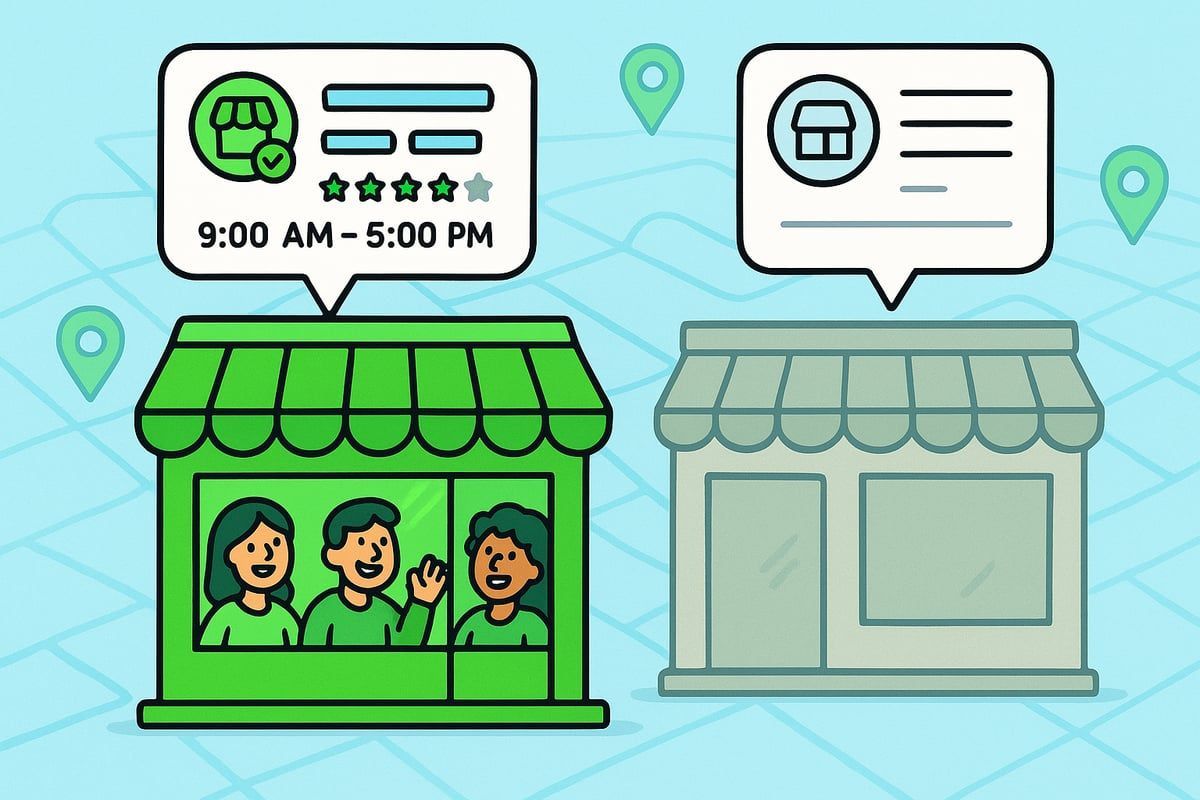
A Google Business Profile (GBP) is your digital shopfront on Google Search and Maps. It showcases essential information like your business name, address, phone number, opening hours, photos, reviews, and special attributes. This profile acts as the first impression for many potential customers searching for services or products nearby.
Let’s compare two boutiques:
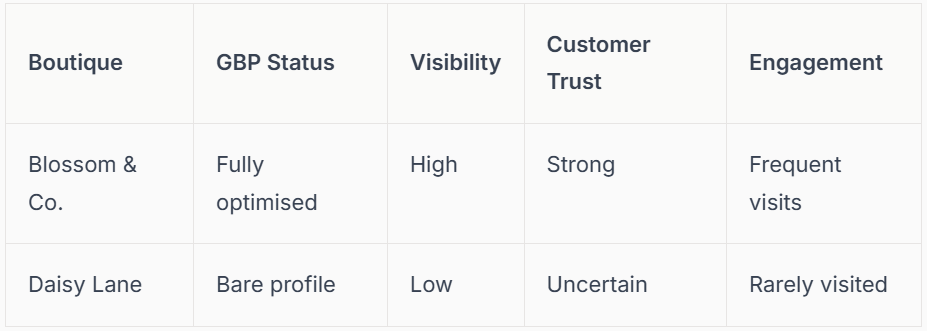
In 2026, google business profile optimization has seen several updates. The interface is now more intuitive, with richer media options and smarter review management. Having a complete, accurate profile directly influences where you appear in local searches and how much customers trust you.
Benefits of an Optimised Google Business Profile
With google business profile optimization, your business makes a stronger first impression. A rich, up-to-date profile increases your visibility in both local search results and on Google Maps. Customers can quickly find what they need—call you, visit your website, or get directions—without confusion.
Businesses with optimised profiles enjoy fewer repetitive questions about opening hours or services, as all key details are available at a glance. According to Localo, top-ranking GBPs have around 70-word descriptions and over 200 reviews, giving them a real edge in local SEO.
Trust is also a major benefit. When customers see positive reviews and clear attributes like “wheelchair accessible” or “in-store pickup,” they’re more likely to visit. For example, a homeware store that highlights its accessibility and pickup options often receives fewer calls about logistics and more foot traffic.
Here’s a quick summary of the main benefits:
- Enhanced local search ranking
- Smoother customer journey from search to purchase
- Fewer missed opportunities due to outdated info
- Higher trust through verified reviews and up-to-date details
Key Updates and Trends for 2026
The landscape of google business profile optimization is evolving quickly. In 2026, new features like AI-powered insights, advanced messaging, and video integration make it easier to connect with your local audience. Google now places greater emphasis on profile engagement, review quality, and completeness when ranking businesses.
Attributes and local justifications play a bigger role in how you appear in search results. For example, adding sustainability or inclusivity features can boost your visibility to specific audiences. Google has also tightened its verification process and anti-spam measures, making it vital to keep your profile accurate and compliant.
Staying ahead means regularly updating your GBP and leveraging new tools. For a step-by-step walkthrough of the latest strategies, see the Google Business Profile guide 2026 for expert advice on mastering these new optimisation trends.
By understanding and embracing these updates, we can ensure that our businesses not only stay visible but also thrive in the ever-changing world of local search.
Step 1: Setting Up and Verifying Your Google Business Profile
Getting started with google business profile optimization is easier than you might think, but it’s essential to lay the right foundations. Let’s walk through the first steps together and make sure your business is ready to shine in local search results.
Creating Your GBP: A Step-by-Step Approach
Setting up your profile is the first step in google business profile optimization. To begin, sign in with your Google account and search for your business. If it’s not listed, you can create a new profile by entering your business name, address, and contact details.
Accuracy is crucial. Ensure your Name, Address, and Phone (NAP) are consistent with what appears across all online directories. This not only helps customers find you but also builds trust with Google. For more on this, check out this guide on how to prepare a clean NAP profile for GBP.
Choose your primary category wisely. Google has over 4,000 to pick from, so be as specific as possible. For example, “Organic Pet Supply Store” will attract a more targeted audience than a generic “Pet Store.”
Common mistakes to avoid:
- Using different business names on other sites
- Adding keywords unnecessarily to your name
- Listing inaccurate hours or outdated phone numbers
A well-prepared start leads to a much smoother google business profile optimization journey.
Why Verification Matters
Verification is the heart of google business profile optimization. Without it, your business might not appear on Google Maps, making it nearly invisible to local customers. Unverified businesses also come across as less trustworthy, and most people will pick a competitor who looks more legitimate.
Imagine searching for a bakery and seeing two results: one verified, with up-to-date details and glowing reviews, and another unverified, with missing information. Which would you choose? Verified profiles also tend to rank higher, pushing you ahead of unverified competitors.
Here’s why verification matters:
- Your business becomes discoverable on Maps and Search
- Customers feel confident you’re real and reputable
- You gain control over your business details and reviews
- Unverified profiles risk being hidden or misrepresented
Don’t risk losing traffic and trust. Make verification a top priority in your google business profile optimization plan.
Verification Methods and Best Practices
There are several ways to verify your business, and each method supports your google business profile optimization efforts. The most common are:
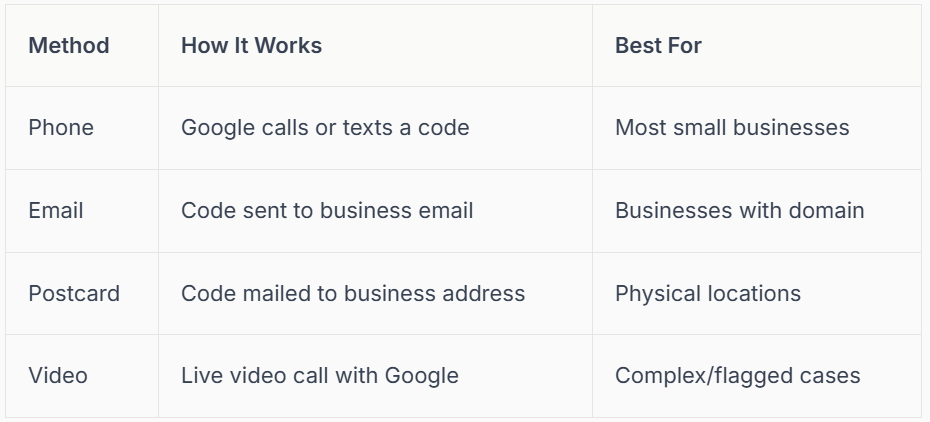
For each method, follow Google’s instructions closely. Enter the code promptly, and double-check your business details before starting. If you have several locations, use bulk verification to save time. For service-area businesses, ensure your address is hidden but service areas are listed correctly.
Troubleshooting tips:
- If your code doesn’t arrive, check spam or request again
- For failed verifications, review your information for typos
- Regularly monitor your profile for any flags or suspensions
Keeping your profile verified and up-to-date is a key part of google business profile optimization.
Connect SEO: Hassle-Free GBP Verification & Optimisation
If you want expert help with google business profile optimization, Connect SEO is here for you. Our team handles everything from start to finish, so you can focus on running your business.
Here’s what you get:
- Fast, professional verification (no tech headaches)
- Profile optimisation: photos, services, hours, descriptions
- Ongoing support to keep you visible and compliant
Connect SEO’s team is UK-based and founded by a real tradesman, so we understand the local business challenges first-hand. With over 2 million Google Local Guide views, our results speak for themselves.
We don’t just offer digital marketing. We deliver real-world expertise that helps trades and local businesses get noticed, trusted, and chosen in 2026. Let us make google business profile optimization easy and effective for you.
Step 2: Optimising Core Business Information for Maximum Visibility
Getting your core details right is the foundation of google business profile optimization. Every field you fill in helps customers find, trust, and choose your business over competitors. Let’s break down the essentials to make your profile shine and ensure you’re set up for maximum local visibility.
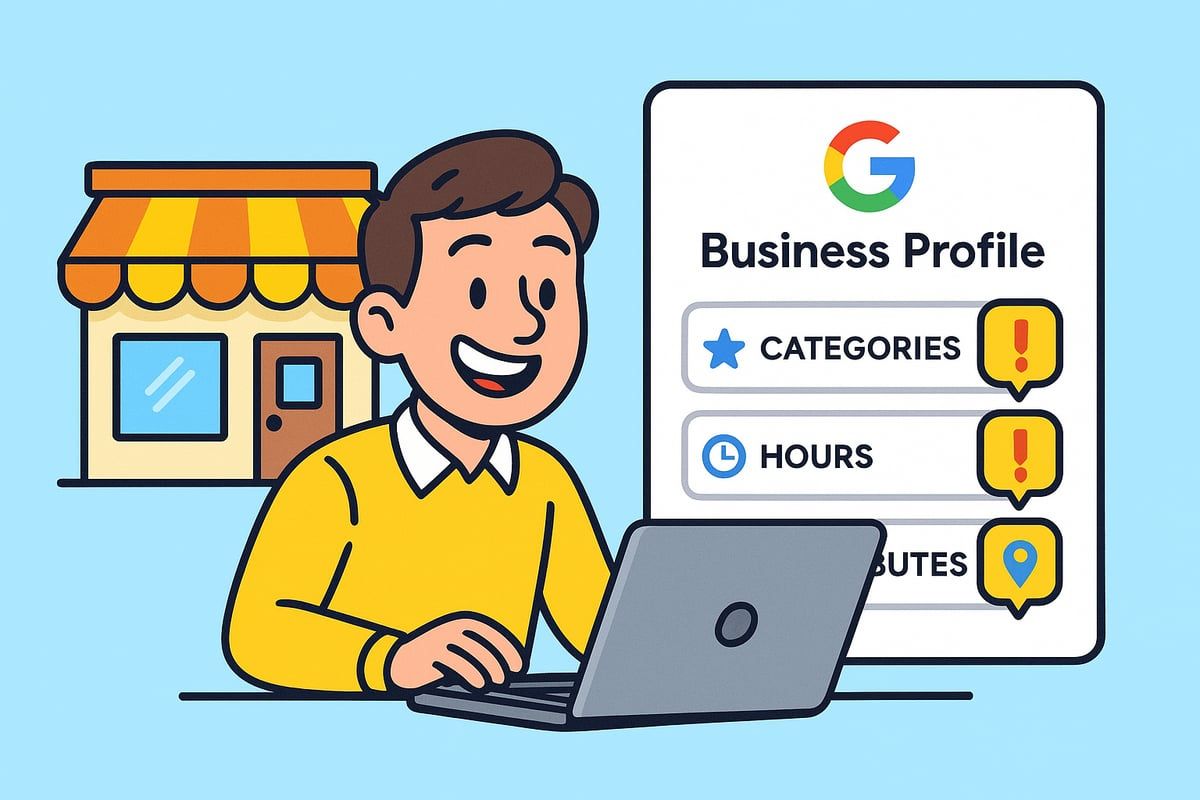
Crafting a Compelling Business Description & Categories
Your business description is your digital handshake. For effective google business profile optimization, write a clear, engaging summary of what sets you apart. Aim for around 70 words, weaving in local keywords naturally.
Choose your primary category with care. There are over 4,000 to pick from, so be specific. For example, “Sustainable fashion in Manchester” attracts more targeted customers than a generic “Clothing Shop.” Add secondary categories to capture your full range.
Top tips for descriptions and categories:
- Include your unique selling points.
- Use location-based keywords.
- Avoid jargon or keyword stuffing.
Remember, top ranking profiles use precise, descriptive language. The right categories and keywords help google business profile optimization boost your local search performance.
Setting Accurate Business Hours & Service Areas
Up-to-date hours show customers when you’re open and ready to serve. Regularly update your hours, especially for holidays or special events. This small step builds trust and prevents frustration.
If you serve customers at their location or offer delivery, set your service area. This helps people nearby find you quickly. For hybrids, list both your physical address and service areas.
Why it matters for google business profile optimization:
- Customers rely on accurate hours to plan visits.
- Incorrect times can lead to negative reviews or missed sales.
- Marking special hours reduces confusion and repetitive calls.
Even one wrong hour can cost you a loyal customer. Keep this info fresh and double-check for accuracy.
Adding and Managing Business Attributes
Attributes tell customers what to expect, from wheelchair accessibility to payment options or pet-friendliness. In 2026, new attributes include sustainability and digital services, so update yours regularly.
Key attribute types for google business profile optimization:
- Accessibility (e.g., step-free access)
- Amenities (e.g., WiFi, baby changing)
- Health & safety (e.g., contactless payment)
- Inclusivity (e.g., gender-neutral toilets)
For example, a florist listing “In-store pickup” and “Wheelchair accessible” can attract more customers and increase conversions. Make sure your attributes reflect what you truly offer.
Managing Multi-Location and Service-Area Profiles
If your business has multiple branches, each location needs its own optimised profile. Use bulk verification and location groups for efficient management. Customise each listing with local details, such as neighbourhood or unique services.
Best practices:
- Keep NAP (Name, Address, Phone) consistent across all locations.
- Tailor descriptions and categories to each branch.
- Avoid duplicate listings to prevent confusion.
Proper multi-location google business profile optimization ensures every site gets local attention and avoids common mistakes that could hurt visibility.
Avoiding Common Pitfalls in Profile Information
Inconsistent data is a leading cause of lost traffic and profile suspensions. Double-check that your NAP matches across all online directories. Outdated info or keyword stuffing can trigger penalties from Google.
To keep your google business profile optimization efforts safe, review your profile regularly. For a detailed look at what not to do, see Avoid GBP suspension triggers for the most common causes and how to avoid them.
A suspended profile means you disappear from search, so accuracy and compliance are essential. Protect your online presence by staying vigilant and proactive.
Step 3: Enhancing Engagement with Photos, Videos, and Google Posts
First impressions count, and nowhere is this truer than on your Google Business Profile. In a world where searchers make snap decisions, engaging visuals and timely updates can be the difference between a click and a pass. Let’s explore how to use photos, videos, and Google Posts to set your business apart and drive real results with google business profile optimization.
Uploading High-Quality Photos and Videos
High-quality photos and videos are your digital shop window. Crisp images of your storefront, interiors, and team help customers visualise your business before they even step inside. Adding short videos, like team introductions or 360° tours, builds trust and gives your profile personality.
A craft shop that introduced a 360° video tour reported a noticeable rise in in-store visits. This is a prime example of google business profile optimization in action, showing how the right visuals can boost engagement. Avoid blurry or outdated content as it can turn customers away. Instead, showcase your best side with fresh, relevant media.
Leveraging Google Posts for Real-Time Updates
Google Posts are your tool for sharing timely updates and connecting with local customers. Use them to announce events, promotions, new arrivals, or celebrate milestones. Posting regularly keeps your audience engaged and signals to Google that your business is active, which is a key part of google business profile optimization.
For best results, aim to post at least once a week. Highlight seasonal offers or community involvement to create a sense of connection. For instance, a bookshop posting about weekly events saw a surge in local attendance and online interactions. Google Posts are indexed, making them a valuable asset for boosting your local search visibility.
Showcasing Products and Services Effectively
Your Google Business Profile isn’t just for basic details—it’s a showcase for what you offer. Add detailed product or service listings, complete with clear photos and concise descriptions. Use categories and tags so customers can easily find what they need. This is an essential step in google business profile optimization, as it helps you stand out in crowded search results.
A florist listing their most popular bouquets, with prices and seasonal availability, makes it easier for customers to choose and act quickly. Highlighting new or featured items can also give your business a competitive edge and prompt more direct enquiries.
Maintaining a Fresh and Active Profile
An active profile signals reliability and keeps your business top of mind. Update photos, posts, and business attributes regularly—especially after changes or new offerings. Monitor for user-generated content and edits, and use Google’s AI suggestions to keep your profile relevant.
A monthly refresh plan, like updating a café’s menu photos or posting about new specials, ensures your profile always reflects your current business. This consistency builds trust and encourages repeat visits.
Measuring Visual Content Impact
Tracking what works is vital for ongoing google business profile optimization. Use GBP Insights to review photo and video views, and watch for spikes in engagement after new posts or media uploads. Analysing this data helps you spot trends and tweak your content strategy for even better results.
By staying proactive and data-driven, you’ll maximize the impact of every photo, video, and post—turning profile visitors into loyal customers.
Step 4: Mastering Reviews, Messaging, and Customer Interaction
Building genuine connections with your local audience is at the heart of google business profile optimization. In 2026, reviews, messaging, and customer interaction are more influential than ever for your online visibility and reputation. Let’s explore how to create lasting trust, prompt engagement, and safeguard your profile.
Encouraging and Managing Google Reviews
Reviews are a cornerstone of google business profile optimization. With 83% of consumers reading Google reviews before making a choice, your review strategy can make or break local trust. According to local SEO statistics, businesses with more reviews and timely responses consistently outrank competitors.
Encourage feedback by asking in person, following up with a polite email, or adding a QR code to receipts and signage. One boutique saw a 40% increase in reviews simply by handing out cards with a direct review link at checkout.
Respond to every review, positive or negative. Thank happy customers, and address concerns with empathy. Avoid review gating or offering incentives, as Google’s policies are stricter than ever. Consistent and authentic engagement is key for google business profile optimization.
Leveraging Google Messaging and Q&A
Fast, friendly communication is essential for google business profile optimization. Enable Google Messaging to let customers reach you instantly with questions. Reply within 24 hours to show you value their time and build trust.
Manage the Q&A section actively. Provide clear answers to common queries, and monitor for misinformation. For example, a restaurant that quickly answers allergy questions through messaging reassures potential diners and reduces lost opportunities.
Stay proactive. Set up notifications so you never miss a message. Prompt responses and helpful engagement set you apart in local search and contribute directly to your google business profile optimization efforts.
Handling Negative Feedback and Reputation Management
Negative reviews are inevitable, but with the right approach, they can become opportunities for growth. In google business profile optimization, how you respond is as important as the review itself.
Address negative feedback publicly but professionally. Thank the reviewer for their honesty, apologise sincerely if needed, and explain any actions you’re taking. If a review is false or malicious, follow Google’s escalation process to report it.
For instance, a service business that responded calmly to a critical review and resolved the issue often saw more positive feedback afterwards. Each response is a chance to show your commitment to improvement, which matters greatly for your google business profile optimization.
Building Social Proof and Trust Signals
Social proof is a powerful driver in google business profile optimization. Showcase your best reviews and testimonials by featuring them in Google Posts or as part of your photos. Highlight achievements, such as awards or “Top Rated on Google” badges, to boost credibility further.
Celebrate milestones like customer anniversaries or high ratings. For example, a salon proudly displaying its “Top Rated on Google” badge both online and in-store saw an increase in new bookings. These trust signals foster a sense of community and reliability, key elements of successful google business profile optimization.
Staying Compliant with Google’s Review Policies
Compliance is non-negotiable for google business profile optimization in 2026. Avoid prohibited practices such as fake reviews, incentivised feedback, or bulk submissions. Google’s crackdown on spam and suspicious activity is stricter than ever.
Monitor your profile for unusual review patterns. If you spot anything suspicious or face issues, consult resources like Troubleshooting Google Business Profile issues for guidance on fixing and reporting problems.
Regular checks keep your reputation secure and ensure your profile remains visible. Staying compliant means you can focus on building genuine connections and lasting customer trust.
Step 5: Monitoring Performance and Advanced Optimisation Strategies
Keeping your Google Business Profile sharp is not a one-and-done task. Monitoring performance and embracing advanced strategies makes all the difference between blending in and standing out locally. Let’s break down how you can use data, tools, and proactive tactics to keep your google business profile optimization on track, all while making it easy and even a little fun.
Using GBP Insights and Analytics
Understanding how people interact with your profile is essential for effective google business profile optimization. Google Business Profile Insights gives you access to data on profile views, searches, and customer actions like calls, website clicks, and direction requests.
Here’s a quick summary of key metrics you’ll want to track:
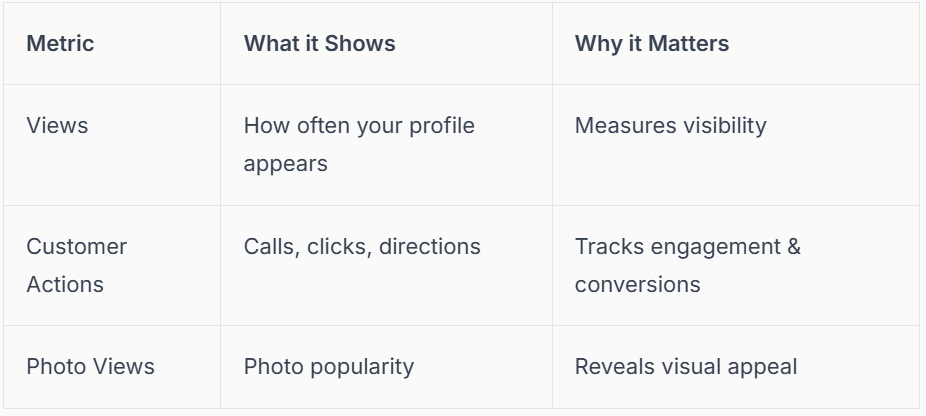
When reviewing your stats, look for patterns. Did foot traffic increase after you updated your photos or posted an offer? Adjust your strategy based on these insights. According to Google Business Profile, businesses that review their analytics monthly see a 22% boost in engagement, so keep checking in.
UTM Tracking and Integration with Google Analytics
Take your google business profile optimization further by setting up UTM parameters for links from your profile to your website. These little tags let you see exactly how many visitors come from GBP, what pages they land on, and whether they make a booking or purchase.
To set this up:
- Create a UTM-tagged link using Google’s Campaign URL Builder.
- Add this link to your website field in your GBP.
- Track GBP traffic in Google Analytics under ‘Acquisition > Campaigns’.
For example, a café noticed a spike in online orders after adding a “Order Now” button with UTM tracking. This insight helped them focus more on online promotions, improving ROI and customer satisfaction.
Advanced Local SEO Tactics for 2026
As google business profile optimization evolves, advanced tactics can give you a real advantage. Focus on local justifications, which are snippets Google pulls from your profile or reviews to justify your ranking. Make sure your attributes (like “Wheelchair accessible” or “Online appointments available”) are complete and accurate.
Build citations across trusted directories, and check your listings for consistency. Embrace new AI-driven content suggestions within GBP to ensure your profile stays fresh and relevant. For a deep dive into the latest strategies, check out this guide on Google Business Profile Optimization 2026.
Proactive Profile Protection: Spam, Suspensions, and Support
Protecting your business profile is a crucial part of google business profile optimization. Regularly monitor your profile for unexpected changes, suspicious edits, or spammy reviews. If you notice your profile has been suspended or merged incorrectly, act quickly.
Steps to stay safe:
- Set up email alerts for profile changes.
- Keep documentation for verification handy.
- Report fake reviews or scams using Google’s support tools.
For example, a local plumber who lost their Maps pin due to a scam was able to recover it by contacting Google support and providing clear evidence. Staying vigilant helps you avoid disruptions and keeps your customers happy.
Staying Ahead: Adapting to Google’s Evolving Features
Google is always updating features, so ongoing learning is key for google business profile optimization. Subscribe to Google’s official updates, join local SEO communities, and provide regular training for your team.
When new features like video posts or advanced messaging launch, be among the first to test them. For instance, a retail chain that quickly adopted video posts saw a surge in engagement and local brand recognition.
By staying curious and proactive, you’ll always be one step ahead, ensuring your business remains visible, trusted, and competitive in your local area.
We’ve covered a lot about getting your Google Business Profile ready for 2026 – from setting up and verifying your profile to making it pop with engaging photos, reviews, and the latest features. If you’re feeling a bit overwhelmed or just want peace of mind that your business is set up for real local success, you don’t have to do it alone. Let’s work together and make sure your business stands out, attracts more customers, and stays ahead of the game. If you’re ready for hassle free support from local experts who get your trade,
Contact connect SEO Today.











