
Google Business Verification: Complete UK Guide 2026
Getting found by local customers on Google Maps and search results depends on one crucial step: google business verification. Without this authentication process, your business remains invisible to potential customers searching for your services nearby. Whether you run a plumbing company, electrical firm, or any local service business, verification is the gateway to appearing in the coveted "Local Pack" results that drive phone calls and enquiries. In 2026, Google continues to refine its verification methods to combat fake listings whilst making legitimate businesses easier to authenticate. Understanding the process, choosing the right verification method, and avoiding common pitfalls can mean the difference between thriving online visibility and complete obscurity in local search.
Understanding Google Business Verification Requirements
Google business verification serves as proof that you're the legitimate owner of a business at a specific location or serving a particular area. The platform needs to confirm that you have the authority to manage the listing and that your business actually exists where you claim it does.
The verification requirements vary depending on your business type. Storefront businesses with physical premises where customers visit need to prove their address through postcard verification or other methods. Service area businesses (SABs) that travel to customers, like plumbers or electricians, face slightly different requirements but still need authentication.
Why Google Requires Verification
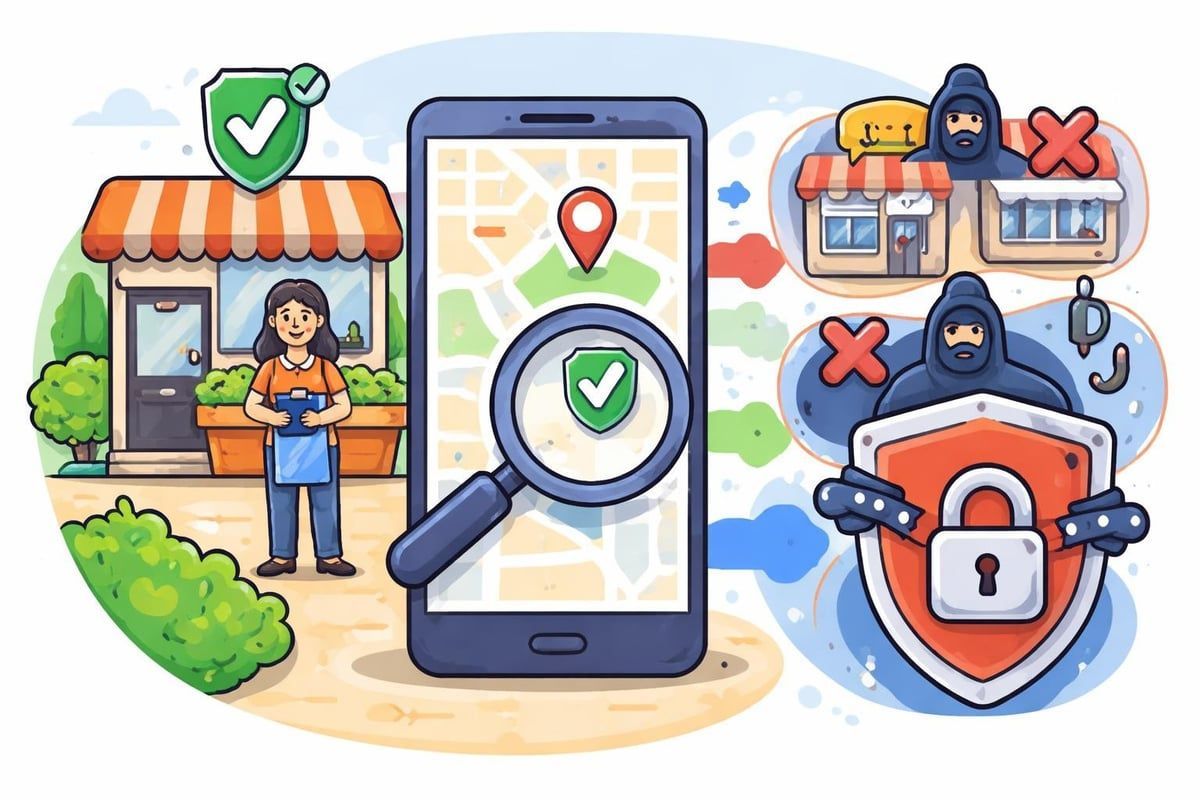
Google's verification system protects both businesses and consumers from fraudulent listings. Without authentication, anyone could create fake business profiles, mislead customers, or damage competitors' reputations.
Here's what verification prevents:
- Fake business listings claiming to operate from prestigious addresses
- Competitors creating duplicate listings to confuse customers
- Lead generation companies posing as legitimate service providers
- Scammers using business profiles to collect customer information
The verification process for Google Business Profiles has become more sophisticated, with Google employing multiple signals to detect suspicious activity before even offering verification options.
Available Verification Methods in 2026
Google offers several verification pathways, and the options available to your business depend on various factors including business type, location, and Google's assessment of your listing quality.
Postcard Verification
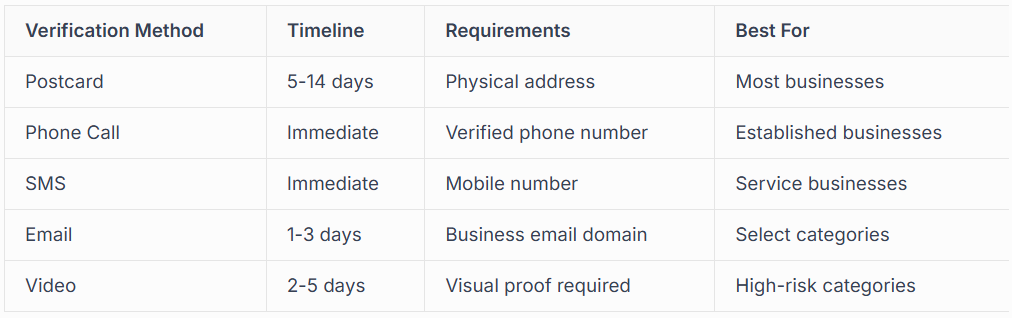
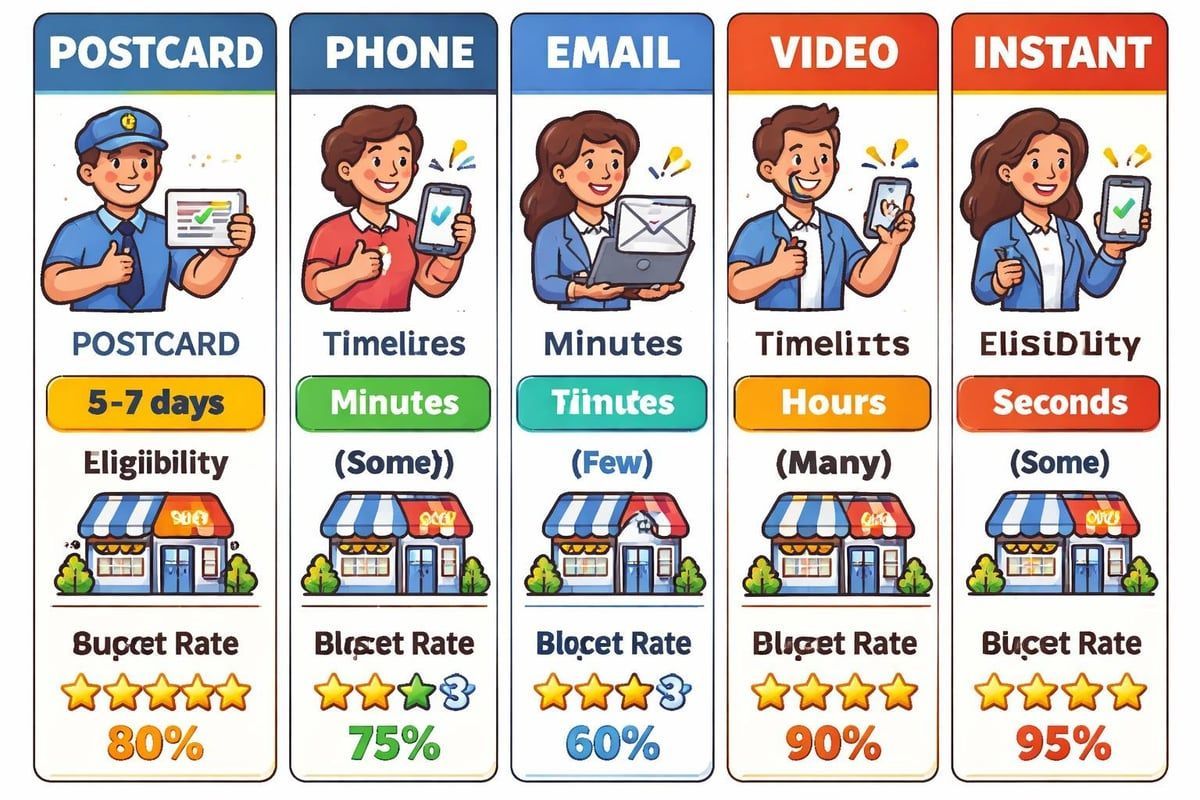
This remains the most common method. Google sends a physical postcard containing a verification code to your business address. The postcard typically arrives within 5 to 14 days, though some UK locations may see it sooner.
The process involves:
- Requesting postcard verification through your Google Business Profile dashboard
- Waiting for the postcard to arrive at your registered address
- Entering the five-digit code into your profile within 30 days
- Completing any additional profile information Google requests
According to guidance on verifying service area businesses, postcard verification works for both storefront and service area businesses, making it the most versatile option.
Phone Verification
Some businesses qualify for instant phone verification. Google sends an automated call or text message with a verification code to your business phone number. This method offers the fastest route to verification, often completing within minutes.
Email Verification
Businesses with established online presence and domain-based email addresses sometimes receive email verification options. Google sends a verification link to your business email address, which you click to authenticate your profile.
Video Verification
Introduced to combat sophisticated fraud,
video verification methods require businesses to record specific footage proving their legitimacy. You might need to show your shopfront, signage, or documentation linking you to the business address.
The video option typically appears when:
- Your business category has high fraud rates
- You've recently changed your business address
- Google's systems detect unusual patterns in your listing
- You're creating a profile for a new location
Instant Verification
Businesses already verified through Google Search Console for their website domain may qualify for instant verification. This method connects your verified website ownership to your Business Profile, streamlining the authentication process.
The Step-by-Step Verification Process
Starting your google business verification journey requires careful preparation. Rushing through the process or providing inconsistent information creates delays and potential rejections.
Before You Begin
Gather these essential details:
- Business name exactly as it appears on your signage and registration documents
- Complete address including postcode (for storefront businesses)
- Service area clearly defined (for SABs)
- Primary phone number that customers can reach you on
- Business category that accurately describes your main service
- Business hours including special hours for holidays
- Website URL if you have one
Consistency across all platforms matters enormously. Your Google Business Profile details should match your website, social media, and business registration documents. Mismatches trigger Google's fraud detection systems and delay verification.
Creating Your Profile
Navigate to the
Google Business Profile manager and search for your business. If it already exists (perhaps created by Google automatically or by a previous owner), claim it. If not, create a new listing.
When creating your listing:
Fill in your business name without adding keywords or extra descriptive text. "Joe's Plumbing" works; "Joe's Plumbing | Best Emergency Plumber London" doesn't. Google penalises keyword stuffing in business names.
Select your primary category carefully. This drives which searches you appear in and affects your verification options. Choose the most specific category that describes your main service.
Add your address or service area. Service area businesses should hide their address and instead specify the towns, postcodes, or radius they serve.
Requesting Verification
Once your basic information is complete, Google presents available verification options. The platform determines which methods you qualify for based on your business type, category, and other signals.
If postcard verification is your only option, double-check your address for accuracy. A single typo means the postcard goes to the wrong location and you'll need to wait another two weeks for a replacement.
For phone verification, ensure the number you provide is:
- Publicly listed on your website
- A direct line to your business (not a call centre or answering service)
- Able to receive calls or texts during business hours
- Not used for multiple Business Profiles
Completing Verification
Enter your verification code within the specified timeframe. For postcards, you have 30 days. Phone and email codes typically expire within hours or days.
After entering your code, Google may ask additional questions or request more information about your business. Answer truthfully and thoroughly. The managing verification guide emphasises that incomplete or inconsistent responses trigger manual reviews that significantly extend your verification timeline.
Common Verification Challenges and Solutions
Many UK businesses encounter obstacles during google business verification. Understanding these challenges helps you avoid them or resolve them quickly when they arise.
Verification Option Not Available
Sometimes Google doesn't offer verification at all.
This happens when:
- Your business information lacks sufficient detail
- The address cannot be validated through Google's systems
- Your business category requires additional review
- Google suspects the listing may be fraudulent
Solution: Complete every section of your profile thoroughly. Add photos, detailed descriptions, services, and attributes. Wait 3-5 days and check again for verification options.
Postcard Never Arrives
Missing postcards frustrate many business owners. They may be lost in the post, delivered to the wrong address, or delayed by Royal Mail.
Solution: Wait the full 14 days before requesting a new postcard. Check with neighbours or building management in case it was misdelivered. You can request up to three postcards for the same location, but excessive requests trigger manual review.
Verification Code Doesn't Work
Entering the wrong code, waiting too long, or technical glitches can invalidate verification codes.
Solution: Double-check you're entering the exact code shown on your postcard or message. Codes are case-sensitive and don't include spaces. If the code genuinely doesn't work within the valid period, request a new verification using a different method if available.
Business Already Verified by Someone Else
Previous owners, employees, or marketing agencies may have verified your profile without your knowledge.
Checking your verification status
helps identify this situation.
Solution: Use the "Request Access" feature in Google Business Profile manager. If that fails, contact Google support with proof of business ownership such as business rates bills, utility bills, or Companies House documentation.
Service Area Business Verification Issues
SABs face unique challenges because they lack a public-facing address. Google scrutinises these more carefully to prevent fake service area listings from dominating search results.
Solution: Provide comprehensive business information including your website, detailed service descriptions, and authentic photos of your work, team, and vehicles. Consider professional Google Business Profile management services if you repeatedly face rejection.
Why Verification Matters for Your Business Visibility
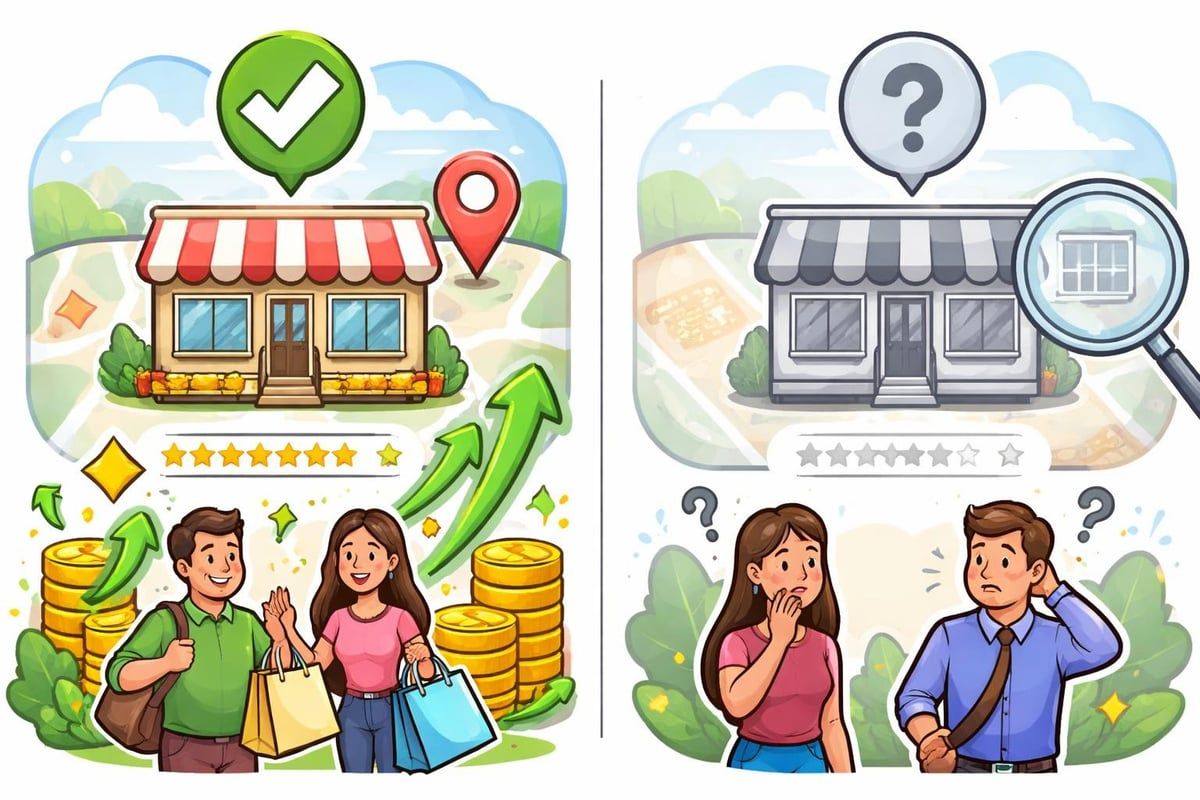
The impact of google business verification extends far beyond simply having a listing. Verified profiles receive preferential treatment in Google's ranking algorithms and customer trust signals.
Appearing in Google Maps and Local Pack
Unverified businesses don't appear in the Local Pack, the map results showing at the top of local searches. This prime real estate drives the majority of local search clicks and customer actions.
Building Customer Trust
That small blue checkmark next to your business name signals legitimacy to potential customers. In an era of online scams and fake reviews, verification provides reassurance that your business genuinely exists and operates from the location claimed.
Customers can:
- See your verified business hours
- Get accurate directions to your location
- Trust your phone number connects to a real business
- Read reviews from authenticated customers
- View genuine photos of your business
Outranking Unverified Competitors
Google's local search algorithm prioritises verified businesses. When two similar businesses compete for the same search terms, the verified one typically ranks higher, all else being equal.
Verified businesses gain advantages in:
- Search result positioning
- Map placement visibility
- Review collection and display
- Customer messaging capabilities
- Posts and updates visibility
- Insights and analytics access
Optimising Your Profile After Verification
Google business verification unlocks your profile's full potential, but verification alone doesn't guarantee visibility. Optimisation following verification determines how well you compete in local search.
Essential Post-Verification Steps
Complete every available section in your Business Profile dashboard. Google rewards comprehensive profiles with better rankings and more prominent display in search results.
Priority optimisation tasks:
- Upload high-quality photos of your business, team, products, and completed work
- Write a detailed business description using natural language (not keyword-stuffed text)
- Add all relevant service offerings with descriptions
- Set accurate business hours including special hours for holidays
- Enable messaging if you can respond promptly to customer enquiries
- Create regular posts about offers, news, and updates
Many businesses benefit from professional Google Business Profile management to ensure ongoing optimisation and monitoring.
Building Reviews and Engagement
Reviews significantly influence local rankings. After verification, implement a systematic approach to collecting authentic customer reviews.
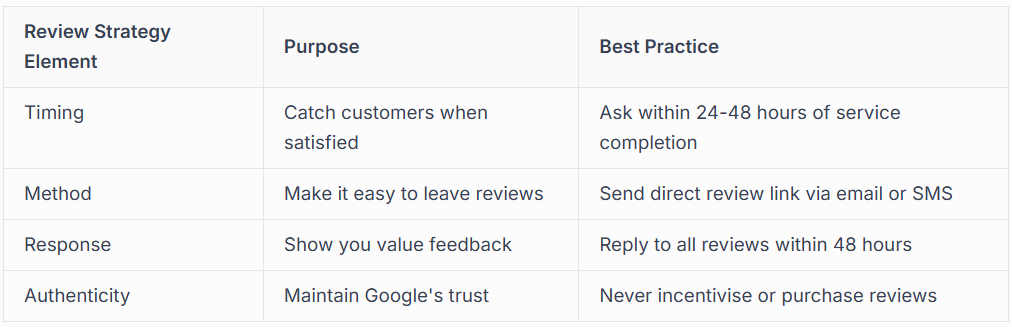
Responding to reviews, both positive and negative, demonstrates active management and builds customer confidence. Google also considers response rates when determining local rankings.
Monitoring for Suspension Risks
Even verified profiles face suspension risks if they violate Google's guidelines. Regular monitoring helps you catch and address issues before they escalate.
Common suspension triggers include:
- Accumulating multiple negative reviews quickly
- Changing business name to include keywords
- Creating duplicate listings for the same location
- Using virtual offices or coworking spaces for SABs
- Repeatedly violating photo guidelines
- Operating from residential addresses in certain categories
If suspension occurs, services like Google Business Profile reinstatement can help navigate the appeals process.
Advanced Verification Considerations
Some business situations require specialised approaches to google business verification. Understanding these edge cases prevents frustration and wasted time.
Multi-Location Businesses
Businesses operating from multiple locations need separate verified profiles for each address. The bulk verification process exists for qualifying businesses with 10 or more locations.
Requirements for bulk verification:
- Consistent branding across all locations
- Unique phone numbers for each location (preferred)
- Authority documentation proving you manage all locations
- Complete information for every location
Google applies stricter scrutiny to multi-location businesses to prevent spam networks and franchise violations.
Businesses Operating from Home
Home-based businesses can get verified but must follow specific guidelines. Service area businesses should hide their residential address and display only their service area.
If you operate a storefront business from home, be aware that some categories aren't eligible for home-based verification. Google prohibits home addresses for businesses like law firms, medical practices, and other professional services unless they're licensed to operate from that residential location.
Recently Moved Businesses
Moving your business address requires updating your Google Business Profile and often triggers re-verification. Google wants to confirm you genuinely operate from the new location.
Moving process:
- Update your address in the Business Profile dashboard
- Expect Google to suspend your profile temporarily
- Complete verification again (usually postcard to new address)
- Update your address on your website and all online directories
- Monitor for duplicate listings at the old address
The verification specialists at Connect SEO regularly help businesses navigate address changes without losing rankings or visibility.
Shared Office Spaces and Virtual Offices
Google's policies around shared office spaces and virtual offices tightened significantly in recent years. Generally, virtual offices don't qualify for verification unless you have a genuine physical presence with regular staffing.
Coworking spaces may work if:
- You have a dedicated private office (not just a hot desk)
- Your business signage appears at the location
- You're physically present during stated business hours
- The space isn't primarily used for mail forwarding
Professional Verification Support Services
Many businesses struggle with google business verification despite following all guidelines correctly. Complex business structures, previous suspension history, or Google's increasingly stringent requirements can make professional assistance worthwhile.
When to Seek Professional Help
Consider expert verification services if you've experienced:
- Multiple verification rejections without clear explanation
- Previous profile suspensions affecting new verification attempts
- Technical issues with verification codes or options not appearing
- Time constraints preventing you from managing the process yourself
- Complex business structures requiring specialised verification approaches
Understanding the technical aspects, including verification APIs and management tools, requires expertise that most business owners reasonably lack.
What Professional Services Provide
Reputable Google Business Profile verification services offer:
- Pre-verification audit of your business information and online presence
- Strategic selection of the optimal verification method for your situation
- Management of the entire verification process from start to finish
- Profile optimisation following successful verification
- Ongoing monitoring to prevent suspension and maintain visibility
- Support for reinstatement if issues arise
Services should be transparent about their process and never promise guaranteed verification, as Google ultimately controls approval. Detailed information on verification methodologies helps businesses understand what legitimate services can and cannot achieve.
Choosing a Verification Partner
Select verification services based on:
- Experience: UK-based providers familiar with local business verification requirements
- Track record: Demonstrated success with businesses in your category
- Transparency: Clear explanation of their process and realistic timeframe expectations
- Ongoing support: Not just verification, but continued optimisation and monitoring
The importance of verification for business visibility means choosing a partner who understands both the technical requirements and the strategic implications for your local SEO.
Maintaining Your Verified Status Long-Term
Google business verification isn't a one-time achievement. Maintaining your verified status requires ongoing attention to Google's policies and your business information accuracy.
Regular Profile Maintenance
Schedule monthly reviews of your Business Profile to ensure:
- Business hours remain accurate, especially around holidays
- Photos stay current and represent your business well
- Service offerings reflect your current capabilities
- Contact information works correctly
- Posts and updates publish regularly
Stale, outdated information signals neglect to both Google and potential customers, potentially affecting your rankings and click-through rates.
Staying Compliant with Google's Guidelines
Google regularly updates its Business Profile policies. Staying informed prevents unintentional violations that could trigger suspension.
Key compliance areas to monitor:
- Business name formatting (no keyword stuffing or promotional text)
- Category accuracy (using Google's defined categories)
- Service area boundaries (realistic, not overly broad)
- Photo content (no prohibited content like watermarks or promotional text)
- Review responses (professional, non-promotional)
Many businesses find that expert Google Business Profile services provide peace of mind through continuous compliance monitoring and proactive updates.
Responding to Verification Challenges
Even well-maintained profiles occasionally face verification challenges.
Google may request re-verification if:
- Significant business information changes
- Multiple user reports flag potential issues
- Google's systems detect unusual activity patterns
- You've been inactive for extended periods
Responding promptly and thoroughly to reverification requests prevents profile suspension. Keep documentation readily available proving your business legitimacy, including business rates bills, utility statements, and professional licences.
Google business verification forms the foundation of local search visibility, determining whether customers can find your business on Maps and in local search results. The process, whilst sometimes challenging, becomes manageable with proper preparation, accurate information, and patience. Whether you choose postcard, phone, email, or video verification, completing this crucial step unlocks opportunities for customer engagement, review collection, and competitive advantage in your local market. If you're struggling with verification, facing rejections, or simply want expert handling of the entire process, Connect SEO Ltd provides comprehensive verification services backed by real-world experience scaling local businesses through optimised Google Business Profiles. We handle everything from initial verification through ongoing optimisation, ensuring your business maintains strong visibility and avoids common pitfalls that lead to suspension.











