
Google Shopping Ads: A Complete UK Guide for 2026
Google shopping ads have revolutionised the way businesses sell products online, offering a visual and immediate way to showcase inventory directly within Google search results. Unlike traditional text ads, these product listings appear with images, prices, and merchant details, creating a shopping experience that begins the moment a potential customer searches. For UK businesses looking to increase sales and visibility in 2026, understanding how to leverage google shopping ads effectively can mean the difference between getting lost in search results and dominating your product category. Whether you're a retailer, tradesman selling equipment, or service provider with physical products, mastering this advertising format opens doors to customers actively searching to buy.
Understanding Google Shopping Ads in 2026
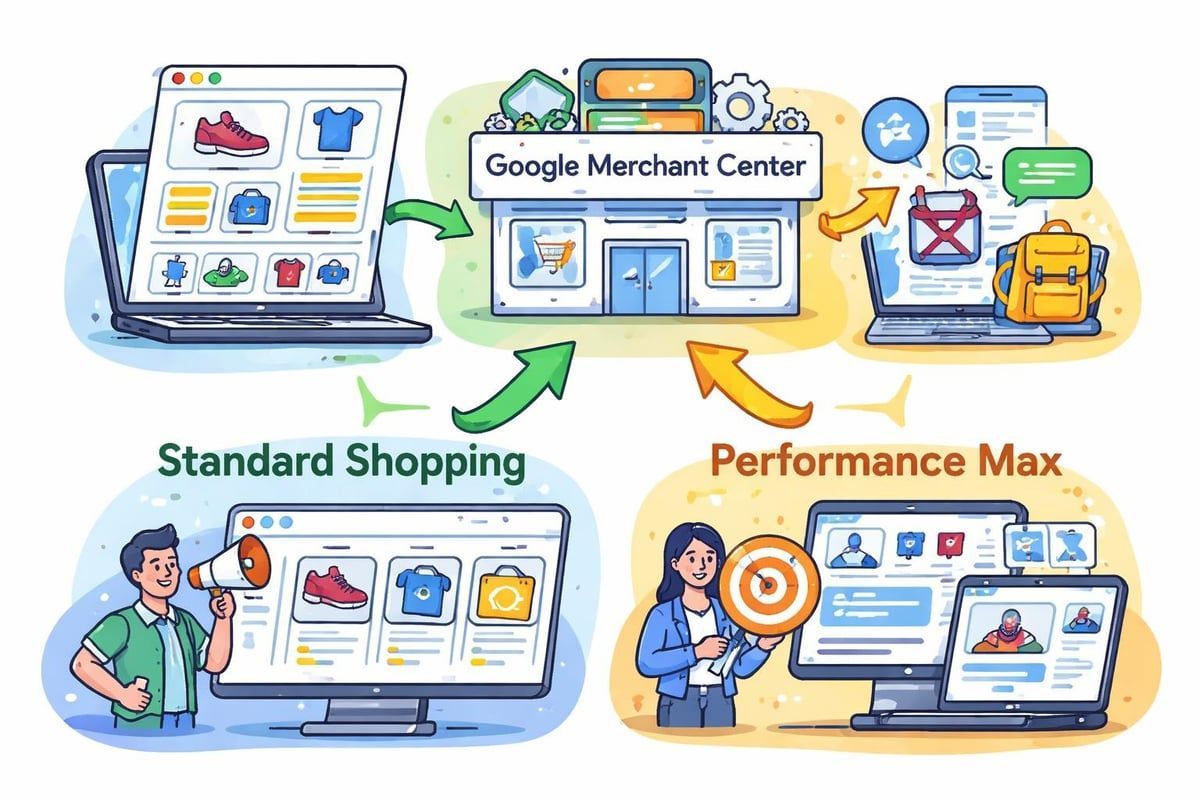
Google shopping ads represent a distinct advertising format that pulls product information directly from your Merchant Center account rather than using manually created ad copy. When someone searches for "cordless drill" or "safety boots UK", these visual product listings appear above organic results and alongside traditional search ads.
The system works through three connected components: your product feed, Google Merchant Center, and Google Ads campaigns. Your feed contains all product data including titles, descriptions, prices, images, and availability. This information syncs with Merchant Center, which then connects to your Shopping campaigns in Google Ads.
Key benefits of google shopping ads include:
- Higher click-through rates due to visual appeal
- Qualified traffic from users ready to purchase
- Showcase multiple products simultaneously
- Detailed product information before the click
- Competitive pricing transparency
The format has evolved significantly since its introduction, now incorporating smart bidding, automation features, and enhanced reporting capabilities. Understanding various placements of Google Shopping Ads helps advertisers maximise visibility across Google's network, including the main search results page, Google Images, and the Shopping tab.
Why Businesses Choose Shopping Over Text Ads
Traditional search ads require you to guess what someone might search and craft ad copy accordingly. Shopping ads flip this model by displaying actual products with real-time pricing and availability. This transparency builds trust immediately.
For tradesmen and service businesses that also sell products, google shopping ads offer a way to monetise searches that might otherwise go to large retailers. A plumber selling bathroom fixtures or an electrician offering tools can compete directly with national chains by showcasing specific products with competitive pricing.
The visual nature also reduces wasted clicks. When someone sees your product image, price, and brand before clicking, they're making an informed decision. This pre-qualification means better conversion rates and more efficient ad spend.
Setting Up Your First Shopping Campaign
Before launching google shopping ads, you'll need verified access to both Google Merchant Center and Google Ads. The Merchant Center houses your product feed, whilst Google Ads manages your campaigns and bidding. Just as
Google Business Profile verification establishes your local presence, verifying your website and business information in the Merchant Center establishes credibility for Shopping ads.
Creating Your Product Feed
Your product feed serves as the foundation for all Shopping campaigns. This structured data file contains every detail about your products in a format Google can understand and display.
Essential feed attributes include:
- Product ID - Unique identifier for each item
- Title - Descriptive name with key attributes
- Description - Detailed product information
- Link - Direct URL to product page
- Image link - High-quality product photo
- Price - Current selling price
- Availability - In stock, out of stock, or preorder
- Brand - Manufacturer or brand name
- GTIN - Global Trade Item Number (when applicable)
- Condition - New, used, or refurbished
Feed optimisation directly impacts campaign performance. Product titles should include the most important attributes first: brand, product type, key features, size, colour. "DeWalt 18V Cordless Combi Drill 2 Batteries XR Range" performs better than "Drill 18V Cordless".
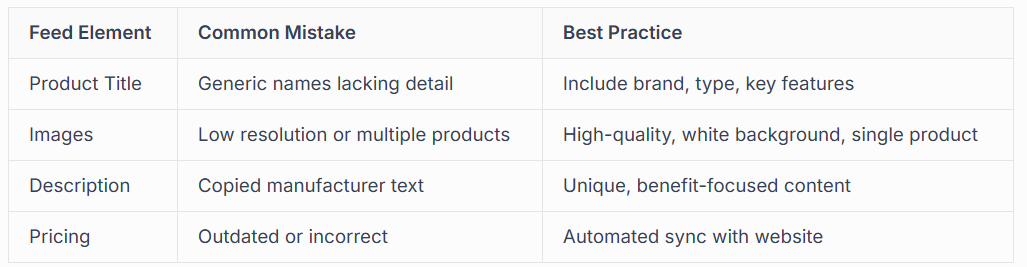
You can create feeds manually through spreadsheets, use e-commerce platform plugins, or employ feed management tools. For businesses with large inventories, automation prevents the headaches of manual updates when prices or availability change.
Campaign Structure and Organisation
Organising your google shopping ads properly from the start saves countless hours later. Campaign structure affects how you allocate budgets, adjust bids, and analyse performance across different product categories.
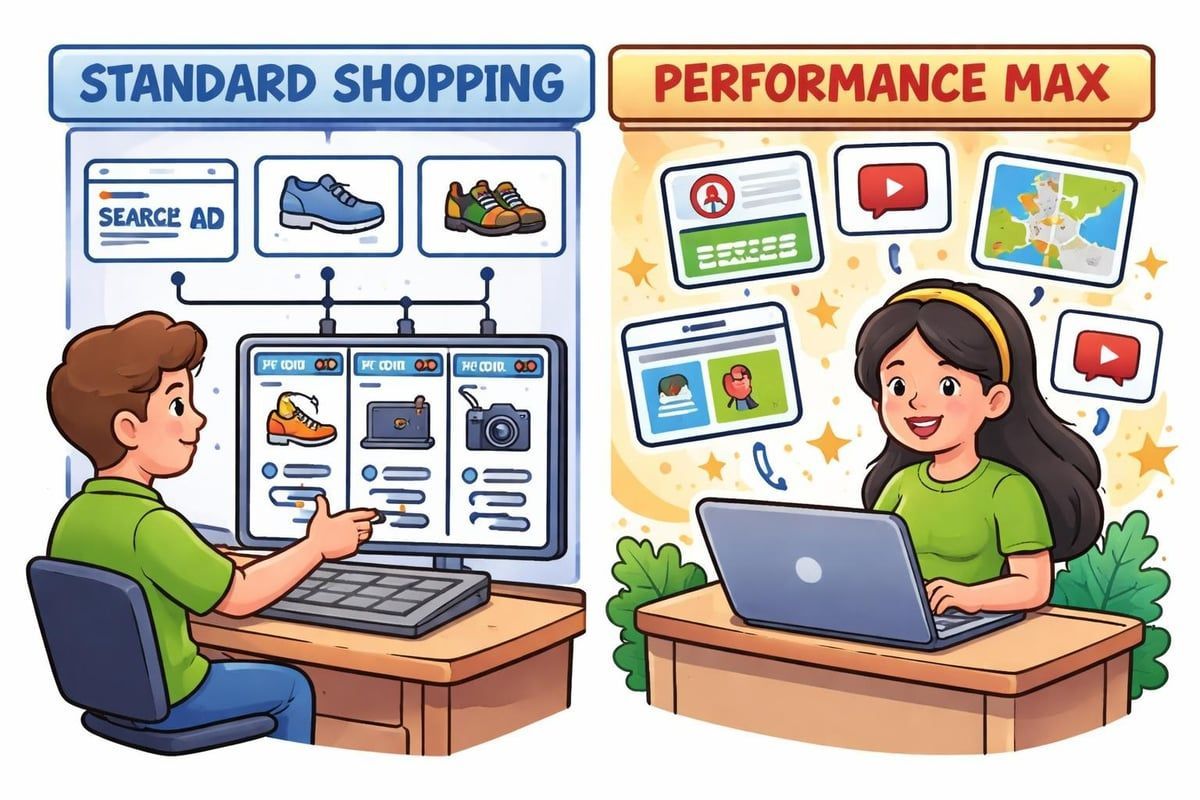
The two primary campaign types for Shopping are Standard Shopping campaigns and Performance Max campaigns. Standard Shopping gives you granular control over bidding and product groups, whilst Performance Max uses automation and machine learning to optimise across Google's entire inventory of placements.
Building Product Groups
Within Shopping campaigns, you organise products into ad groups and product groups. This structure determines how granularly you can manage bids and budgets.
Start by subdividing your product inventory based on:
- Product category (power tools, hand tools, safety equipment)
- Brand (premium brands vs. budget options)
- Price range (under £50, £50-£100, over £100)
- Margin (high-margin items vs. low-margin volume sellers)
- Performance (best sellers vs. new products)
This granularity allows you to bid more aggressively on high-margin products whilst maintaining presence across your full catalogue. A well-structured campaign might have separate ad groups for professional-grade equipment and DIY-level products, each with different bidding strategies.
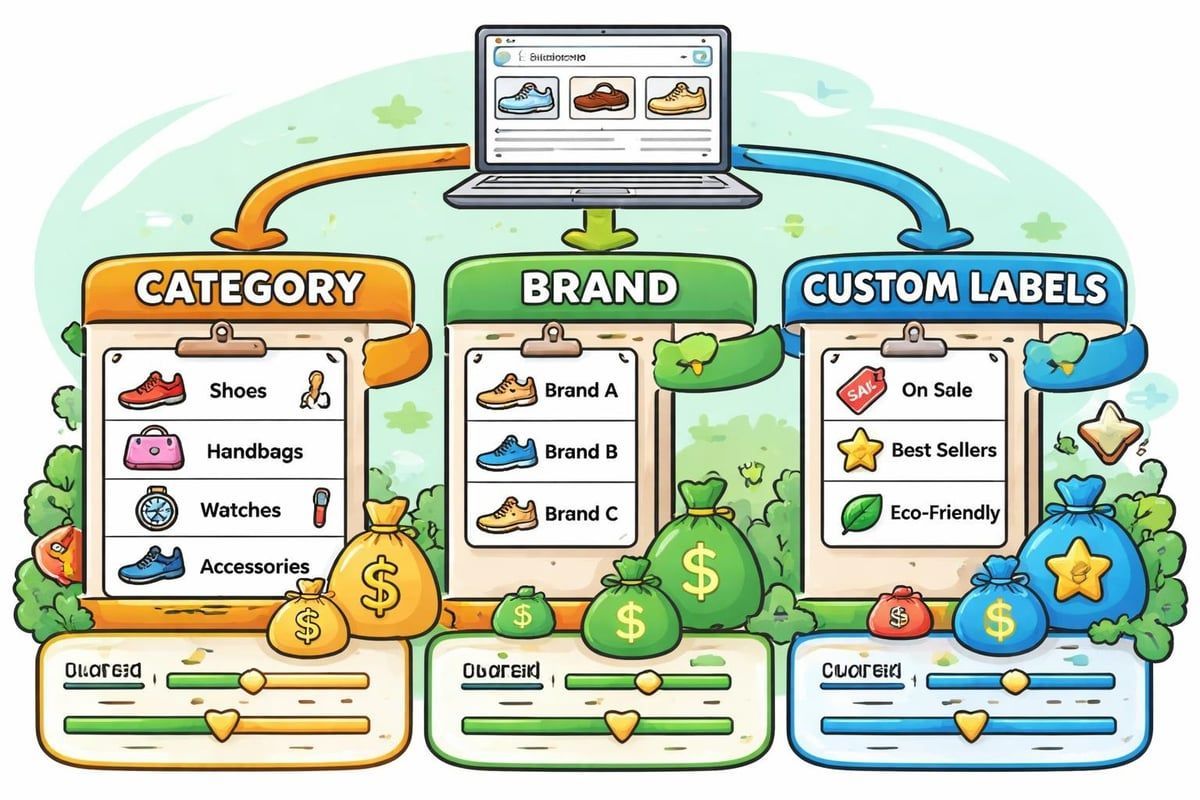
The best practices for running effective Google Shopping Ads emphasise starting with broader product groups and subdividing based on performance data. This prevents over-segmentation before you have meaningful data to guide decisions.
Bidding Strategies That Work
Google shopping ads operate on a
cost-per-click model, but how you approach bidding dramatically affects both spend efficiency and sales volume. In 2026, the platform offers both manual and automated bidding options, each suited to different business scenarios.
Manual CPC bidding gives you complete control, setting maximum bids at the product group level. This works well when you're testing new products, have limited budgets, or want absolute control over costs. The downside is missing opportunities when you could profitably bid higher during peak conversion times.
Automated bidding strategies include:
- Maximise clicks - Gets the most traffic within your budget
- Target ROAS - Focuses on return on ad spend goals
- Maximise conversion value - Prioritises total revenue
- Enhanced CPC - Adjusts manual bids based on conversion likelihood
Target ROAS works brilliantly for businesses with consistent conversion tracking and varying product margins. You might set a 400% target ROAS, meaning for every £1 spent, you aim for £4 in revenue. The system then bids more aggressively on products and searches likely to achieve this target.
For seasonal businesses or those in competitive markets, combining manual control with enhanced CPC offers a middle ground. You maintain bid caps whilst allowing Google to increase bids up to 30% when conversion signals are strong.
Optimisation Techniques for Better Performance
Running google shopping ads isn't a "set and forget" activity. Continuous optimisation based on performance data separates profitable campaigns from money drains. The good news? Much of this optimisation follows predictable patterns you can systematise.
Product Feed Optimisation
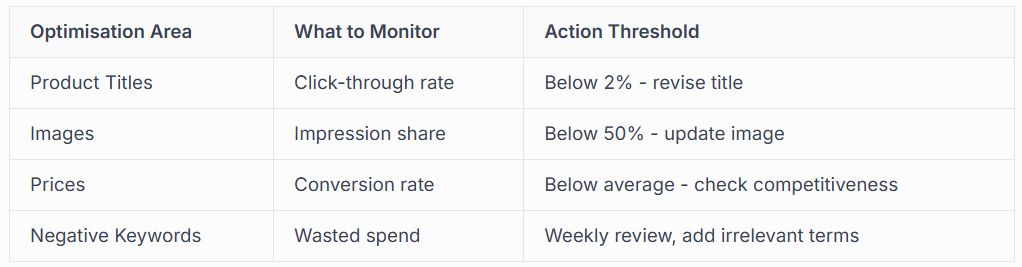
Your product feed deserves regular attention. Google's algorithm relies entirely on the data you provide to match products with searches. Poor feed quality means missing relevant searches or appearing for irrelevant ones.
Review your Search Terms report weekly to identify:
- High-impression, low-click products (image or title problem)
- High-click, low-conversion products (pricing or landing page issue)
- Unexpected search terms (missing negative keywords)
- Missing searches you should appear for (feed attribute gaps)
Product titles are particularly crucial. Testing shows that front-loading titles with the most searched attributes improves impression share. "Makita Cordless Drill 18V 2 Battery Combi LXT" captures more relevant searches than "Cordless Drill Combi 18V Makita LXT 2 Battery".
Custom labels in your feed unlock powerful organisation options. You might label products by margin (high, medium, low), seasonality (summer, winter, year-round), or performance tier (best seller, average, slow mover). These labels then become subdivision options within product groups.
Similar to how Google Business Profile management requires ongoing updates to maintain visibility, your product feed needs regular refreshes to stay competitive and relevant.
Negative Keyword Management
Even though google shopping ads don't use keywords like traditional search campaigns, negative keywords still apply. These prevent your products appearing for irrelevant searches that waste budget.
Common negative keywords for Shopping campaigns include:
- Free, cheap, discount (if you're premium)
- Used, second-hand, refurbished (if you sell new only)
- DIY, how to, tutorial (informational intent)
- Jobs, careers, courses (wrong intent entirely)
- Competitor brand names (unless you explicitly want comparison traffic)
Build your negative keyword list from Search Terms reports rather than guessing. You'll discover unexpected terms people use that lead to clicks but never conversions. Add these systematically to campaign or account-level negative lists.
Advanced Shopping Campaign Tactics
Once your basic google shopping ads campaigns run profitably, advanced tactics can multiply results without proportionally increasing management time. These strategies leverage Google's automation whilst maintaining strategic control.
Performance Max for Shopping
Performance Max campaigns represent Google's newest Shopping format, using machine learning to optimise bids and placements across Search, Shopping, Display, YouTube, Gmail, and Discover simultaneously. Rather than managing separate campaigns for each placement, Performance Max handles distribution automatically.
The trade-off is reduced visibility into exactly where ads appear and which placements drive results. For this reason, many advertisers run Performance Max alongside Standard Shopping campaigns, comparing performance and learning from both.
Performance Max works best when you:
- Have strong conversion tracking implemented
- Can provide diverse creative assets (images, videos, text)
- Want to test new placements without manual campaign creation
- Have sufficient budget to allow learning phase (typically 6-8 weeks)
- Trust automation with strategic decisions
Feed Performance Max campaigns with audience signals indicating who your best customers are. This might include website visitors who spent over 5 minutes browsing, past purchasers, or email list subscribers. These signals help the algorithm find similar users across Google's properties.
Merchant Promotions
Running promotions directly within your google shopping ads increases click-through rates by highlighting special offers before users visit your site. These appear as a "special offer" link beneath your product listing.
Eligible promotions include:
- Percentage discounts (e.g., "15% off")
- Money off amounts (e.g., "£10 off")
- Free delivery offers
- Gift with purchase
- Buy one get one deals
Setting up promotions requires submitting them through the Merchant Center with specific start/end dates and qualifying conditions. The promotional text then appears automatically on eligible products.
Measuring Success and ROI
Understanding whether your google shopping ads deliver profitable returns requires tracking beyond simple click and impression metrics. E-commerce businesses need full visibility from ad click through to completed purchase, including which products generate profit vs. those that drain budgets.
Essential Metrics to Track
Performance metrics for Shopping campaigns:
- ROAS (Return on Ad Spend) - Revenue divided by cost
- Conversion rate - Purchases divided by clicks
- Average order value - Total revenue divided by number of orders
- Cost per acquisition - Total spend divided by conversions
- Impression share - Your impressions vs. total available
- Click-through rate - Clicks divided by impressions
- Product performance - Individual SKU profitability
ROAS represents your primary profitability indicator. A 300% ROAS means you generate £3 for every £1 spent. Whether this is profitable depends on your margins. If products carry 50% margins, 300% ROAS yields 50% profit before advertising. Understanding this relationship prevents the mistake of optimising for ROAS targets that look good but lose money.
Segment performance by device (mobile vs. desktop), time of day, day of week, and geographic location. You might discover mobile traffic converts poorly for high-value items but excellently for impulse purchases under £50. This insight allows device-specific bidding adjustments.
Attribution Considerations
Google Ads defaults to last-click attribution, giving 100% conversion credit to the final click before purchase. This undervalues google shopping ads if customers typically click multiple times before buying.
Data-driven attribution (available for accounts with sufficient conversion volume) distributes credit across touchpoints based on their actual contribution to conversions. This often reveals Shopping ads playing crucial research roles early in the buying journey, even when customers ultimately convert through brand searches or direct visits.
For businesses offering both products and services, like tradespeople who sell equipment whilst also taking installation jobs, connecting Shopping campaign performance with overall business revenue matters more than isolated campaign metrics. Someone who buys a £50 tool might later book a £500 service after experiencing your reliability.
Integration with Broader Marketing Strategy
Google shopping ads shouldn't exist in isolation from your other marketing efforts. The most successful campaigns integrate with
PPC advertising strategies, local visibility through Google Business Profiles, and organic search optimisation.
When someone searches your brand name after seeing your Shopping ad elsewhere, you want to dominate that results page. This means having:
- Active Shopping campaigns for branded searches
- Verified Google Business Profile appearing in local pack
- Optimised website ranking organically
- Text ads capturing any remaining visibility
This integrated approach according to best practice guidance from Distinctly ensures maximum visibility regardless of how customers prefer to engage. Some click products, others prefer reading reviews on your Business Profile, whilst others want detailed website content first.
For local businesses, Shopping campaigns can target specific geographic areas where you operate or deliver. A plumber selling bathroom suites might limit Shopping ads to within 30 miles of their location, ensuring delivery is feasible for any resulting sales.
Seasonal Planning
Most product-based businesses experience seasonal demand fluctuations. Planning your google shopping ads around these patterns prevents wasted spend during slow periods whilst maximising high-demand windows.
Build a seasonal calendar noting:
- Peak selling months for different product categories
- Industry events or trade shows driving demand
- Holiday shopping periods
- Weather-dependent product demand (heating equipment, outdoor tools)
- Economic cycles affecting purchasing behaviour
Increase budgets 4-6 weeks before peak seasons to capture early researchers. Many buyers browse extensively before purchasing, so your shopping ads need visibility during the research phase even if purchases happen later.
Common Mistakes to Avoid
Even experienced advertisers make predictable mistakes with
google shopping ads that drain budgets or limit campaign potential. Learning from these common pitfalls saves both money and frustration.
Frequent Shopping campaign errors:
- Neglecting mobile optimisation when 60%+ of searches occur on phones
- Using manufacturer product descriptions that match competitors exactly
- Ignoring Search Terms reports and missing negative keyword opportunities
- Setting uniform bids across all products regardless of margin or demand
- Failing to test different product images for click-through improvement
- Running Shopping campaigns without conversion tracking properly configured
- Abandoning campaigns too quickly before accumulating meaningful data
- Not updating feeds when prices, availability, or product details change
The single biggest mistake is treating google shopping ads as "passive" advertising that runs itself. Whilst automation handles tactical bidding adjustments, strategic decisions about product selection, pricing competitiveness, feed optimisation, and budget allocation still require human judgment.
Another critical error involves neglecting landing page quality. Your Shopping ad might be perfect, but if the product page loads slowly, lacks mobile optimisation, or doesn't match the advertised details, conversions suffer. The customer journey from ad click to completed purchase needs optimisation at every step.
Feed Management Tools and Solutions
Managing product feeds manually works for small catalogues but becomes unmanageable beyond a few dozen products. Feed management solutions automate updates, enhance product data, and ensure compliance with Google's requirements.
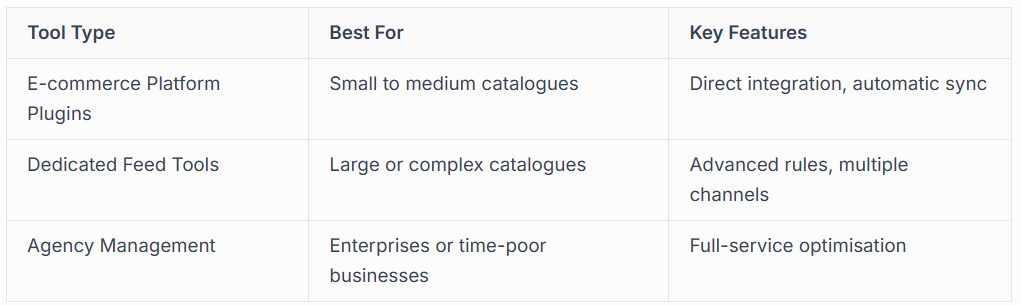
Popular platforms like Shopify, WooCommerce, and BigCommerce offer native Shopping integrations that sync product data automatically. These work well for straightforward implementations but may lack advanced optimisation features.
Dedicated feed management tools like Feedonomics, DataFeedWatch, or GoDataFeed provide sophisticated rules engines for transforming product data. You might automatically append "UK Stock" to titles, calculate discounted prices, or generate missing attributes based on category rules.
For businesses focused on core operations rather than advertising technicalities, working with specialists who handle feed optimisation, campaign management, and ongoing improvements makes economic sense. Similar to how Google Ads management services help tradespeople focus on their craft rather than campaign mechanics, feed management services keep Shopping ads performing whilst you concentrate on business growth.
Mobile Shopping Considerations
Over 65% of Google searches now occur on mobile devices, making mobile optimisation non-negotiable for google shopping ads success. Mobile users behave differently from desktop searchers, showing less patience for slow loads and greater intent to purchase immediately when ready.
Mobile-Specific Optimisation
Ensure your product pages load in under 3 seconds on mobile connections. Google's algorithm factors page speed into quality scores, affecting both ad rank and cost-per-click. Compress images, minimise code, and implement caching to improve mobile performance.
Mobile product pages need:
- Large, tappable buttons for "Add to Cart" and "Buy Now"
- Minimal form fields during checkout
- Mobile payment options (Google Pay, Apple Pay)
- Clear product information visible without excessive scrolling
- Quick-loading, high-resolution images that zoom easily
Phone number click-to-call buttons convert exceptionally well for businesses offering both products and services. Someone browsing power tools might prefer calling to discuss a larger project rather than buying a single item online.
Test your Shopping ads and landing pages on actual mobile devices, not just desktop browsers resized. Real-world mobile experience often differs from desktop simulations, revealing issues with touch targets, readability, or checkout flow.
Future Trends in Shopping Ads
The google shopping ads landscape continues evolving rapidly, with automation, AI, and new formats reshaping how advertisers approach product campaigns. Staying ahead of trends provides competitive advantages as capabilities expand.
Machine learning now powers bidding strategies that once required manual adjustment. These systems analyse thousands of signals (time, device, location, user behaviour) simultaneously, adjusting bids in real-time for maximum efficiency. The trend toward automation continues, with Performance Max representing Google's vision for simplified, AI-driven campaign management.
Visual search capabilities are expanding, allowing users to photograph products and find similar items through Google Lens. This creates new discovery opportunities for distinctive products that photograph well and have properly optimised images in feeds.
Augmented reality features enabling customers to visualise products in their space before buying represent another emerging trend. Whilst not universally applicable, businesses selling physical goods that customers need to see "in place" (furniture, décor, equipment) may find AR integration valuable as adoption grows.
Sustainability information including carbon footprint data and eco-certifications increasingly appear in Shopping listings as environmental concerns influence purchasing decisions. Products with verified sustainability credentials may see preferential treatment in algorithms as Google responds to user preferences.
Google shopping ads offer powerful opportunities for businesses selling physical products to connect with ready-to-buy customers at the exact moment they're searching. Success requires strategic campaign structure, diligent feed optimisation, and ongoing performance monitoring, but the returns justify the investment for product-based businesses. Whether you're managing campaigns yourself or need expert support, Connect SEO Ltd brings the same dedication to Shopping campaign success that we apply to Google Business Profile verification and local visibility, ensuring your products appear where customers are actively searching and ready to purchase.











