
Suspended Google Business Profile Guide: Restore Access in 2026
Imagine waking up to find your business missing from Google Maps. No calls, no clicks, and no new customers—just silence. If you’ve ever faced a suspended google business profile, you know how quickly everything can change.
This guide is here to help you take back control in 2026. We’ll break down why suspensions happen, how to restore your profile, and what steps you can take to protect your business for the future. You’ll learn about the types of suspensions, common triggers, exactly how to get reinstated, what evidence you need, and how to keep your profile safe. Let’s make sure your business stays visible, trusted, and thriving.
Understanding Google Business Profile Suspensions
Imagine waking up to see your business missing from Google Maps. For many, this is the reality of a suspended google business profile. Let’s break down what suspensions mean, how they happen, and why they matter.
What is a Suspension?
A suspended
google business profile means your business listing is either partially or completely removed from Google Search and Maps. There are two main types: hard and soft suspensions. Hard suspension takes your profile off public view, while soft suspension means the profile is visible, but you cannot manage or edit it.
Google notifies you by email and in your Business Profile dashboard. However, explanations are often vague, mentioning only "Policy Violation" or "Deceptive Content." For example, a local tradesman might wake up to find their profile gone with little warning or detail.
Suspensions are frustrating because Google rarely explains the exact issue, leaving owners in the dark about what went wrong.
Types of Suspensions: Hard vs Soft
There are two types of suspended google business profile cases to understand: hard and soft.
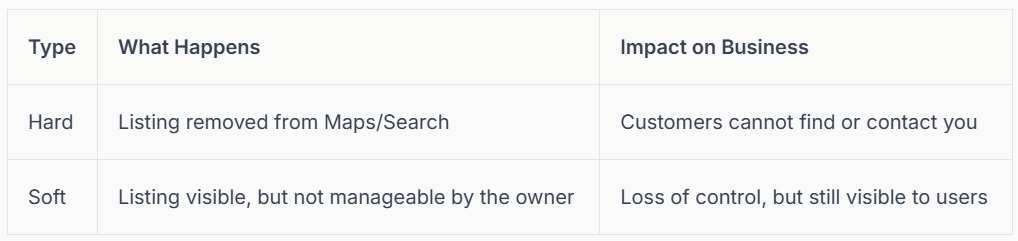
Hard suspensions are more severe, as they mean your top source of leads vanishes overnight. For example, a service-based company might lose all incoming calls if hit with a hard suspension.
Soft suspensions are less damaging but still restrict your ability to update or fix your listing. High-spam industries, such as locksmiths or home services, see more hard suspensions.
How Common Are Suspensions?
You might think a
suspended google business profile only happens to those breaking the rules, but that’s not always true. Even legitimate businesses face suspensions.
Google uses AI and algorithms to review millions of listings. After major updates, there are often waves of sudden suspensions. Industry reports suggest suspensions rose by 40% in 2025, with even compliant businesses affected.
So, even if you follow the rules, your listing can still be flagged by mistake or during automated sweeps. Staying alert is crucial.
Immediate Consequences for Businesses
The impact of a suspended google business profile is immediate and stressful. You can lose all inbound calls, quote requests, and website traffic overnight.
Revenue often drops sharply, especially for businesses relying on local search. For example, after a competitor’s suspension, their bookings fell by half in just a week.
Beyond the financial hit, business owners feel anxiety and worry about their reputation. Customers may wonder why your business "disappeared," leading to trust issues.
Why Google Suspends Profiles
Why does a suspended google business profile happen in the first place? Google’s main goal is to protect users from spam, fraud, or policy violations.
Profiles can be suspended due to user reports or during automated sweeps. Sometimes, even small mistakes trigger a suspension, leaving businesses "guilty until proven innocent." For a detailed breakdown, check out the Most common causes of suspension.
Understanding these triggers helps you avoid future issues and prepares you to act fast if your profile is ever affected.
Top Causes of Google Business Profile Suspension in 2026
Staying visible on Google Maps and Search is essential for business growth. Yet, a suspended google business profile can happen to anyone, often with little warning. Understanding the top causes in 2026 helps you take action before trouble strikes.
Common Triggers and Violations
Many businesses face a suspended google business profile after making seemingly harmless changes. Editing your business name, address, or main category can immediately trigger Google’s automated review. Using virtual offices, PO boxes, or shared mail centres is another red flag.
Multiple listings for the same business or address, especially in high-risk sectors like locksmiths or legal services, are frequently targeted. For example, a profile might be suspended after an address change, even if the move is legitimate. To dive deeper into these triggers and ways to resolve them, see Why your Google Business Profile got suspended.
Algorithmic Sweeps and Manual Suspensions
Google’s AI-driven systems run ongoing algorithmic sweeps, scanning profiles for suspicious activity or inconsistencies. These reviews can result in a suspended google business profile overnight, especially after major Google updates.
Manual suspensions also occur when users report issues using the “Suggest an Edit” feature. For instance, after a large algorithm update in 2025, many businesses experienced bulk suspensions despite following the rules. The increased use of automation means even minor errors can have big consequences.
Account-Related Issues
Your Google account health directly affects your profile’s safety. If your main account is not in good standing, or if you’ve granted access to agencies or partners with a poor track record, you risk a suspended google business profile.
A common example is a marketing agency with prior violations managing multiple client profiles, leading to widespread suspensions. Regularly auditing your access list and removing risky or inactive users is now a must for every business.
Content and Listing Violations
Content-related mistakes are a major reason for a
suspended google business profile. Keyword stuffing in your business name, listing false opening hours, or including promotional phrases in descriptions can all trigger suspensions.
Google also penalises duplicate content, fake reviews, or uploading text-heavy or repeated images. For example, profiles have been suspended for claiming to be “Open 24 Hours” when not, or for sharing the same review text across multiple listings.
Location and Address Issues
Google requires a real, verifiable physical presence for each business listing. Using coworking spaces, virtual offices, or frequently changing your address can quickly result in a suspended google business profile.
Service-area businesses sometimes use home addresses incorrectly, or create multiple listings at one location. Always ensure your address is legitimate and matches your business documents. Google’s rules in 2026 are stricter than ever, so accuracy and transparency are essential.
Step-by-Step Guide to Restoring Access to a Suspended Google Business Profile
Facing a suspended google business profile can feel overwhelming, but you are not alone. Whether your listing vanished overnight or you received a confusing email, there is a clear path to getting your business back online. Let us walk through each step together so you can restore your profile, regain trust, and welcome customers again.
Step 1: Identify Your Suspension Type and Reason
Start by logging into your Google Business Profile dashboard. Look for any banners or notifications indicating your profile is suspended. You should also check your email inbox for a message from Google explaining the suspension.
Google usually provides very limited information, often citing “Policy Violation” or “Deceptive Content” without further details. Read carefully, as the type of suspension impacts your next steps. Hard suspensions mean your profile is removed from Maps and Search, while soft suspensions keep your listing visible but lock out management features.
Here is a simple table to help you identify your case:
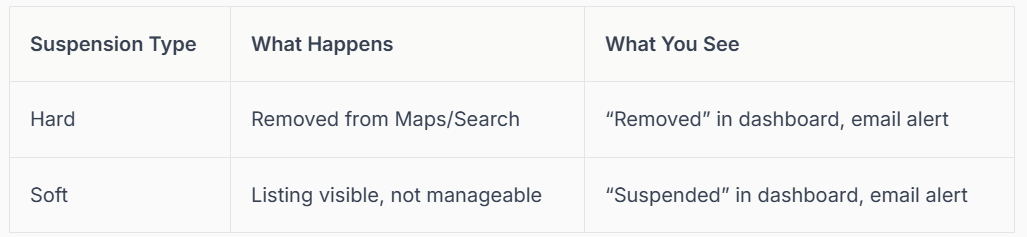
Knowing the exact status of your suspended google business profile is essential before moving forward.
Step 2: Review Google’s Latest Guidelines (2026 Update)
Before taking any action, read Google’s most recent Business Profile guidelines line by line. The rules change frequently, especially as AI checks become stricter in 2026.
Pay close attention to:
- Business name formatting
- Address and physical location requirements
- Category selection
- Description content
For example, including a phone number or social media handle in your profile description can now trigger a suspended google business profile. Review all updates since last year, as even small changes can result in a suspension.
If you are unsure about a rule, refer to Google’s official support articles linked in your suspension email. This step ensures you do not repeat the same mistake when you appeal.
Step 3: Audit Your Profile and Access List
Next, review every detail of your suspended google business profile for accuracy and compliance. Check your business name, address, phone number, categories, and operating hours. Remove any outdated or incorrect information.
Audit your access list as well. Remove inactive users, agencies, or partners—especially if their Google accounts have a history of violations. Every collaborator should have a Google account in good standing.
Here are some quick audit tips:
- Confirm all profile info matches your official documents.
- Remove agencies or users you no longer work with.
- Look for any recent changes that might have triggered the suspension.
A thorough audit can prevent future problems and speed up reinstatement of your suspended google business profile.
Step 4: Gather and Prepare Reinstatement Evidence
Google will ask for clear, verifiable evidence that your business is real and operating at the claimed location. Collect the following documents:
- Business licence and registration documents
- Recent utility bills with your business address
- High-quality photos of your storefront, signage, or office
- Proof of active business operations (receipts, invoices, etc.)
Make sure all documents are up to date and match the details on your suspended google business profile. Create a checklist to organise your evidence. The more comprehensive your package, the faster Google can verify your claim.
Example: A business owner submitted a full set of documents, including a photo of their branded sign next to the street address. Their profile was reinstated within a week.
Step 5: Submit Your Appeal via Google’s Reinstatement Tool
Now it is time to appeal. Use Google’s Business Profile Appeals Tool accessible via the dashboard or your suspension email. Carefully fill in all required details and upload your prepared evidence.
- Be clear, honest, and factual in your explanation.
- Double-check that all documents are attached and legible.
- Tell your story briefly, focusing on why your suspended google business profile should be reinstated.
The average processing time is 1–3 weeks, but it can take longer during busy periods. For a detailed walkthrough of the process, see the Google Business Profile reinstatement steps.
If your appeal is successful, you will receive an email confirming reinstatement. If not, do not worry—there are still steps you can take.
Step 6: Follow Up and Escalate If Needed
After submitting your appeal, monitor your email and Google dashboard for updates. If you do not hear back within the stated timescale, prepare to follow up with Google Support.
Keep your reference number handy. When contacting support, be polite and persistent. If your initial appeal is denied, you can request an additional review with updated evidence.
Some businesses have had their suspended google business profile reinstated after a second or even third attempt, so persistence matters.
Step 7: Special Cases—Multi-Location and High-Risk Businesses
If you manage multiple locations or operate in a high-risk industry, you may need extra documentation for each branch. Google often requests separate proof for every address, such as photos of each storefront and unique utility bills.
Coordinate appeals carefully, submitting evidence for each location in your suspended google business profile. Franchises and service-area businesses should ensure every listing complies with Google’s guidelines.
Example: A multi-location business submitted full documentation for each branch and was reinstated across all profiles after a thorough review.
Essential Evidence and Documentation for Google Reinstatement in 2026
Getting your suspended google business profile reinstated starts with presenting the right evidence. Google wants to see clear, undeniable proof that your business exists at the stated location and operates as described on your profile. Without this, your business could remain invisible to new customers, and your competitors may fill the gap.
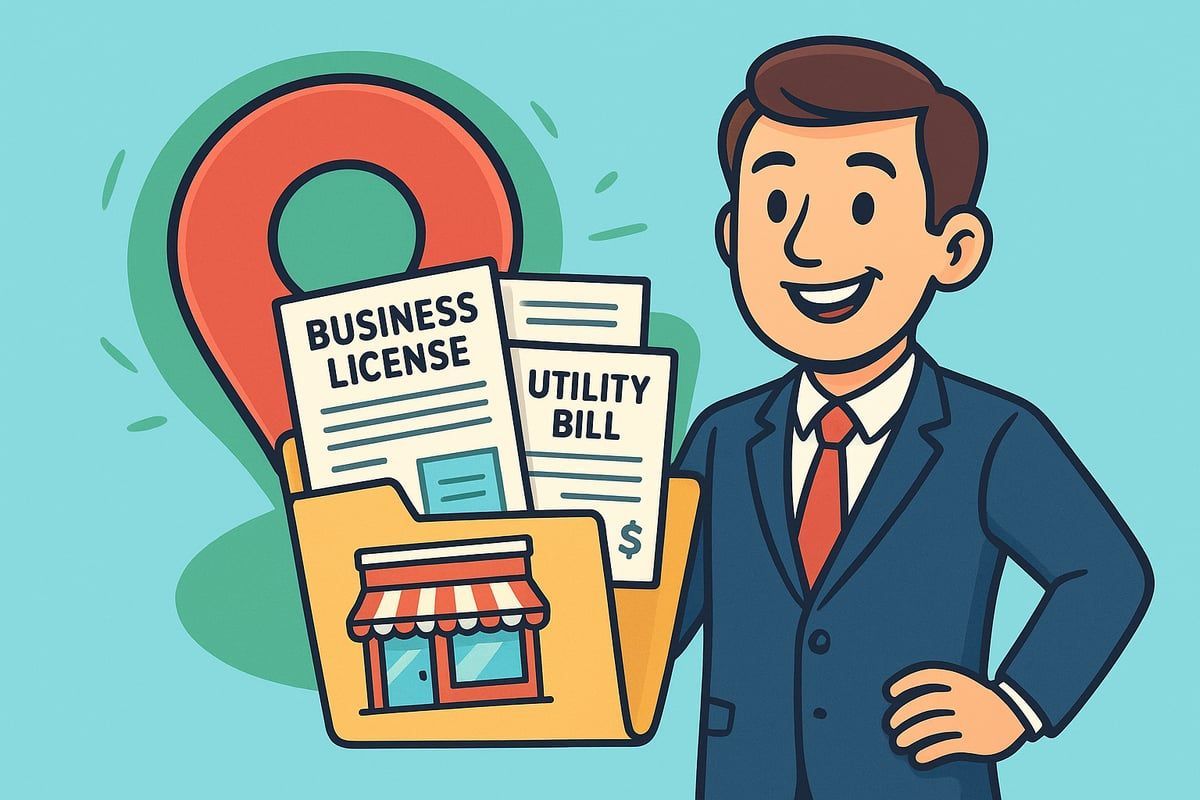
What Google Wants: Evidence Checklist
For a suspended google business profile, Google expects a precise package of evidence before considering reinstatement. Here’s what you should gather:
- Business licence or registration: Official paperwork showing your business name and address.
- Utility bill: A recent bill (gas, electric, water, or internet) matching your listed address.
- Photos: Clear images of your storefront, permanent signage, and if possible, your business interior.
- Proof of operations: Receipts, invoices, or evidence of active business activity.
Imagine a local café owner submitting a folder with all these items. Their suspended google business profile was quickly restored because the documents matched perfectly and proved their real-world presence.
Tips for Collecting and Presenting Evidence
Quality and clarity are key when submitting evidence for your suspended google business profile. Here are some tips to help your case stand out:
- Use high-resolution, recent photos—avoid anything blurry or outdated.
- Double-check that all details on your documents match your Google profile.
- Scan paperwork in colour, ensuring text and addresses are readable.
- Avoid mistakes like sending expired licences or unclear images.
Here’s a quick comparison:
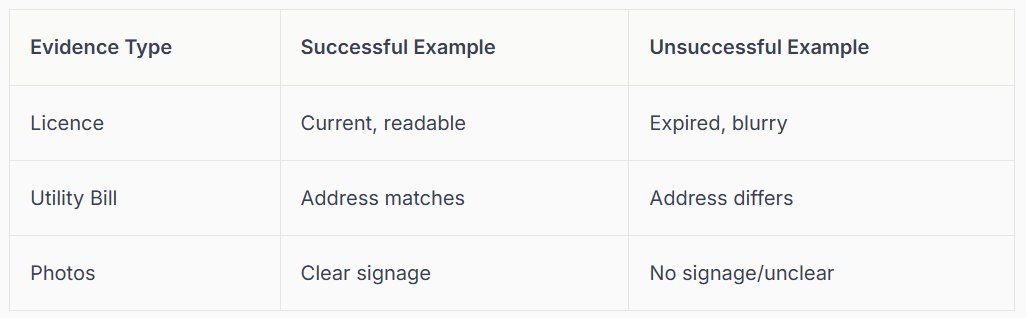
By focusing on accuracy and quality, you give your suspended google business profile the best chance at reinstatement.
Appealing for Multiple Locations
If your suspended google business profile covers several locations—like a franchise or chain—each branch needs its own set of documents. Google checks every location for consistency and accuracy.
- Provide business licences and utility bills for every site.
- Ensure the Name, Address, and Phone number (NAP) are identical on your profile and in your submitted paperwork.
- Take separate photos for each location, showing unique features or signage.
For example, a bakery with three shops had each suspended google business profile reinstated after submitting full documentation for all addresses, proving each was genuine and open.
What to Do If Your Appeal Is Denied
Sometimes, even with care, Google may deny your suspended google business profile appeal. If this happens:
- Review Google’s feedback and correct any mistakes.
- Update or replace unclear or outdated documents.
- Reapply with improved evidence.
- If you’re stuck, seek advice from trusted experts or the Google support community.
With the 40% rise in Google Business Profile suspensions and longer appeal times in recent years, persistence and proper documentation are more important than ever. Many businesses succeed on their second or third try, so do not give up if your first appeal is unsuccessful.
How to Prevent Future Suspensions and Protect Your Google Business Profile
Keeping your Google Business Profile healthy is much more than a one-off task. Prevention is always easier than fighting to restore a suspended google business profile. Let’s explore the steps you can take to avoid headaches and keep your business visible, trusted, and thriving.
Best Practices for Ongoing Compliance
The foundation of avoiding a suspended google business profile is strict adherence to Google’s guidelines. Always use a real, verifiable address for your business. Virtual offices, PO boxes, or mail centres are not accepted and can trigger suspensions quickly.
Make changes gradually. Avoid updating your business name, address, and categories all at once, as this can raise red flags. Regularly check your profile for accuracy, especially after any business changes. For service-area businesses, remember to hide your address if you don’t serve customers at your location. These habits protect your listing and build trust with Google and customers alike.
Managing Access and Trusted Partners
Who you give access to matters. Limit your Google Business Profile to trusted team members and reputable agencies. Granting access to users or partners with a history of problems can put you at risk of a suspended google business profile.
Audit your access list often. Remove inactive users or agencies that no longer support your business. If you change agencies, always check their standing first. One business avoided a lengthy suspension simply by removing an agency with previous violations before Google’s next review.
Avoiding Common Triggers and Policy Violations
Many suspensions stem from avoidable mistakes. Never stuff keywords into your business name, create duplicate listings, or buy fake reviews. Listing false opening hours or misrepresenting your services can lead to a suspended google business profile.
Be truthful in every field. Do not say you’re “open 24 hours” if you are not. Stick to your actual business categories and only use images and descriptions relevant to your real-world business. Following these rules keeps your profile safe from sudden penalties.
Monitoring for Suspicious Activity and Algorithmic Sweeps
Google’s automated systems and manual checks are always evolving. To protect your profile, use monitoring tools that alert you to unauthorised changes or suspicious edits. If you receive a notification about your suspended google business profile, act quickly.
Respond promptly to any alerts or emails from Google. One business owner spotted a suspicious edit to their listing and corrected it before it led to suspension. Regular monitoring is your best defence. For more in-depth strategies, check out this Troubleshooting Google Business Profile issues guide.
Staying Informed on Google Policy Updates (2026)
Google updates its policies regularly, especially as new scams and spam tactics emerge. Subscribe to Google’s official updates, industry blogs, and relevant forums. Attend webinars or local SEO training to stay ahead of the curve and avoid a suspended google business profile.
Many businesses have avoided trouble simply by learning about rule changes before they took effect. For example, staying updated on the 2026 guidelines helped one owner avoid a policy breach that caught out several competitors.
When to Seek Expert Help for Profile Management
Sometimes, even with the best intentions, you may find yourself at risk of a suspended google business profile, especially if you have multiple locations or complex account histories. Don’t hesitate to seek expert help if you experience repeated suspensions or complicated reinstatement processes.
Professional support can speed up your restoration process and help you future-proof your listing. Industry case studies show that businesses restored with expert intervention often stay compliant longer and avoid repeated issues. For insight into the growing challenges of suspensions and appeals, see Google Business Profile Suspensions Rise.
Professional Google Business Profile Support from Connect SEO
Why does verification really matter? Without proper verification, your business might not show on Google Maps at all. Customers are less likely to trust unverified businesses, and you risk competitors with verified profiles appearing above you.
At Connect SEO, we offer a fast, professional Google Business Profile verification service. Our UK-based team gets your business visible on Google Search and Maps, supports you with profile fixes, manages evidence gathering, and handles appeals. Founded by a tradesman who scaled his business with GBP, we know exactly what it takes to keep your profile live and thriving.
Frequently Asked Questions About Suspended Google Business Profiles
If you have suddenly found your business missing from Maps or Search, you are not alone. Let us answer the most common questions about a suspended google business profile so you know what to expect and how to get back on track.
What Causes a Google Business Profile Suspension?
A suspended google business profile usually results from breaking Google's rules, often unintentionally. Common triggers include updating business name, address or categories, listing a PO box or virtual office, or operating in high-risk industries like locksmiths or home services. Google's AI is stricter than ever, especially after their 2025 review policy changes, as explained inGoogle's 2025 Review Policy Changes.
How Long Does Reinstatement Take?
The reinstatement process for a suspended google business profile can take anywhere from one to three weeks. If your case is complex or documents are missing, it might take longer. Factors such as the completeness of your submitted evidence and Google's current backlog play a role. Patience and thoroughness make all the difference when waiting for results.
Can You Still Appear on Google If Suspended?
It depends on the type of suspension. With a soft suspension, your suspended google business profile is still visible to customers, but you cannot manage or edit it. In a hard suspension, your profile is completely removed from Google Maps and Search, making your business invisible until reinstated.
What Should I Do If My Appeal Is Denied?
If your appeal for a suspended google business profile is denied, do not lose hope. Review the evidence you submitted, fix any mistakes, update your documents, and request another review. Sometimes, reaching out to expert support or using Google’s forums helps. Persistence and accurate information can make a big difference.
How to Avoid Suspensions in the Future?
To avoid a suspended google business profile, always use accurate information and a real, verifiable address. Avoid risky edits, keyword stuffing, and granting access to untrusted users. Stay up to date with Google’s latest policies, which are changing rapidly as outlined in
Google's 2025 Review Policy Changes.
Are Certain Industries More at Risk?
Yes, some sectors face more scrutiny and risk of a suspended google business profile. Industries like locksmiths, legal services, and home repairs often see higher suspension rates because of frequent spam and abuse. If you operate in these fields, follow all guidelines closely and monitor your profile for changes.
What Evidence Does Google Require for Reinstatement?
For reinstating a suspended google business profile, Google wants to see clear proof your business is real and active:
- Business licence or registration
- Utility bills matching your listed address
- Photos of your physical signage or storefront
- Evidence of daily business operations
Consistency and clarity are essential for a successful appeal.
We know how overwhelming it can feel when your Google Business Profile gets suspended—one minute, you’re connecting with customers, the next, you’re invisible online. Restoring access isn’t just about ticking boxes, it’s about safeguarding your livelihood and reputation. If you’re stuck or simply want peace of mind that your profile is fully verified and optimised, you don’t have to face it alone. We’re here to help you navigate the steps, handle the paperwork, and keep you visible in Maps and search. Let’s get your business back where it belongs—right in front of your customers.
Contact connect SEO Today











