
Google Maps Business Edit: A Complete Guide for 2026
Keeping your business information accurate on Google Maps isn't just good practice – it's essential for attracting customers and staying competitive in local search. When potential customers search for services in your area, they rely on the details displayed in your Google Business Profile to make quick decisions about which business to contact. If your opening hours are wrong, your phone number is outdated, or your address is incorrect, you're not just losing potential customers – you're actively sending them to your competitors. Understanding how to perform a google maps business edit ensures your business appears professional, trustworthy, and accessible to the people searching for exactly what you offer.
Why Google Maps Business Edit Matters for Your Visibility
Your Google Business Profile serves as your digital shopfront, appearing when customers search for businesses like yours on Google Search and Maps. Every detail matters, from your business category to your opening hours, and keeping this information current requires regular attention.
Many business owners don't realise that Google allows direct editing of business information from both Search and Maps, making it easier than ever to maintain accurate listings. However, the process isn't always straightforward, particularly if you're managing multiple locations or dealing with verification issues.
Here's why google maps business edit capabilities are crucial:
- Customers make decisions based on accurate information
- Outdated details damage your credibility and trust
- Incorrect hours lead to frustrated customers and negative reviews
- Missing information means lost opportunities to competitors
- Regular updates signal to Google that your business is active
When your profile is complete and current, you're more likely to appear in the Local Pack – those top three results that appear with map pins when someone searches for local services. This prime positioning can dramatically increase your visibility and customer enquiries.

Understanding Your Editing Options
You have several methods available for performing a google maps business edit, each suited to different situations and preferences. The most direct approach involves editing through the Google Business Profile Manager, but you can also make changes directly from Google Search results or the Maps app itself.
For verified business owners, the process is straightforward. You simply claim your business, verify ownership, and gain full editing rights. However, things become more complex if you're dealing with verification challenges or suspended profiles, which require specialist knowledge to resolve properly.
Step-by-Step Guide to Editing Your Business Information
Making changes to your Google Business Profile requires accessing the right platform and navigating to the correct settings. Whether you're updating basic information or adding new services, the process follows a logical sequence that becomes second nature once you've done it a few times.
Accessing Your Business Profile for Editing
First, you'll need to access your
Google Business Profile Manager. Sign in with the Google account associated with your business listing, then select the profile you want to edit if you manage multiple locations.
The dashboard displays all your business information in sections, making it easy to identify what needs updating. You'll see categories for basic information, contact details, hours, services, and more.
Quick access methods:
- Direct URL: Visit business.google.com and sign in
- Google Search: Search for your business name and click "Edit profile"
- Google Maps: Find your business and select "Edit"
- Mobile app: Download the Google Business Profile app for on-the-go edits
Each method offers the same editing capabilities, though the interface varies slightly depending on your access point. The mobile app provides convenient options for business owners who need to update information whilst away from their desk.
Editing Core Business Details
Your business name, address, and phone number (NAP) form the foundation of your local SEO presence. These details must be consistent across all online platforms, and any google maps business edit you make should maintain this consistency.
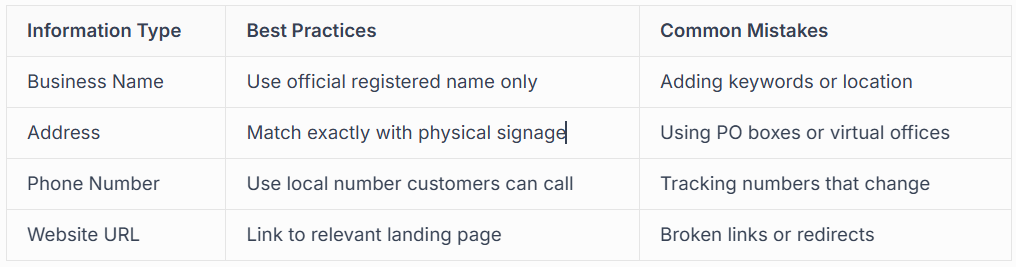
When editing your address, be particularly careful. Google's algorithms detect address changes and may require re-verification, especially if the change is significant. Moving to a new location requires proper planning to maintain your existing reviews and ranking signals.
Your business category is equally important. Select the most specific category that describes your primary service, then add additional categories for secondary offerings. This helps Google understand when to display your business in search results.
Updating Hours and Special Dates
Accurate opening hours prevent customer frustration and wasted journeys. Regular google maps business edit sessions should include reviewing your hours, especially around holidays and special events.
Google allows you to set regular hours, special hours for holidays, and even "more hours" for specific departments or services. This flexibility ensures customers always have the correct information, regardless of when they search.
Setting up comprehensive hours information:
- Regular weekly hours for standard trading
- Holiday hours for Christmas, Easter, and bank holidays
- Special event hours for sales or extended trading
- Service-specific hours if you offer multiple services with different availability
- Temporarily closed status for unexpected closures
The platform also supports marking your business as temporarily closed, which is essential during renovations or unforeseen circumstances. This prevents negative reviews from customers who arrive to find you closed when your profile says you're open.

Managing Visual Content and Service Descriptions
Photos and detailed service descriptions transform your listing from basic information into a compelling business showcase. Visual content particularly influences customer decisions, with profiles containing photos receiving significantly more engagement than those without.
Optimising Your Photo Gallery
Your photo gallery should tell the story of your business through high-quality images that showcase your premises, team, products, and services. Regular additions keep your profile fresh and signal to both Google and customers that your business is active and well-maintained.
When performing a google maps business edit focused on photos, consider these categories:
- Exterior photos: Help customers identify your location
- Interior shots: Show your workspace and facilities
- Team photos: Build trust through personal connection
- Product images: Display what you offer
- Service delivery: Show your work in action
- Before/after: Demonstrate results and quality
Google's algorithms favour profiles with recent photos, so aim to add new images monthly. You'll also receive notifications when customers add photos to your listing, allowing you to monitor user-generated content that represents your business.
Adding and Updating Services
The services section allows you to list specific offerings with descriptions and pricing. This detailed information helps customers understand exactly what you provide before they contact you, qualifying leads and reducing time-wasting enquiries.
Google provides tools for adding products and services through the Product Editor, making it straightforward to showcase your complete range. Each service can include a name, description, price range, and even a direct booking link.
For trade businesses like electricians, plumbers, or builders, detailed service descriptions combined with strategic local SEO create powerful lead generation opportunities. Customers searching for specific services see exactly what you offer, building confidence before they even contact you.
Advanced Editing Features and Attributes
Beyond basic information, Google Business Profile offers numerous attributes and features that enhance your listing's usefulness and appeal. These advanced options require thoughtful consideration but can significantly impact your visibility and customer engagement.
Business Attributes That Influence Customer Choice
Attributes are predefined characteristics that describe your business features and amenities. They appear as tags on your profile and help customers filter search results based on their specific needs.
Common attribute categories include:
- Accessibility features (wheelchair access, accessible parking)
- Amenities (free Wi-Fi, parking availability)
- Payment options (contactless, credit cards, cash)
- Service options (online estimates, emergency services)
- Crowd information (popular times, wait times)
Not all attributes apply to every business type, so Google displays only relevant options based on your category. Regular google maps business edit reviews should include checking whether new attributes have become available that suit your business.
Some attributes carry particular weight for customer decisions. For instance, "emergency services available" for tradespeople or "free quotes" for service businesses can be deciding factors when customers compare multiple options.
Managing Questions and Answers
The Q&A section allows potential customers to ask questions directly on your profile, with answers visible to everyone who views your listing. This crowdsourced information section requires active management to ensure accuracy and helpfulness.
You can proactively add questions and answers to address common enquiries, controlling the narrative and providing essential information upfront. This reduces repetitive customer service queries whilst improving the value of your profile.
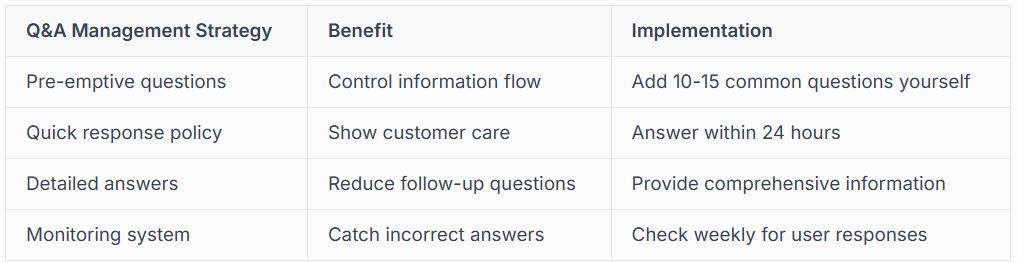
When customers ask questions, respond promptly and professionally. Your answers reflect your customer service quality and business professionalism. If users provide incorrect answers to questions, you can report them or add your own correct answer to clarify.

Handling Reviews and Customer Interaction
Your review management significantly impacts your local search performance and customer acquisition. While you cannot edit reviews directly, how you respond to them through google maps business edit features shapes customer perceptions and influences Google's assessment of your business quality.
Responding to Reviews Professionally
Every review deserves acknowledgement, whether positive or negative. Your responses demonstrate your commitment to customer satisfaction and provide context for future customers reading the reviews.
Review response best practices:
- Thank customers for positive feedback specifically
- Address negative reviews with empathy and solutions
- Keep responses professional, never defensive
- Respond within 48 hours to show active management
- Use keywords naturally when thanking customers for mentioning specific services
Negative reviews particularly benefit from thoughtful responses. Acknowledging issues, explaining circumstances, and offering resolutions show prospective customers that you care about service quality. Sometimes a professional response to a negative review builds more trust than a dozen positive reviews without engagement.
For businesses struggling with unfair or fake reviews, specialist review management services can help address policy violations whilst maintaining profile integrity.
Building a Review Generation Strategy
Proactive review collection strengthens your local search presence and provides social proof for potential customers. However, requesting reviews must follow Google's guidelines to avoid penalties or profile suspension.
Create natural opportunities for satisfied customers to leave reviews by providing excellent service, then making the process easy. Send follow-up emails with direct links to your review page, or create QR codes that customers can scan on-site.
Never offer incentives for reviews, purchase fake reviews, or write reviews for your own business. These practices violate Google's policies and can result in profile suspension requiring professional reinstatement services to recover.
Common Google Maps Business Edit Challenges
Even experienced business owners encounter obstacles when managing their Google Business Profile. Understanding common issues and their solutions saves time and prevents frustration during routine maintenance.
Verification Problems and Solutions
Verification proves you're authorised to manage a specific business listing. Without verification, your editing capabilities are severely limited, and your business may not appear in search results at all.
Google offers several verification methods, including postcard, phone, email, and instant verification for eligible businesses. Each method has specific requirements and processing times that vary based on your business type and location.
Verification challenges often include:
- Postcards not arriving within the expected timeframe
- Phone verification unavailable for your business category
- Email verification not offered for your domain
- Instant verification failing to recognise your business
- Multiple locations requiring individual verification
When standard verification fails, professional verification services navigate complex cases, including businesses operating from home, multiple locations at the same address, or categories with stricter verification requirements.
Dealing with Unauthorised Edits
Sometimes you'll discover changes to your profile that you didn't make. This occurs when users suggest edits through Google Maps, and Google's algorithms automatically approve changes they deem credible.
Understanding how to manage your business identity includes monitoring for unauthorised changes and knowing how to revert them. Regular audits of your profile information help catch these changes before they impact your business operations.
You can view suggested edits in your dashboard and choose to accept or decline them. For information that's been changed automatically, simply edit it back to the correct details and provide supporting documentation if Google requests verification.
Monitoring and Measuring Your Profile Performance
Google Business Profile provides insights that reveal how customers find and interact with your listing. These metrics guide your google maps business edit strategy, showing which information customers value most and where improvements yield the best results.
Understanding Your Profile Insights
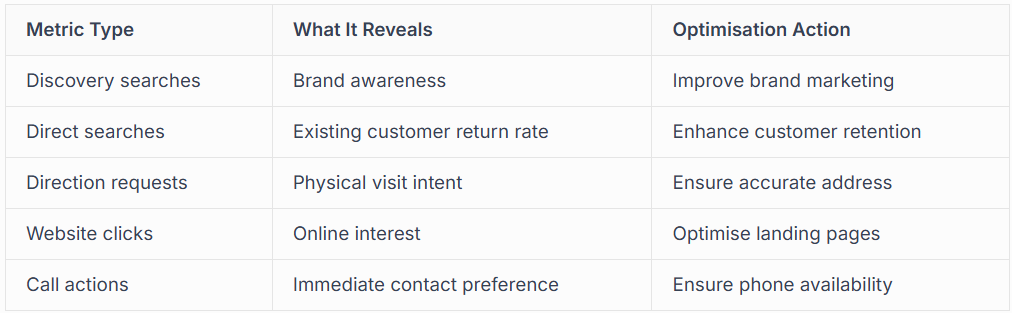
The insights dashboard displays views, searches, actions, and customer behaviour over time. This data helps you understand your profile's effectiveness and identify optimisation opportunities.
Key metrics to monitor include:
- Search queries: How customers find your business
- Views: Profile and photo view counts
- Actions: Calls, website visits, direction requests
- Photo insights: Which images generate most engagement
- Competitor comparisons: How you rank against similar businesses
Tracking these metrics monthly reveals trends and seasonal patterns. You might discover that certain services generate more enquiries during specific months, or that updated photos correlate with increased customer actions.
Creating a Regular Maintenance Schedule
Successful google maps business edit management requires consistency rather than sporadic attention. Establishing a regular schedule ensures your information stays current and your profile continues performing optimally.
A monthly review covers most businesses' needs, but those with frequently changing information may require weekly attention. Schedule time to review insights, update photos, respond to reviews, check information accuracy, and add new services or products.
Comprehensive Google Business Profile management services handle this ongoing maintenance professionally, ensuring your profile receives consistent attention even when you're focused on running your business. This proves particularly valuable for trade businesses where time on-site with customers limits administrative capacity.
Integration with Broader Local SEO Strategy
Your Google Business Profile doesn't exist in isolation. It functions as part of a broader local SEO ecosystem that includes your website, directory listings, social media presence, and customer reviews across multiple platforms.
Maintaining Consistency Across Platforms
NAP consistency across all online mentions of your business strengthens local search signals. Every google maps business edit should consider how changes affect your broader online presence and ensure consistency everywhere your business appears.
When you update your phone number on Google, update it simultaneously on your website, Facebook, industry directories, and any other platforms where your business has a presence. Inconsistent information confuses both customers and search engines, potentially harming your rankings.
Create a master document listing all platforms where your business appears, then reference this during any google maps business edit session. This systematic approach prevents oversights and maintains the consistency that local SEO requires.
Connecting Your Profile to Your Website
Your Google Business Profile and website should work together seamlessly. The website URL in your profile should lead to a relevant landing page that continues the conversation started in your Google listing.
For businesses offering multiple services, consider creating location-specific landing pages that match your Google Business Profile information. This relevance strengthens the connection between your profile and website, potentially improving both your local search rankings and conversion rates.
Professional website development services can create optimised landing pages designed to convert the traffic your Google Business Profile generates, maximising the return on your local SEO efforts.
Future-Proofing Your Google Business Profile
Google continuously evolves its Business Profile features, adding new capabilities and changing how information displays in search results. Staying informed about these changes ensures your google maps business edit strategy remains effective as the platform develops.
Keeping Up with Feature Updates
Google announces major updates through official channels, but many smaller changes roll out gradually without formal announcements. Resources like Reporting Ninja's management guide help business owners stay informed about new features and best practices.
Subscribe to Google's official Business Profile updates and join communities where local SEO professionals share insights about platform changes. This knowledge allows you to adopt new features early, potentially gaining competitive advantages before other businesses in your area.
Preparing for Algorithm Changes
Google's local search algorithm considers hundreds of factors when determining which businesses to display and in what order. Whilst you cannot control the algorithm, maintaining a complete, accurate, and actively managed profile positions your business favourably regardless of algorithm adjustments.
Focus on sustainable practices rather than trying to game the system. Authentic customer reviews, accurate information, regular updates, and genuine engagement with customers create long-term success that withstands algorithm changes.
For businesses seeking expert guidance through the complexities of Google Business Profile management and local SEO, professional support ensures your profile remains optimised as Google's requirements evolve.
Avoiding Profile Suspension and Penalties
Google maintains strict quality guidelines for Business Profiles, and violations can result in suspension or permanent removal. Understanding these guidelines prevents costly mistakes that could make your business invisible to local searchers.
Common Guideline Violations
Many suspensions result from unintentional violations rather than deliberate manipulation. Common issues include using a virtual office or PO box as your business address, adding keywords to your business name, creating multiple listings for the same location, or representing a service area business incorrectly.
High-risk practices to avoid:
- Keyword stuffing in business name or description
- Creating fake reviews or review exchanges
- Using virtual addresses for service area businesses
- Operating multiple businesses from residential addresses
- Selecting inappropriate business categories
- Adding phone numbers that forward to call centres
If your profile becomes suspended, immediate action is essential. Specialist reinstatement services understand Google's appeal process and can significantly increase your chances of successful recovery.
Building a Compliant Profile
Compliance starts with understanding Google's guidelines and applying them consistently. Every google maps business edit should align with these requirements, ensuring your profile remains in good standing.
Read Google's Business Profile guidelines thoroughly, and when in doubt, err on the side of caution. The short-term gains from bending rules pale in comparison to the catastrophic impact of suspension, particularly for businesses that rely heavily on local search traffic.
Managing your Google Business Profile effectively requires consistent attention, accurate information, and understanding of Google's evolving requirements. Whether you're performing routine google maps business edit updates or navigating complex verification challenges, maintaining an optimised profile directly impacts your ability to attract and convert local customers. At Connect SEO Ltd, we provide comprehensive Google Business Profile verification and management services that keep your business visible in Maps and local search, handling everything from initial verification through ongoing optimisation and suspension recovery with the expertise of UK-based specialists who understand both your industry and local search systems.











