
Google Ads Keyword Planner: Complete Guide for 2026
Finding the right keywords can transform your local business's online visibility, and the google ads keyword planner remains one of the most powerful (and free) tools available in 2026. Whether you're running a verified Google Business Profile or planning your first paid campaign, understanding how to extract valuable keyword data helps you connect with customers actively searching for your services. This comprehensive guide walks you through everything you need to know about leveraging this essential tool for local search success.
What Is Google Ads Keyword Planner and Why It Matters
The google ads keyword planner is a free research tool within the Google Ads platform that helps businesses discover new keywords, analyse search volumes, and estimate costs for advertising campaigns. Originally designed for pay-per-click advertisers, this tool has become invaluable for anyone wanting to understand what their potential customers are searching for online.
For local businesses, particularly tradespeople and service providers, keyword data directly influences how you structure your Google Business Profile content and advertising strategy. When you know the exact phrases customers use when searching for your services, you can tailor your profile descriptions, posts, and paid campaigns to match that intent.
The Connection Between Keywords and Local Visibility
Your Google Business Profile works hand-in-hand with keyword research. When someone searches "emergency plumber near me" or "electrician in Manchester," Google matches those terms against the content in your profile, website, and reviews.
Key benefits of using keyword data for local businesses:
- Understand the exact language your customers use
- Identify seasonal trends in your industry
- Discover related services you might not have considered
- Optimise your profile for maximum visibility
- Plan advertising budgets based on actual search demand
The official Google Ads guide on using Keyword Planner provides excellent starting points, but applying these insights to local search requires additional strategy.
Getting Access to Google Ads Keyword Planner
Before diving into research, you'll need access to the tool itself. Unlike some premium SEO platforms, the google ads keyword planner is completely free, though you do need a Google Ads account.
Setting Up Your Account
Creating a Google Ads account takes just minutes, and you don't need to run active campaigns to access the Keyword Planner. Simply visit the Google Ads Keyword Planner page and follow the account creation process.
Here's what you'll need:
- A Google account (the same one you use for Gmail or Google Business Profile)
- Basic business information
- Billing details (though you won't be charged unless you run ads)

Once you're in, navigate to "Tools & Settings" in the top menu, then select "Keyword Planner" under the Planning section. You'll see two main options: "Discover new keywords" and "Get search volume and forecasts."
Understanding Account Limitations
Google provides different levels of data depending on your account activity. If you've never run ads, you might see search volume ranges (like "1K-10K") rather than precise numbers. Active advertisers typically receive more granular data.
For most local businesses, the range data still provides tremendous value when combined with your understanding of your market.
Discovering New Keywords for Local Services
The "Discover new keywords" feature is where most local businesses should start. This section helps you uncover terms and phrases related to your core services that you might not have considered.
Starting with Seed Keywords
Begin by entering 2-3 basic terms that describe your business. For example, if you're an electrician, you might enter:
- Electrician
- Electrical repairs
- Emergency electrical services
The google ads keyword planner then generates hundreds of related keywords, complete with average monthly searches, competition levels, and estimated bid costs.
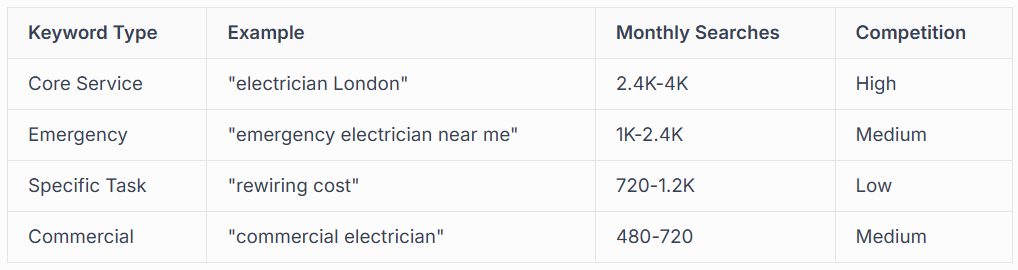
Filtering for Local Intent
Not all keywords are created equal for local businesses. The Keyword Planner allows you to filter results by location, which is crucial for understanding demand in your specific service area.
Steps to filter effectively:
- Click "Add filter" within the results
- Select your target location (city, region, or radius)
- Review monthly search volumes for your area
- Focus on keywords with local modifiers ("near me," city names, neighbourhoods)
Analysing Search Volumes and Competition
Raw keyword lists mean little without proper analysis. The google ads keyword planner provides three critical metrics that help you prioritise which keywords deserve your attention.
Understanding Monthly Search Volume
The "Avg. monthly searches" column shows how many times people search for each term. For local businesses, even keywords with 50-100 monthly searches can be valuable if they indicate strong commercial intent.
Consider this perspective: if you're a specialist boiler repair service, a keyword like "Worcester Bosch error code repair" might only show 60 monthly searches. However, every one of those searches represents someone with a specific, urgent need that you can fulfil.
Decoding Competition Levels
The "Competition" metric specifically refers to how many advertisers are bidding on that keyword. High competition usually means the keyword is commercially valuable, but it also means higher advertising costs.
For Google Ads campaigns, you'll want a mix:
- High competition keywords: Your core services that drive the most revenue
- Medium competition keywords: Related services with decent demand
- Low competition keywords: Niche services where you face less advertising co2mpetition
Evaluating Top of Page Bid Estimates
The bid range gives you a realistic expectation of what you'd pay per click if you advertised for that keyword. This information helps you budget effectively and identify opportunities.
If a keyword shows £8-£12 per click, that tells you two things: competitors find it valuable enough to pay premium prices, and you'll need strong conversion rates to make advertising profitable.

Creative Applications Beyond Basic Research
Whilst most people use the google ads keyword planner for straightforward keyword discovery, creative applications exist that can give local businesses a competitive edge.
Seasonal Planning and Trend Identification
The tool's historical metrics feature reveals seasonal patterns in search behaviour. For tradespeople, this intelligence is gold.
Example seasonal insights for different trades:
- Plumbers: "Boiler service" peaks September-November as heating season approaches
- Electricians: "Outdoor lighting installation" spikes November-December
- Roofers: "Roof leak repair" increases during autumn and winter months
- Gardeners: "Garden clearance" peaks March-April
By identifying these patterns, you can adjust your Google Business Profile posts and advertising budgets to match actual demand.
Competitor Research Strategy
Enter your competitors' website URLs into the google ads keyword planner to discover what keywords are associated with their sites. This reveals gaps in your own keyword strategy and highlights opportunities they might be missing.
The process works like this:
- Select "Start with a website" instead of entering keywords
- Input a competitor's domain
- Review the keywords Google associates with their content
- Identify valuable keywords you're not currently targeting
Content Planning for Your Website and Profile
Every keyword represents a question or need your potential customers have. Use this data to create blog posts, service pages, and Google Business Profile updates that directly address these queries.
If the keyword "landlord gas safety certificate cost" shows strong search volume, create dedicated content answering that question. Then optimise that content for both your website and your Google Business Profile description.
Integrating Keyword Data with Your Google Business Profile
Here's where the google ads keyword planner becomes particularly powerful for local businesses. The keywords you discover should directly inform how you structure and optimise your verified Google Business Profile.
Service Descriptions and Categories
Your primary and secondary business categories should align with high-volume keywords in your industry. If "emergency plumber" shows significantly more searches than "plumbing contractor," ensure your profile emphasises emergency services.
Optimisation checklist:
- Include high-value keywords in your business description (first 250 characters most important)
- Use keywords naturally in service descriptions
- Add location-specific keywords that match actual search patterns
- Update seasonally based on keyword trends
Google Business Profile Posts
Regular posts keep your profile active and provide opportunities to target specific keywords. The expert insight on using Keyword Planner suggest creating posts around medium-competition keywords where you can establish authority.
For instance, if you discover "underfloor heating installation cost" has moderate competition and decent search volume, create a post specifically addressing this topic with transparent pricing information.
Review Response Strategy
Keyword research can even improve how you respond to customer reviews. When customers use specific phrases in their reviews that match high-value keywords, reinforce those terms in your responses.
If a customer writes "The emergency callout was brilliant," and "emergency callout" is a target keyword, your response might naturally include: "Thank you for choosing our emergency callout service. We're always here when you need urgent help."
Building Effective Google Ads Campaigns from Keyword Research
Once you've identified valuable keywords, translating that research into profitable advertising campaigns requires strategic thinking. The google ads keyword planner provides forecasting features that help you plan budgets and set realistic expectations.
Creating Keyword Groups and Ad Groups
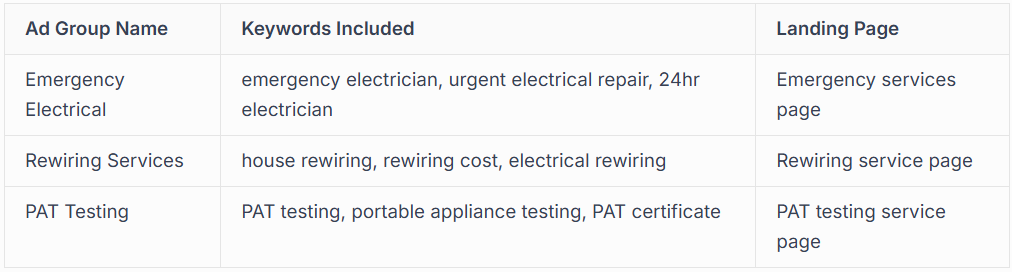
Rather than targeting every keyword individually, group related terms into themed ad groups. This allows you to create highly relevant ads that improve your Quality Score and reduce costs.
Example ad group structure for an electrician:
Budget Planning with Forecasts
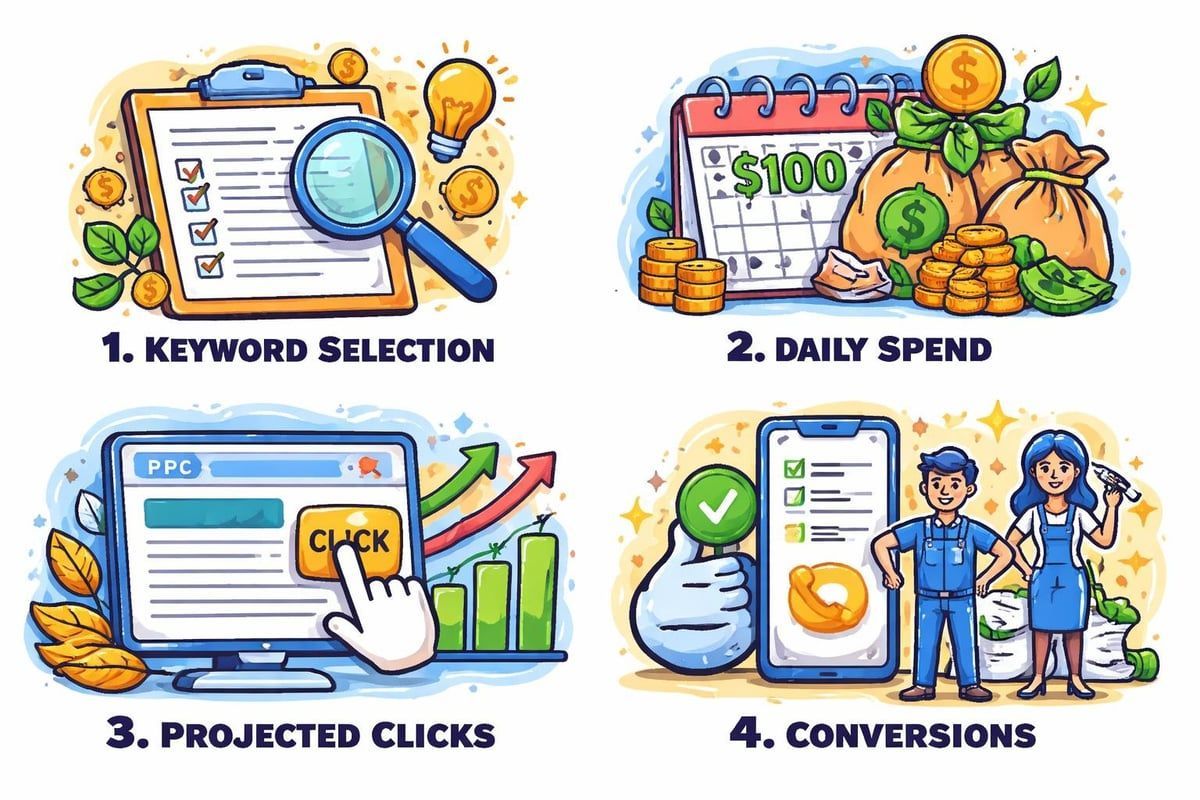
The "Get search volume and forecasts" feature lets you enter a list of keywords and a daily budget to see projected performance. This removes guesswork from campaign planning.
Input your shortlisted keywords and a proposed budget (say, £20 per day), and the tool predicts:
- Expected clicks per week
- Estimated impressions
- Average cost per click
- Potential conversion opportunities
These forecasts help you determine whether your budget is realistic for your goals or whether you need to either increase spending or target different, less competitive keywords.
Negative Keyword Identification
An often-overlooked feature of the google ads keyword planner is identifying what NOT to target. By reviewing the full keyword list, you'll spot irrelevant terms that might trigger your ads.
For example, if you're a professional electrician, you'd want to exclude keywords like "electrician salary," "electrician courses," or "electrician apprenticeships" as these indicate job seekers rather than customers.
Building a comprehensive negative keyword list from the start saves money and improves campaign performance.
Common Mistakes Local Businesses Make with Keyword Planner
Even with access to powerful data, it's easy to misinterpret or misuse the google ads keyword planner. Here are pitfalls to avoid, drawn from years of experience helping local businesses improve their digital presence.
Focusing Only on High-Volume Keywords
The biggest mistake is assuming higher search volume always means better opportunity. For local businesses, a keyword with 50 monthly searches and high commercial intent often outperforms a 5,000-search keyword with low intent.
"Electrician" might show 40,000 monthly searches, but "commercial electrician certification inspection London" with just 90 searches likely represents far more qualified leads if that's your service area.
Ignoring Geographic Variations
The Keyword Planner defaults to national or broad geographic searches unless you specify otherwise. Always filter by your actual service area to get relevant data.
A keyword might show 10,000 monthly searches nationally but only 120 in your city. Understanding this distinction prevents unrealistic expectations and helps you allocate resources appropriately.
Neglecting Long-Tail Keywords
Long-tail keywords (3+ words) typically show lower search volumes but higher conversion rates. Someone searching "emergency electrician Islington Sunday" knows exactly what they need and is ready to hire.
The google ads keyword planner excels at revealing these specific, high-intent phrases that competitors often overlook.
Treating Data as Static
Search behaviour evolves constantly. Economic changes, seasonal factors, new technologies, and even weather patterns influence what people search for. Review your keyword data quarterly at minimum, and monthly if you're actively advertising.
Advanced Features for Experienced Users
Once you're comfortable with basic keyword research, the google ads keyword planner offers advanced features that provide deeper competitive intelligence.
Historical Metrics and Trend Analysis
Access historical search volume data to identify long-term trends versus temporary spikes. This helps distinguish between fad searches and sustainable keyword opportunities.
For trades businesses, understanding multi-year trends can inform business development decisions. If searches for "smart home electrical installation" have increased 300% over three years, that signals a growing service area worth developing expertise in.
Device and Location Segmentation
Break down search volumes by device type (mobile, desktop, tablet) to understand how your customers search. Most local service searches now occur on mobile devices, which should influence your landing page design and
advertising strategy.
Similarly, location segmentation reveals which specific areas within your service region show the strongest demand for particular services.
Combining with Other Google Tools
The google ads keyword planner integrates with Google Trends, Google Analytics, and Google Search Console to provide comprehensive search intelligence.
Powerful integration workflow:
- Use Keyword Planner to identify potential keywords
- Check Google Trends to confirm rising interest
- Review Search Console to see which terms already drive traffic to your site
- Implement findings across your Google Business Profile and website
- Monitor Google Analytics for conversion performance
This holistic approach ensures your keyword strategy is data-driven at every stage.
Practical Keyword Research Workflow for Local Businesses
Let's put everything together into a repeatable process you can use quarterly to refine your local search strategy and advertising campaigns.
Your 8-Step Keyword Research Process
Step 1: Define Your Service Areas
List all services you offer and geographic areas you serve. Be specific-this forms the foundation of your research.
Step 2: Generate Seed Keywords
For each service, list 3-5 basic terms customers might use. Don't overthink this; start simple.
Step 3: Use the Discovery Tool
Enter your seed keywords into the google ads keyword planner's "Discover new keywords" feature. Apply location filters matching your service area.
Step 4: Export and Categorise
Download the results to a spreadsheet. Group keywords by service type, intent (informational vs. transactional), and priority level.
Step 5: Analyse Competition and Viability
For each keyword group, assess whether you can realistically compete based on competition level, bid costs, and your budget.
Step 6: Map Keywords to Content
Assign each valuable keyword to specific pages on your website or sections of your Google Business Profile.
Step 7: Plan Your Campaigns
Use the forecasting feature to build realistic campaign budgets. Start with your highest-priority service areas.
Step 8: Monitor and Refine
After 30 days, review performance. Identify which keywords drive actual enquiries and adjust accordingly.
This systematic approach transforms raw keyword data into actionable business intelligence.
Maximising ROI from Your Keyword Research
Understanding keywords is valuable, but the real return comes from implementation. Here's how successful local businesses turn google ads keyword planner insights into measurable results.
Prioritisation Framework
Not all keywords deserve equal attention. Use this scoring system to prioritise:
- Search Volume (0-3 points): Higher volume = more points
- Commercial Intent (0-3 points): Transactional keywords score highest
- Competition Level (0-3 points): Lower competition = more points
- Relevance to Your Services (0-3 points): Perfect match scores highest
Keywords scoring 9-12 points become your primary focus. Those scoring 6-8 are secondary targets. Below 6, consider whether they're worth pursuing.
Testing and Iteration
The google ads keyword planner provides predictions, but real-world performance sometimes surprises us. Allocate 20% of your advertising budget to testing new keywords and approaches.
If a seemingly perfect keyword doesn't generate enquiries, investigate why. Perhaps the search intent doesn't match what you assumed, or your landing page doesn't address the specific need behind that search.
Combining Organic and Paid Strategies
The most cost-effective approach uses keyword research to inform both your
Google Business Profile optimisation and your paid advertising. Target high-competition keywords with ads whilst building organic visibility for medium-competition terms through content and profile optimisation.
This dual approach maximises visibility whilst controlling costs.
The google ads keyword planner remains an essential tool for any local business serious about online visibility in 2026, providing the intelligence needed to connect with customers actively searching for your services. Whether you're optimising your Google Business Profile, planning advertising campaigns, or developing content strategy, keyword data ensures every decision is grounded in actual customer behaviour. At Connect SEO Ltd, we combine expert keyword research with our proven Google Business Profile verification and optimisation services to help UK tradespeople and local businesses dominate their local search markets-from initial setup through ongoing campaign management, we're your partners in sustainable growth. Get your verified, optimised profile working harder for your business by partnering with Connect SEO Ltd today.











